
Pinned

💎
⭐
1d •
🚀New Video: How Anthropic Engineers Actually Prompt Fable 5
Fable 5 is back, and it's the strongest model I've used. It's also expensive and won't stay free on your Claude plan for long, so this video breaks down the six habits I'm using to get the most out of it without burning tokens. Everything from giving it the right context, to matching effort levels, to knowing when it quietly hands your task off to Opus.
Pinned
💎
⭐
30d •
What do you get if you upgrade to AIS+?
Some of you have never heard of the AIS+ community. Others have but the part that trips you up is the actual difference between the two. Either way, this post will give you clarity. This free group is a bundle of quick resources pulled from my YouTube videos, plus a massive open community that anyone can join. It's a great place to get your bearings and see what's possible. But it's open to everyone, it can be noisy and overwhelming, and there's no path through it. You can get help from other members, but I rarely answer questions here. AIS+ is the opposite: - A step by step roadmap with a clear order, so you're never guessing what to do next - A much smaller community of people who are seriously committed to building and selling AI agents - I answer questions every day and run a weekly Q&A call where you can get direct access to me For the course material: The roadmap takes you from zero to building and selling AI agents, and the whole thing is built on the latest tech like Claude Code and Codex. We update it constantly. The old n8n material has been archived. It's still there if you want it, but it's no longer the focus, because the way you build today has moved on and the courses moved with it. Here's the actual roadmap inside, in order, with when each piece opens up: 1. Start Here (opens the moment you join). Gets you oriented. How the community works, the path ahead, and how to get help when you need it. 2. Build Your Portfolio (opens the moment you join). Why a portfolio matters, beginner level tutorials, and what types of projects to focus on. You end up with real work you can show a client. 3. Claude Code (opens the moment you join). This is now its own dedicated course. Build faster, turn ideas into working automations, and go deep on the tool serious builders are using right now. This takes you from beginner to advanced, step-by-step. 4. Get Your First Clients (opens after 30 days). Getting your first clients is hard, because you don’t have any case studies yet. So, we analyzed all of the success stories from our members and found they get their initial clients with two different techniques: warm outreach and Upwork. So, we teach both techniques in detail with exactly what to say, exactly how to position yourself when you have no proof.
Pinned
💎
⭐
Apr 11 •
📚 Looking for a YouTube video resource?
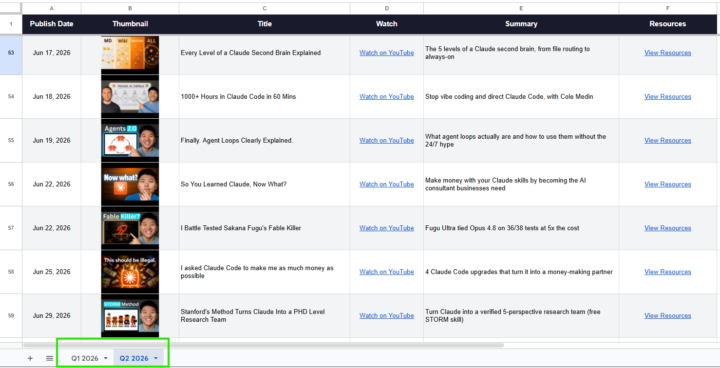
Hey everyone, I built a Google Sheet that has every video I've published in 2026 along with the links to all resources, tools, and files mentioned in each one. If you're ever looking for something I referenced in a video, start here: 📌 YouTube Video Database This will get updated as new videos drop. Bookmark it. Check the tabs at the bottom to make sure you're on the right sheet. - Nate

23h •
Huge Win - My First AI Contract! 🔥
On June 01st I decided to go all in on AI Consulting and building. A month later I just got a 50% deposit for a $8k AI install 😎 Very thankful to AIS and what I learned here that got me the foundational knowledge to be able to pitch AI Automations for businesses. Plus I have another meeting tomorrow for a similar install. Lets go! 🎉


2m •
Your Repetitive Tasks Eating Away at Team Productivity? Here's a Solution
Does your team spend hours on repetitive tasks that could go toward strategic work? It might be time to look at workflow automation. By automating routine work, you free up time for higher-impact initiatives. Automation isn't just a tech decision, it's about letting your team focus on what actually matters. Some examples: 1. Lead follow-up: Prompt responses boost engagement and conversion rates. 2. Internal reporting: Faster data collection and analysis saves hours each week. 3. Error reduction: Fewer manual steps means fewer mistakes. 4. Scalability: Handle more work without adding headcount. Not every task belongs in an automation pipeline. Complex decisions and sensitive customer interactions still need a human touch. Before starting, ask: Who on my team spends more than an hour a day on something repetitive that follows the same steps? If you can answer that, you've found your next automation project. Workflow automation helps teams move faster.
0
0
1-30 of 20,691

skool.com/ai-automation-society
Learn to get paid for AI solutions, regardless of your background.
Leaderboard (30-day)
1

🔥
+7296
2

+5990
3

🔥
+5815
4

🔥
+4622
5

+1297
Powered by