Activity
Mon
Wed
Fri
Sun
Jun
Jul
Aug
Sep
Oct
Nov
Dec
Jan
Feb
Mar
Apr
What is this?
Less
More
Memberships
Clief Notes
26.2k members • Free
AI Automation (A-Z)
153.5k members • Free
Attraction Academy
122 members • $97/m
AI Sales Agency Launchpad
14.7k members • Free
Brendan's AI Community
24.4k members • Free
AI Automation Agency Hub
314.4k members • Free
Flipbytes Community (Closed)
2.1k members • Free
5 contributions to Clief Notes

Mar 15 •
🏁 Foundations 4.1 Check-In
First session done. Vote below, then drop your OS and any issues you hit in the comments. If you got stuck, someone here has probably solved it already.
Poll
273 members have voted

0 likes • 5h
Thank you. I've only been using terminal because that's what my coder friend taught me and it's hard to read. This three panel layout looks like something I could really work with.

10d •
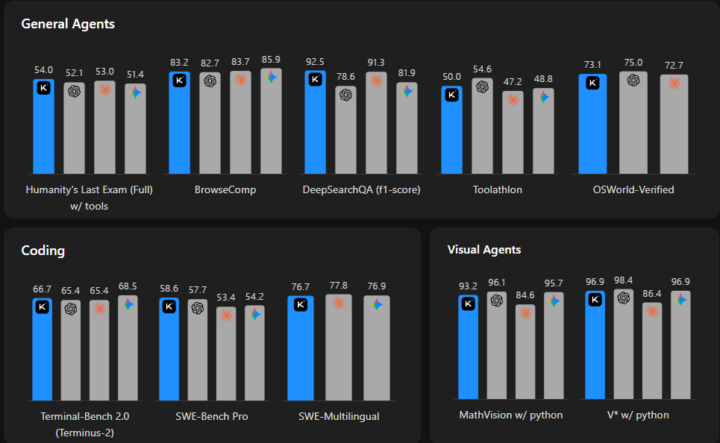
Kimi 2.6 is out!
So there's a lot going on with kimi right now, from what I've looked at, for being completely open source it's quite amazing. The benchmarks look quite promising taking in the fact that it's completely open source. Specialized more towards the longer coding tasks and back end coding languages. A really interesting aspect is that (from their article): Kimi K2.6 successfully downloaded and deployed the Qwen3.5-0.8B model locally on a Mac. By implementing and optimizing model inference in Zig—a highly niche programming language—it demonstrated exceptional out-of-distribution generalization. Across 4,000+ tool calls, over 12 hours of continuous execution, and 14 iterations, Kimi K2.6 dramatically improved throughput from ~15 to ~193 tokens/sec, ultimately achieving speeds ~20% faster than LM Studio. The website design isn't that bad at all, but it feels like they were trained more on aesthetic PPT's than code. Anyways, tons more to explore, the link's here: https://www.kimi.com/blog/kimi-k2-6
0 likes • 14h
From my understanding kimi 2.6 also follows the folder and files structure? I ran into some trouble starting it up.

8d •
From PDF to gorgeous book
Wanted to share this project i got super focused once i reached implementation 3.0— I had claude code help finish my book that bridges anatomy through the lens of Thomas Myers’ work and Traditional Chinese Medicine. It’s fully written, organized, but also through what i learned here, i had a separate project to build anatomy images to include illustrated detailed body alignment images from energy line system. This has been a passion project that ties directly into my yoga and movement philosophy — that movement is primary food and that the body speaks a language we’re only beginning to understand. Here’s the link for a the PDF: https://www.dropbox.com/scl/fi/fube1wf0l53azoyt0h4a8/JDM-Book-Minimal-LightCover.pdf?rlkey=zedmk3v2tb88qcnxkggo2olrx&st=b007apwj&dl=0 @Jake Van Clief i can’t express how grateful i am to what you share. I know i put the time in the chair to view implement and research further But your approach ensured i started from the best place and think organizational Thank you
1 like • 3d
This is amazing! Thank you for sharing what Cladue code can do. learning something new everyday.

4d •
Best Practices for Managing Separate CLAUDE.md Files Across Workspaces
Do you keep separate CLAUDE md files for each workspace to prevent them from becoming too long or unfocused? For example, would you maintain one CLAUDE md for a Content Creator workspace and another for a Software Developer workspace? If so, how do you handle situations where the work overlaps between workspaces? For instance, if the Software Developer workspace creates a new app, but then you want the Content Creator workspace to write a social media post promoting that app, where should the shared context live? Curious how others structure this in practice.
2 likes • 3d
Thanks for asking. The comments section is helpful.
Mar 15 •
Welcome to Clief Notes. Here's where to start.
1. Watch the intro video and introduce yourself in the intro post here 2. Start with The Foundation (free course). Concepts, folder architecture, prompting framework. Everything else builds on this. 3. Check in at the bottom of each lesson. Polls, discussion posts, other members working through the same stuff. Use them. 4. When you're ready to build real things, move to Implementation Playbooks (Level 2). When you're ready to build your own tools, Building Your Stack (Level 3). 5. Post your work. Ask questions. Help others when you can. What are you here to build?
Poll
4236 members have voted
2 likes • Mar 25
excited to learn!
1-5 of 5