Activity
Mon
Wed
Fri
Sun
Oct
Nov
Dec
Jan
Feb
Mar
Apr
May
Jun
Jul
Aug
Sep
What is this?
Less
More
Agent Zero
2.8k members • Free
12 contributions to Agent Zero

Apr 6 •
Access remote machine, lets get this going finally!
I've gotten my web usage guardrails where I want them. Now I'm ready to take on actually testing the capabilities of A0 on a remote machine. It's just a laptop running Ubuntu on my network. I am curious how this process works to connect to it, have "do stuff" and build guardrails along the way. Its ok if I implode the laptop OS. What are some common things people are doing out there in the wild I need use cases, tests, validations ect... everything is local on my home network. I'm guessing I need to get ssh set up on the Ubuntu box to allow connections as I assume that's how A0 reaches machines (at least one way). Give me ideas, go crazy, if it blows up I just reinstall Ubuntu!! Thanks in advance!

Apr 4 •
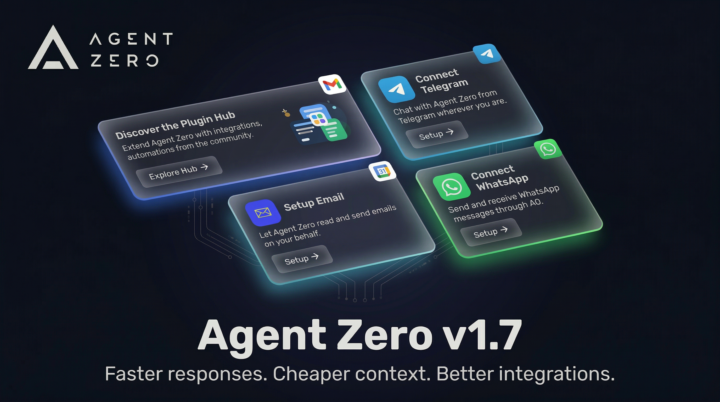
v1.7 is live! (-40% tokens on default prompts) ⚡
Hey everyone, Agent Zero v1.7 is out, and this one is going to save you time (and API credits). Early Tool Dispatch Have you ever watched an agent write out a tool call, and then continue rambling for another 30 seconds before finally executing the tool? Not anymore. Agent Zero now watches the stream, and the exact millisecond the JSON code block closes, it cuts the stream and fires the tool. Cheaper to run We completely overhauled the default prompts. The base instructions are now more compact (under 6,000 tokens total), and agents are instructed to be concise by default. Better Onboarding When setting up a new instance, you (and new users) will now see beautiful Discovery Cards on the welcome screen, showing off top plugins like WhatsApp, Email integration and Telegram. Let us know how the speed feels! Update in Settings > Update tab > Open Self Update > Restart and Update
0 likes • Apr 4
Thanks, still some work to do around agent.py and its handling of JSONs and tool calling and sync processes. My error 400 context size came back after I fixed agent.py in 1.6 but it should only require a minor fix in 1.7 I think I haven't looked over all of it yet. I run local LLMS for all agents.
0 likes • Apr 6
After some work today I was able to clean up the hard fail condition for the commonly dreaded Error 400 on the Utility model context size exceeded. I added some lines to agent.py that now allows for a graceful exception capture, displays a msg to the user saying maybe its time to start a new chat or make your request smaller. It no longer grinds the program to a dead crash, forcing a new chat to be started. Now I can carry on within the same chat if I hit my context limit (rare). I could not get to work the displaying of a banner when the web utility is called. I tried for awhile added some logic that I thought would work but it didn't work even though my test debug lines were being displayed in the logs where expected. Not worth the effort to pursue. Moving on to having it do machine tasks on a remote machine! Now the real fun begins!

Apr 1 •
Seeking a new friend
Hi everyone! Currently I am looking for a someone who can collaborate with me for the long term. This is long term friendship. I would love to connect with you, whatsapp: +81 80 1455 6262 If you are interested in, please give me Dm or message on whatsapp
0 likes • Apr 4
What are ya trying to do w/A0? Fun? work? "Get rich quick"?
0 likes • Apr 6
lol which one?!

Apr 1 •
Local LLM Performance vs Frontier Models
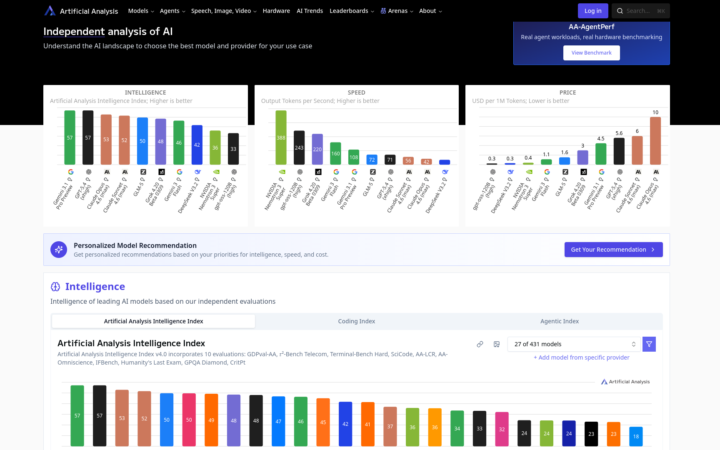
Just thought I would share how I compare open source LLMs to the big proprietary models. I prefer using local LLMs for Agent Zero - for privacy, speed, and unlimited use. However, there are some pros and cons - and choosing the best model for Agent0 can be challenging when there are so many models to choose from and new ones being released practically every week. This is where https://artificialanalysis.ai/ comes in very handy. I use this site to compare the intelligence and speed of models against each other. It also has a special page for coding performance. Hope you all find this useful.
0 likes • Apr 4
Neat. I run all local LLMs so cost = 0. I think most people pick models incorrectly doesn't matter cloud/local. I think a lot of people assume bigger model = better. But many don't follow the golden rule of all ai, pick a model that fits your use case. I've seen people using A0's utility model in the 120B class. It's a utility model it doesn't need that!! They incorrectly understand how A0 works. I mean you do you, but if you are paying for this stuff (cloud) I hope you are really considering your use case and finding the smallest model to meet your needs. Speed, accuracy and concurrency are driving factors. I'm no AI expert at all, not even close!! But I had that mindset when I first started, 'oh let me get the biggest one, or use up as much of the RAM as I can' nah wrong approach. What am I doing, what do I want to achieve, what models are the smallest that will do the job quickly and correctly. Which 'should' be cheaper for those on the cloud wagon. But like I said you do you! (no I'm not talking to you directly I know you are just sharing info) Cheers!

Mar 21 •
My "perfect" model setup
This setup has been working great for me. The chat and web browser models are both using the Ollama cloud. This is about as good as it gets, I think, without paying the Frontier model pricing. Chat: qwen3.5:cloud Web Browser Model: qwen3-vl:32b-cloud Embedding: sentence-transformers/all-MiniLM-L6-v2
0 likes • Apr 4
my god the size of some of these utility models are insane! They don't need to be that big! utility: nemotron-3-super:cloud whaaaaat. Bananas!
1-10 of 12

@rusty-shackleford-9828
20 year veteran of being a Senior Systems Admin or related roles. Seen a lot done a lot. Always more to learn. Diving into AI now.
Active 165d ago
Joined Apr 2, 2026
INFJ
Earth
Powered by