Activity
Mon
Wed
Fri
Sun
Mar
Apr
May
Jun
Jul
Aug
Sep
Oct
Nov
Dec
Jan
Feb
What is this?
Less
More
Memberships
Ep - reMarkable Tablet Support
602 members • Free
3 contributions to Ep - reMarkable Tablet Support

Jan 4 •
Cal Sync in new computer (mac)
Looking for some help. I have moved Cal Sync to a new computer (Vault User) and the files were migrated over with the new computer. It is saying that I have reached the maxium allowed devices for that license, which I understand. I deleted the program from the other computer, but obviously, something is not working. I am still getting the message. How do I fix it? @Jason Smith
0 likes • Jan 5
I just saw the email with the updated version, and installed that on the new computer and still giving me the error.
0 likes • 10d
@Jason Smith You helped me fix this early in the month! (or tech support did!)

10d •
Auto Sync
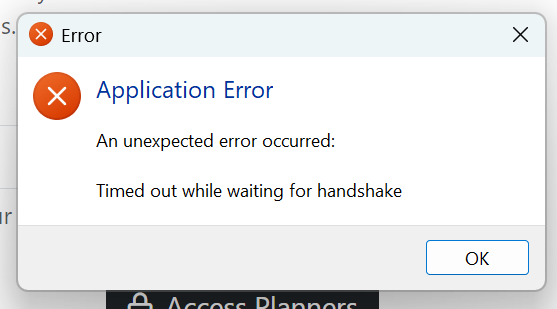
I'm posting in this forum to share my experience. Typically, when I post I'm not sure if it's a bug, user error, or expected behavior. I am running v. 1.0.22 . I have put my remarkable IP address in the box. I have also used chatGPT to make sure that I have an openSSH (though I'm not sure I had to do that but I figured I'd give it a try.) My remarkable is awake and sitting next to my laptop. When I hit "Access Planners" I get this error (screenshot). And when I click "OK" CalSync closes. What should be my next step?
0 likes • 10d
I am also having this happen in the newest version.

16d •
🚀 CalSync Update — Version 1.0.21
Fix to some issues related to calendar feed limits on the settings section. Windows https://www.einkpads.io/api/calsync/win32/releases/latest macOS https://www.einkpads.io/api/calsync/darwin/releases/latest
1 like • 15d
Totally obsessed with this update! All issues getting my feeds to sync have been resolved AND I LOOOOVE the carousel! So excited that it works!!!
1-3 of 3

Active 10d ago
Joined Dec 27, 2025
Powered by