Activity
Mon
Wed
Fri
Sun
Mar
Apr
May
Jun
Jul
Aug
Sep
Oct
Nov
Dec
Jan
Feb
What is this?
Less
More
Owned by Jason
Learn. Share. Create. — Empowering reMarkable, Supernote, and BOOX tablet users worldwide. einkpads.com
Collaborate, share tips, and master your reMarkable tablet — from note-taking and digital planning to creative workflows and productivity hacks.
Memberships
149 contributions to Ep - reMarkable Tablet Support

15d •
getting wifi connection to work for calsync
so I followed instructions somewhere else and ssh'd to the device over usb, then ran: rm-ssh-over-wlan on is this step in the calsync setup and i missed it? or is the setup in cal sync supposed to do this for me on first connection? trying wifi connection now.. noting not stable -interesting - but i think it synced the cal

0 likes • 5h
@Patrick Mccarthy , We are actually on the same page. We are working on an installer that will only include the changes however this will not be in a near release as there is a lot related to the infrastructure that needs to be hammered out before we release.
0 likes • 5h
in the latest release we moved this to settings. we were automatically doing this (m-ssh-over-wlan on) before but it was not clear. We moved it to a switchable option within the settings settings. A usb connection needs to be established first before this will work.

16h •
V1.0.23 is working MUCH better
Hello - just wanted to report that using this on Windows and wirelessly syncing it is VERY good & solid! I remain connected, and the Activity & Sync Status logging is working now! Nice! One thing I noticed, and this is NOT a sync issue but perhaps a calendar design issue, is that as I move through the calendar, when I flip past Monday, the next page I see is the entire week, then Tuesday, Wed, Thurs, Friday, etc. Then I get to Sat, Sun, Monday, then the weekly page again (I would think the weekly page is before the Monday detail). Thoughts? Thanks! DaveR
0 likes • 5h
Thanks for your feedback! The way the pages are actually laid out are independent and could be somewhat illogical if using the onboard navigation on the tablet. To navigate the planner relies primarily on the planners interface. I am assuming you are referring to actually swiping the next page on the tablet. Correct me if I am wrong.

4d •
How do I generate a planner?
I can't get off square one. I'm using a Remarkable 2. I've provided both my wifi IP address and the IP address for direct connect using the Remarkable USB cable. I confirmed the correct IP for direct connect in my system settings, which show the device connected. The upper right hand corner gives a blue dot and says it's connected to the same wifi as my tablet. I don't have a password on my tablet. Is it failing because the password is blank?
0 likes • 5h
@Leslie Cain That is true. I didn't see that detail in your message at first. When you say your password is empty. Are you referring to on your tablet or in the app?
0 likes • 5h
@Leslie Cain that is the passcode not the device password. If your device version is less than 3.9 or greater than 3.18# 1. Connect your device to Wifi, or with a USB cable to your computer. 2. On your device, open the Menu from the main page. 3. Select “Settings”. 4. Select “Help” in the sidebar. 5. Select “Copyright and licenses”. 6. You will find your password and the IP addresses you can use to access your device underneath the “GPLv3 Compliance” header. If your device version is between 3.9 and 3.18# 1. Connect your device to Wifi, or with a USB cable to your computer. 2. On your device, open the Menu from the main page. 3. Select “Settings”. 4. Select “About” in the “Help” section. 5. Select “Copyright and licenses”. 6. You will find your password and the IP addresses you can use to access your device underneath the “GPLv3 Compliance” header.

4d •
Font size in calendar
Hello and good Sunday morning, could anyone help me with this issue: how can I increase the font size in the calendar? Thank you! Milan
0 likes • 5h
Hi, are you on a Move or a Paper pro?

3d •
Error trying to connect Calendar
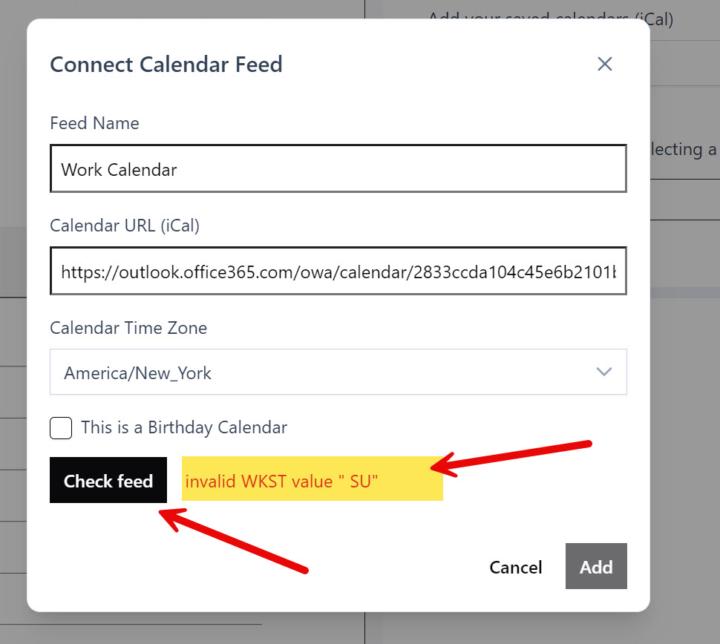
I purchased CalSync today and have been unable to get it to sync my calendar to the Pro. I can create a Planner and push it to my Remarkable but when trying to connect my work calendar i get the following error 'invalid WKST value "SU"' Screen capture attached. I have messed around for several hours but have had no luck. I am connecting to my work Outlook. Any ideas or suggestions? Thanks in advance for any ideas...
0 likes • 24h
hi, this means that your feed has some invalid format. We are about to release an update that is less strict so that feeds go through when they have formatted generated from your ical. This is normal.
0 likes • 6h
check the latest version 1.0.23. Should address this issue.
1-10 of 149

@jason-smith-5342
Welcome to eInkPads! Join fellow e-ink users to explore tools, templates, and tips that help you stay organized, focused, and in control of your time.
Active 2m ago
Joined Sep 11, 2025
Powered by