Activity
Mon
Wed
Fri
Sun
Apr
May
Jun
Jul
Aug
Sep
Oct
Nov
Dec
Jan
Feb
Mar
What is this?
Less
More
Owned by Nick
A build-in-public lab for turning ideas into MVPs and launching real products.
Memberships
Leadbase Free
10.8k members • Free
Synthesizer: Skool Growth Club
38.7k members • Free
Stealth Founders Club
1.5k members • Free
AI Craft
351 members • Free
Grow With Evelyn
2.5k members • $33/month
Lifestyle Foundrs VIP
45 members • Free
Skoolers
189.5k members • Free
30 contributions to AI Craft

🔥
23h •
Gamification vs Games
I've never successfully created a game (yet!). I build other kinds of software products. But Skool has really made me think about how powerful gamification is. Have any of you incorporated gamification into other types of products?
🔥
1 like • 16h
Sorry, my question was actually about gamification added to non-games. Like you see in Skool. They've added a bunch of gamification elements that really seem to help with engagement and retention.
🔥
0 likes • 3h
@Morgan Page Good call on the notifications!

2d •
How I'd use Unity + Claude Code to vibe code a game
Background: I've been making games and apps with Unity for 16+ years. I had someone ask a question about how to use Claude Code to make a game and after writing a short novel, I thought, "hey, this could be helpful to others" -- but I'll let y'all be the judge. (note: a lot of this would also apply to making an app or any piece of software with Claude Code) Someone asked me about making something based off an existing game, but also how would he attract programmers to help him / work for him. Below is my response: --- To start... you need Unity (and some basic familiarity with it) and the Unity MCP and Claude Code (the CLI) -- and claude opus. Opus is extremely good at letting you drop the whole vision at once (including screenshots) and tell it what you're wanting to do. In this case, make a game like XYZ. And it'll tell you where to start and how to progress from there. The one thing that AI cannot do is make a game that's fun. Not intentionally, anyway. It's pretty much always going to need tweaks. In your case, wanting to make a game with big monster trucks... The key to ANY game is usually going to be one core piece or mechanic. I would tackle that hardest piece first. You need to get those vehicles rolling and feeling good to play. AI can build something, and it can build something you can tweak, but it cannot "make a fun game" any more than AI can "make a song that moves me" -- it's too subjective to the person interacting. Talk to Claude Opus, tell it the grand plans, ask it where to start, ask it to build a tech spec for the v0.1 -- again, I'd absolutely start with the car. Tell it you're going to use claude code and the unity mcp. It can build a markdown file very specifically for claude code, along with instructions. Then go to a directory with that file in it (probably needs to be an existing but empty Unity project if you're going to use Unity), go into claude's CLI and reference that file with @ saying something like, "I want you to plan out and then build to the specification in the @car_game.md file" (and the @ will bring up a list of files, fyi)
🔥
2 likes • 23h
Thanks for sharing @Greg Dunn

5d •
project Neopolis 2075 - update, march 2026
Hello friends. In three days, it's AI Week at my high school. Alongside setting up a website for this event, I've launched the fully online version of my game, Neopolis 2075. I've replaced some of the live puzzles and challenges with little games coded with Claude. - a tile game - a connector game - a puzzle game to access a page As if I didn't have enough to do, I also finished Dr. Chen's journal, the Neopolis city timeline, and... the complete lore codex. I had them translated for you, my english speaking friends. And then, I've almost finished the narration for episode 1.5, the script for episode 2, and the pitch for episode 3. I think I remember sleeping at some point last week. And i discovered some implant-like piece of electronics behind my left ear.... weird. 🤖
🔥
2 likes • 4d
@Morgan Page

Feb 16 •
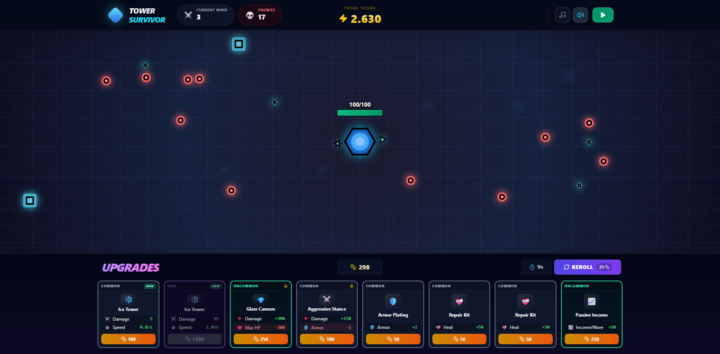
Web-Game: Tower Survivor | Roguelike + tower defense + survival
Hey guys, I made this game for a Lovable contest back in may and decided to ship it on itch.io: https://fonyde.itch.io/tower-survivor I need like 3 or 4 testers left for my android app release. Is anybody here willing to help me out? Would much appreciate it! Leave me your google mail adress via DM so I can invite you as a tester! New upgrades every 30s, endless waves, highscore focus. If you’re into that, I’d love your support (follow / rating) 💖 Hope you are having fun and beat the highscore? 😉
🔥
2 likes • 23d
Yeah, this is pretty cool! I don't have a ton of time to play at the moment, but I made it through the first wave! 🤓
🔥
1 like • 4d
@Sascha Ahlers

8d •
Hello! Angel here!
Hey I'm Angel I'm working on an educational gamified platform. My experience with coding is LOTS. The game I want to ship is that platform so people can learn by playing :D
🔥
0 likes • 5d
Interesting idea! And a great way to make it sticky.
1-10 of 30

🔥
@nick-hough-5727
Founder, Engineer & Entrepreneur. Building a life by design and helping others do the same.
Active 2m ago
Joined Mar 1, 2026
Barcelona, Spain
Powered by