Activity
Mon
Wed
Fri
Sun
Aug
Sep
Oct
Nov
Dec
Jan
Feb
Mar
Apr
May
Jun
What is this?
Less
More
Memberships
KI Agenten Campus
2.6k members • Free
LinkedIn for Builders
515 members • Free
Create Games with AI
547 members • Free
Prompt-Piloten
379 members • Free
Course Creator Community ❤️🔥
158 members • Free
AI Netzwerk DACH (A.N.D.)
989 members • Free
AI Content Creation Community
5k members • Free
Vibe Coding is Life
506 members • $10/month
KI-Mitarbeiter
111 members • $1/month
47 contributions to Create Games with AI

3d •
500 Members 🎉 Game Giveaway
We have just hit 500 members 🤯 ! To celebrate, I’m doing a game giveaway 🎉 If a free member wins: you get 1 game 🎮 If a Premium member wins: you get 2 games 🥰🥰🥰 The Games (You get to pick 1 (or 2)) - Resident Evil Village - SteamWorld Build - The Lord of the Rings: Return to Moria - Assassin's Creed Valhalla - Crysis 3 Remastered - Rogue Waters - Nordhold - Nice Day for Fishing (These are PC games, you will need STEAM) THIS IS HOW YOU ENTER THE GIVEAWAY👇👇👇 Drop your game idea in the comments. Funniest / weirdest / most playable idea wins!


1 like • 2d
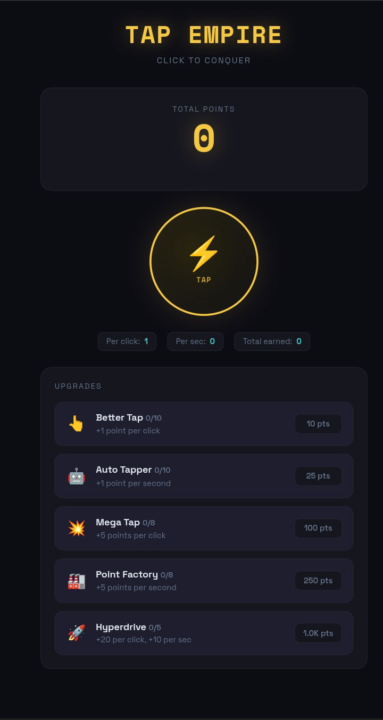
Nice day for fishing, aint it? 🤣 I love these guys and girls! Game idea: Pinball idle game. You start playing actively on one pinball machine and upgrade the points you receive, more balls etc. - then you buy more pinball machines and have some guys play the pinball mashines for you, so you get passive income. Sure thing I tried to vibe code it, but the physics are harder than I thought. And it could be a great simulator-style game like waterpark simulator, even with multiplayer.

0 likes • 2d
Great, keep going!
5d •
Drop what you’re building today 👀
Drop a screenshot, clip, or short description of whatever you’re building right now. Doesn’t need to be polished. Boxes, placeholder art, broken mechanics, weird bugs — all welcome. The messy prototype stage is where the good stuff starts. What are you making?

1 like • 5d
Currently out of tokens/credits... and as it's my sons birthday on sunday, I decided not to top up and just relax for a week. This is what I worked on lastly: https://monstergarden.lovable.app/ Plants vs Zombies meets Pokémon. Could not decide yet whether its an idle game or roguelike - both could fit quite well. The video shows the secret cow level to stress test the game. Needs some more optimization I would say 😅
10d •
Let's celebrate 🎉
I used to spend months building games that nobody played. 30+ years of coding experience. 118K Udemy students. A mobile game with 1.4M downloads. And I was STILL stuck in the same loop most of you know: build slowly, lose momentum, never ship. Then I stopped coding and started directing AI agents instead. Outmine is a great example of this, its a Telegram game with 100,000+ players that generates revenue. Half the game is written the old way (the part that makes no revenue 😅). The part that makes money? An AI agent built it. Not me. What used to take months now takes days. What used to break my back (literally — herniated disc at a game jam, true story) now just works. Here's my question for you: what's the ONE game you've always wanted to build but never finished? Drop it below. I want to hear what's sitting on your hard drive collecting dust 😄

2 likes • 9d
I wanted to make this game with a friend of mine but both of us kept working on other products rather than making this idea come to life. Still think that it could work out pretty well and could make a dime if you sell it on steam.
0 likes • 9d
@Morgan Page Look for Schedule 1 and combine it with Stardew Valley and you get the concept :D
11d •
Working on something exciting 👀
I've been using agentic AI workflows (Claude Code, OpenCode, Antigravity) to build games in days instead of months. My Telegram game, Outmine, brings in thousands of dollars of revenue every month. The interesting part... AI wrote the part of the game that generates that revenue 🤯. Now I'm thinking about helping a small group of people do the same thing. Anyone excited about shipping a real, revenue-generating game? 🤔 How many unfinished game projects are living on your hard drive right now?
Poll
7 members have voted

1 like • 11d
I would love to generate revenue through games and not having to work on other things. At the moment I still love to try out new things every day and I am moving to a new city in a month, my sons birthday is in 9 days etc. - so the last weeks and months I was working more on private stuff and needed something fun after a long day, so I kept making new prototypes 🤣 But whatever, will get back to serious business later this year and maybe I find just the right game I really want to launch and bring to sucess and then I already got plenty of experience with all kind of game mechanics, technical optimization, graphic polishing etc. 🤩
1 like • 11d
@Morgan Page But I already shipped Ship It! (https://shipit.nootcode.de/) xD Nah with most of the games I just don't feel comfortable enough to put the effort needed into the game to be able to get money from it.
1-10 of 47

Active 18h ago
Joined Feb 12, 2026
ENTJ
Powered by