Activity
Mon
Wed
Fri
Sun
Jun
Jul
Aug
Sep
Oct
Nov
Dec
Jan
Feb
Mar
Apr
What is this?
Less
More
Memberships
Free Skool Course
66.7k members • Free
Imperium Academy™
62.7k members • Free
Make $1k-$10k in 30 days
18.4k members • Free
58 contributions to Make $1k-$10k in 30 days

21d •
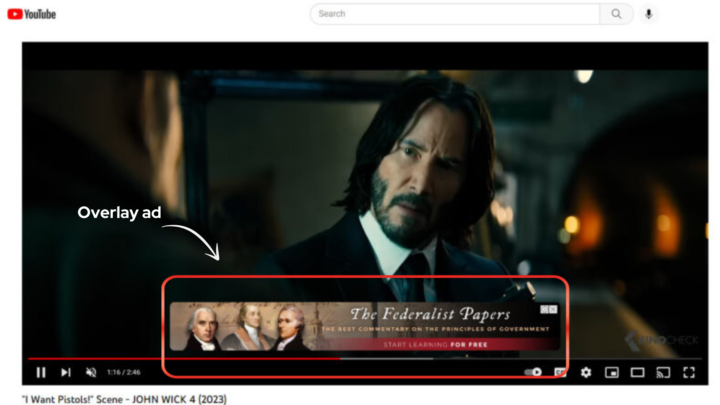
Overlay ads-Key Takeaways
Overlay ads are banner-style advertisements that appear on top of a video while it is playing. In your image, you can see one covering the lower portion of the John Wick 4 clip. Key Features - Location: They typically appear in the bottom 20% of the video player window. - Format: Usually a semi-transparent image or text box (480x70 or 720x90 pixels). - User Action: Viewers can click the ad to visit a website or click the "X" to close it immediately. - Platform: Most commonly seen on desktop versions of video platforms like YouTube. Pros and Cons - Pros: Less intrusive than "mid-roll" ads that stop the video entirely; allows for continuous viewing. - Cons: Can block important visual elements (like subtitles or actor's faces) and can be distracting to the viewer. Note: On many modern platforms, these are being phased out in favor of other formats to improve the mobile viewing experience and reduce visual clutter.
6
0
28d •
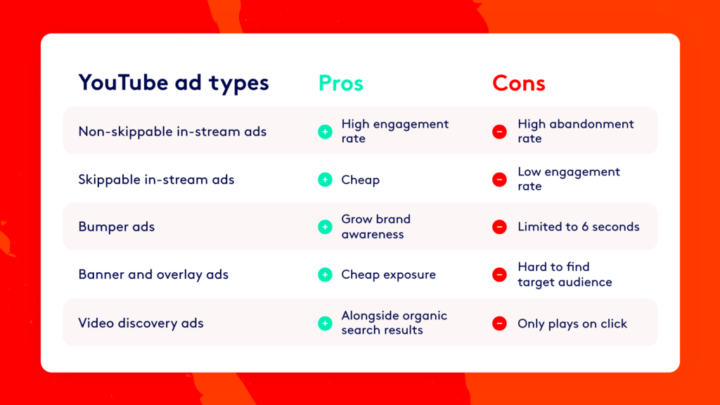
YouTube Ad Types: Pros and Cons
1. Non-skippable In-stream Ads - What it is: Ads that play before, during, or after a video that the viewer must watch entirely. - Pros: High engagement rate because the message is guaranteed to be heard. - Cons: High abandonment rate; viewers may get frustrated and leave the video. 2. Skippable In-stream Ads - What it is: Ads that viewers can choose to skip after the first 5 seconds. - Pros: Cost-effective (Cheap) because you often only pay if they watch a certain amount. - Cons: Low engagement rate as most people skip as soon as possible. 3. Bumper Ads - What it is: Very short ads (6 seconds or less) that cannot be skipped. - Pros: Excellent for growing brand awareness and staying "top of mind". - Cons: Limited time (only 6 seconds) to deliver a complex message. 4. Banner and Overlay Ads - What it is: Image or text ads that appear as a "pop-up" on the bottom of the video player. - Pros: Provides cheap exposure without interrupting the video content. - Cons: Can be hard to find and target the exact right audience. 5. Video Discovery Ads - What it is: Ads that appear in YouTube search results or as "Recommended" videos on the side. - Pros: Appears naturally alongside organic search results. - Cons: Only plays if the user actually clicks on the thumbnail.
1 like • 24d
@Madiha Khattak google ads by Umar tazkeer he explains concept very well and in detail as well
27d •
Daily Journal 03.April.2026,Day 26
▶️ 11:30 AM– 2:00 PM - woke up. - Nashta kiya. - Spent time with guests. ▶️ 2:00 AM -5.30PM - Engaged in skool community. - Studied App install campaign in google ads. - Learned how to optimize the App installation campaign. - Learn about Youtube ad campaign. - Types of Youtube Ads. - Learned how to start skippable ads campaign. ▶️ 5:30 PM – 6:30 PM - went for walk. ▶️ 7:00 PM – 10:00 PM - Went outside with family to have dinner 🏆 Wins - Completed App installation Tutorials. - 📅 Next Day Tasks - Learn about the youtube ad campaign in Google Ads.
2
0
28d •
Daily Journal 03.April.2026,Day 26
▶️ 08:30 AM– 11:00 AM - woke up. - Nashta kiya. - Went to market to buy groceries ▶️ 11:00 AM -12.30PM - came back home. - Engaged in skool community. - Prepared for jumma prayer ▶️ 12:30 PM – 2:00 PM - Prayed Jumma. - Came back home. - Had Lunch. ▶️ 2:00 PM – 6:00 PM - Studied about automatic bidding strategies. - Studied what is Labels. - Studied how to do remarketing using display campaign. - Studied about Similar audiences. - Learned about Rich Media Gallery. - Write down the most important points to remember while running display ads. ▶️ 6:30 PM – 10:00 PM - Went to hospital to get my mothers test done. - came back home and had Dinner with Family. 🏆 Wins - Completed display ads Tutorials. - 📅 Next Day Tasks - Learn about the app campaign in Google Ads.
3
0
29d •
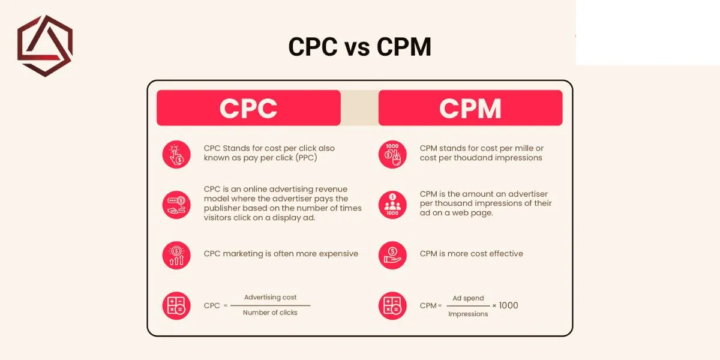
CPC vs. CPM: Payment Models
1. CPC (Cost Per Click) - Definition: Also known as PPC (Pay Per Click). You only pay when someone actually clicks on your ad. - How it Works: It is a revenue model where the advertiser pays the publisher based on the number of times visitors interact with the ad. - Cost: Generally more expensive per individual action, but you are paying for a specific "intent" (someone taking an action). - Calculation: Advertising Cost/Number of clicks 2. CPM (Cost Per Mille) - Definition: "Mille" is Latin for thousand. CPM stands for Cost Per Thousand Impressions. - How it Works: You pay for every 1,000 times your ad is shown on a webpage, regardless of whether someone clicks it or not. - Cost: Usually more cost-effective for getting your brand seen by a large audience. - Calculation: (Ad spend/impressions)*100
2
0
1-10 of 58