Activity
Mon
Wed
Fri
Sun
May
Jun
Jul
Aug
Sep
Oct
Nov
Dec
Jan
Feb
Mar
Apr
What is this?
Less
More
Memberships
The AI Advantage
118.8k members • Free
Digital Growth Community
59.8k members • Free
4 contributions to The AI Advantage

🔥
8d •
⚡ Productivity Quick Wins
Tool: Wispr Flow Why This Tool: Wispr Flow is the only AI voice dictation tool that works inside every single app on your device (email, Slack, WhatsApp, ChatGPT, Instagram, anywhere you can type), automatically removes filler words and handles messy speech corrections in real-time ("5pm, no actually 6pm" becomes just "6pm"), and adapts tone and formatting based on context (formal for emails, casual for texts) so you write 4x faster than typing without editing afterward. Best For: Anyone who spends hours typing emails and messages each day, professionals with back-to-back meetings who need to respond quickly between calls, people with mobility challenges or conditions like Parkinson's or arthritis that make typing difficult, multilingual communicators working across languages, content creators drafting long-form material who want to skip the keyboard entirely Cost: Free plan (2,000 words per week), Flow Pro from $12-15 per month (unlimited words, Command Mode), Flow Enterprise $24 per user per month, Android version currently free and unlimited during early access, check wisprflow.ai for current rates Website: https://wisprflow.ai/ Quick Win Prompt: "Download Wispr Flow on your phone or computer and activate it in your most-used messaging app (Slack, email, WhatsApp). Press the hotkey (fn on desktop, tap the Flow bubble on mobile) and speak naturally like you're having a conversation, including all the 'ums,' false starts, and corrections you'd normally make. Watch as Flow instantly cleans up your speech, removes filler words, adds proper punctuation, and formats it perfectly based on the app you're in. Send that first message without editing a single word. You just wrote in seconds what would've taken minutes to type and proofread." Other Things Wispr Flow Can Do: - Command Mode for voice editing: Select any text and use voice commands like "make this more formal," "turn this into bullet points," "summarize this," or even "build me an app that..." (it'll open Replit and start coding based on your prompt), so you can edit and transform content without touching your keyboard - Personal dictionary with cross-device sync: Add custom names, technical terms, industry jargon, acronyms, or company-specific language once and Flow remembers them across all your devices (Mac, Windows, iOS, Android), ensuring perfect spelling every time you dictate - Whisper mode and context awareness: Dictate quietly in public spaces without disturbing anyone, while Flow intelligently adapts formatting and tone based on where you're typing (professional for Gmail, casual for iMessage, technical for coding in VS Code) - HIPAA-ready and SOC 2 Type II compliant: Trusted by 95% of Fortune 500 companies and used by Reid Hoffman, Marc Andreessen, and Steve Wozniak, with enterprise-grade security that makes it safe for handling sensitive information in healthcare, legal, and financial workflows


0 likes • 60m
Thanks! I passed this onto to my hubby!
8h •
Homework complete and I'm beyond happy!!!
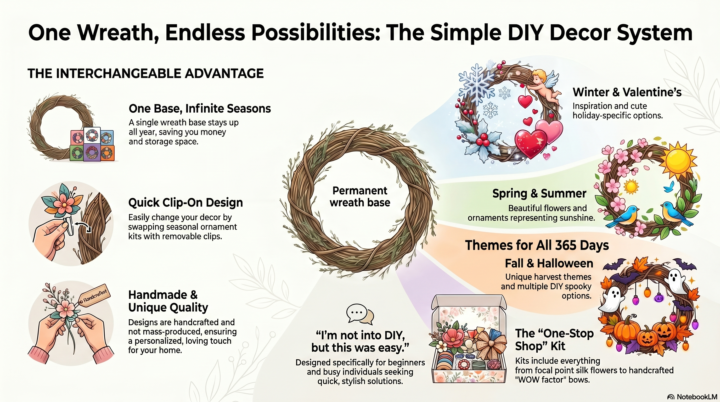
It's soooo worth trying what Molly instructed us to do! I had never been on google notebook before. And man! I'm missing out! Instead of giving it all sorts of prompt instructions, I told it to use my website to create the infographic. After I was pleasantly surprised with the results (that popped out in less than 2 minutes), I had it create a video. Although the video probably needs to be a bit shorter, I was so surprised at how spot on it was, just from gathering info from my website! It was perfect!!🤩 If anyone wants to see the video it created, I'm happy to share.
0 likes • 1h
@Sara Taylor thanks! I've also heard how you can upload full podcasts or videos into notebook and it will summarize for you, create flashcards, etc.
1 like • 1h
@Laura Ann Sterling thanks! Best of luck to you!

22d •
Building AI agents publicly
I just learned how to build AI Agents and recently monetized that as well. Due to the inspiration from another person in this community, I am going to share my experiences building AI Agents publicly on my social media platforms. While I'm in here, I'll share my insights so far. All I did really was learn a little bit about AI every single day and sign up for a few news letters, and one in particular from Allie Miller. I attended a one-hour video of hers, took notes, and had my AI recorder out from that video. I grabbed the transcript of that webinar and pasted it into Claude. I basically asked it to teach me how to make an AI agent, and it did. I just asked for step-by-step instructions, and it did. I'm not a detail-oriented person. I just had AI teach me all the steps. It can be that simple. If I can do it, you can too. Then I showed my AI agent that I use in my business to an entrepreneur friend of mine, and she said, "I want one too," and she paid me for it as well.
2 likes • 22d
At my daughter's doc appointment yesterday, he had an "AI recorder" as well. It just looked like he had his phone sitting on the patient table. What exactly is an "AI recorder" and how does it work? Great job by the way with what you created! I wanna learn and try as well!

⭐
23d •
🌱 April is here. What are you building this month?
New month, new window. April is a reminder that progress does not come from waiting for the perfect moment. It comes from choosing one thing, committing to it, and building momentum before doubt has a chance to slow us down. This is the month to stop overthinking and start moving. What are we building? A better system? A new offer? Stronger habits? More confidence with AI? More time back in the week? Whatever it is, April is an opportunity to create real traction, not just more intentions. The biggest wins rarely come from doing everything at once. They come from picking a clear goal and working it consistently. One focused month can change a lot. It can cut cycle time, reduce procrastination, sharpen skills, and create the kind of progress that compounds fast. So let’s make this month count. Build the workflow. Launch the idea. Learn the tool. Finish the draft. Start the project. Protect the time. Use April to create something future you will thank you for. No drifting. No waiting. No playing small. April is here. What are you building this month? Comment your April goal.
1 like • 23d
I am building a website so I can draw traffic to it from Pinterest. I’ve asked ChatGPT to look at my website and give me feedback as well as help fixing the needed things. Pretty cool!
1-4 of 4

@mistee-champagne-7572
I've put my career goals on hold over the past 20 years so I can help my family reach their goals. Now it's my turn to make something of myself!
Active 47m ago
Joined Mar 26, 2026
USA
Powered by