Activity
Mon
Wed
Fri
Sun
Mar
Apr
May
Jun
Jul
Aug
Sep
Oct
Nov
Dec
Jan
Feb
What is this?
Less
More
Owned by Lindsay
AI Identity Lab is for coaches, creators, and entrepreneurs who want to reinvent themselves and their business with AI, AI Images + AI Videos.
Memberships
BL
Beyond Limits Circle
9 members • Free
ChatGPT Users
12.7k members • Free
the Wealth Building Room
102 members • $47/month
Synthesizer
34.7k members • Free
Skool Growth Free Training Hub
5.7k members • Free
Authority Ecosystem
77 members • Free
🌺The Renegade Bloomer™
94 members • $9/month
WeMeetWednesdays.com ☕️🔥💪❤️
262 members • $39/month
50 by 50 Adventure Women
11 members • $35/m
4 contributions to ChatGPT Users

19d •
ChatGPT Health Mode 👩⚕️
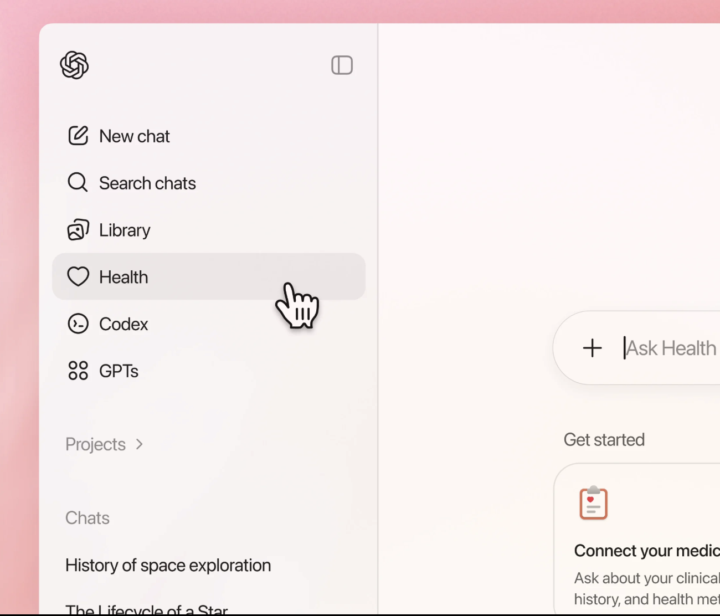
ChatGPT quietly rolled out a new Health mode the other day, and it’s actually a meaningful addition rather than just a label change. The idea is simple: when you’re asking questions about health, symptoms, fitness, sleep, nutrition, or general wellbeing, ChatGPT now switches into a mode that’s more careful, more structured, and clearer about uncertainty and next steps. I get my blood tested every year and checked for everything and then I upload the results into ChatGPT for its feedback but now I can just keep it permanently uploaded in the ChatGPT health section for future questions etc. I also linked up my Apple Watch data to ChatGPT health so it has more health data on me to work from. At this point I think ChatGPT probably knows me better than my wife 😄 What I’ve noticed so far: - The answers are calmer and more balanced - It avoids jumping to conclusions or worst-case scenarios - It’s much better at explaining what’s normal vs what might be worth checking - It’s clearly designed to support thinking, not replace a professional This isn’t about diagnosis or medical advice. It’s about helping people understand what they’re experiencing, ask better questions, and make more informed decisions. If you’ve already used ChatGPT for things like: - training plans - recovery, sleep, or nutrition - understanding symptoms before a GP visit - general health education you’ll probably notice the difference straight away. Has anyone here tried it yet? Cheers Jason

🔥
6 likes • 19d
@Eduardo Mayorga It seems to be rolled out to some and not others.
🔥
7 likes • 19d
This is an interesting idea. When I asked Chat about it and why I don't have it in my sidebar (I am currently in South America so I assumed it was a USA feature first) this was the answer: If you don’t see “Health” in the left sidebar, you’re not missing anything you can toggle on. Here’s what’s actually happening, clean and factual: Why you don’t see it The Health tab is a limited, staged rollout. It’s not tied to: - Plus vs free (yet) - US vs non-US in a clean way - Anything you can enable in settings It is tied to a combo of: - Account cohort (A/B testing) - Platform (some people see it on iOS app first, not desktop) - App version (mobile updates matter here) - OpenAI experimenting quietly (no announcement, no docs) So two people sitting next to each other can have totally different sidebars. Annoying, but normal for OpenAI. Important clarification (this matters) Even for people who DO see “Health”: - It is not a permanent medical vault - It does not auto-remember labs long-term - It does not natively sync Apple Watch data for most users Right now it’s best understood as: a dedicated conversation space with extra guardrails and framingnot a full health profile system So Jason likely has: - early access - mobile-first rollout - and is over-inferring permanence and integrations (very common) The part that does apply to you already Even without the Health tab, you’re already getting the same health-safe behavior when you ask about: - labs - training - sleep - nutrition - recovery - symptoms That logic is system-wide now.The tab is mostly UX + labeling, not a fundamentally different brain. Bottom line (no sugarcoating) - You’re not behind - You’re not missing a setting - This is not fully launched - And it’s not stable enough yet to build systems around anyway When (or if) it rolls out to everyone, it’ll be obvious — and you’ll see it without doing a thing.
Nov '25 •
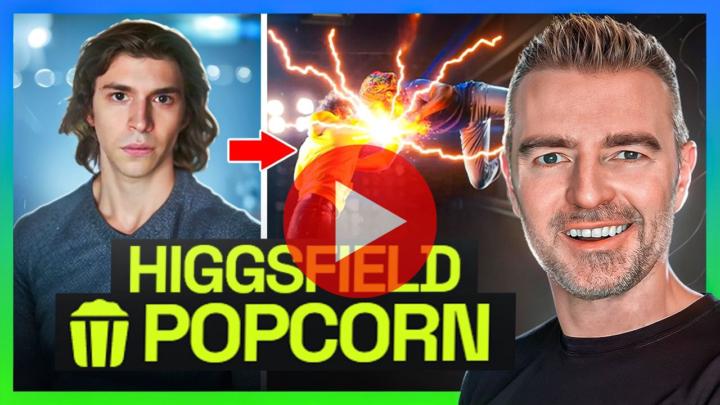
Just tried something pretty incredible with Higgsfield’s new “Popcorn” feature
I’ve just tested a new AI tool that turns a single photo into a full storyboard… and honestly, it’s a bit mind-blowing how well it works. Popcorn takes any image you upload and builds multiple scenes around it with consistent characters and settings. You can even animate the results or put two completely different people together in totally new environments. In the video I just posted, I tested things like: - Turning a girl in a coffee shop into a 1930s archaeologist at the pyramids - Turning a guy into a stadium rock star - Combining both people into beach scenes and even animating the clip with AI voices If you’re into creating visuals for clients, content, ads, thumbnails, storyboards, or just messing around with new tools, this one is worth a look. Here’s the video if you want to check it out:👉 Watch the Higgsfield Popcorn demo Let me know what you think and if you create anything cool with it, share it in the comments so everyone can see what’s possible. Cheers Jason 🙌
🔥
0 likes • Dec '25
🥰🥰

Sep '25 •
Custom GPTs
Are you building Custom GPTs for your business?If not, you’re leaving a major time saver on the table. Who here is building them? Share your use cases in the comments. My example: I’ve built several, and the biggest time saver is my Marketing Assistant GPT. I type a topic and it delivers: - A full blog post on my chosen topic - A LinkedIn post that drives traffic back to the blog - Instagram and X (Twitter) versions adapted from the same content - SEO assets: title, meta description, excerpt - Platform-specific CTAs and hashtags One topic becomes coordinated content for multiple platforms in a single pass. How many hours a week would that save you?Start today and get AI working for you. Keep it simple and learn one piece at a time. Prompting matters most. Quality in, quality out. Quick setup checklist: - Create a clear Master Prompt - Add precise Custom Instructions - Define your System Prompts - Use canvases or docs to draft and refine your prompts - Organize everything with Project Folders - Looking forward to seeing what you’ve built.
🔥
0 likes • Nov '25
I have so many but my fav is Lexie FiX My Image. I create hyper realistic AI images and sometimes they are just off. I use Lexi to get the setting right or the look..she also has a ton of SASS and attidude that makes me laugh.

Sep '23 •
Best AI for presentation slides?
Any recommendations for the best apps for making slide decks?

🔥
0 likes • Nov '25
I love Gamma. Nano Banana Pro is a top contender as well.
1-4 of 4

🔥
@lindsay-hack-2004
I am Lindsay Hack, the owner of The Identity Hacker. Join the AI Identity Lab https://www.skool.com/ai-identity-lab.
Active 3h ago
Joined Nov 27, 2025
INFJ
La Paz, Bolivia
Powered by