Activity
Mon
Wed
Fri
Sun
Aug
Sep
Oct
Nov
Dec
Jan
Feb
Mar
Apr
May
Jun
What is this?
Less
More
Owned by Klaus
Scale your eBay business with AI automation. Join Klaus from KLJ Trading to discover smarter, faster ways to boost your sales and profits.
Memberships
61 contributions to eBay & AI Mastery Academy

Apr 7 •
My Favorite “Due Diligence” Prompt For Sourcing Industrial Inventory (With AI Doing The Heavy Lifting
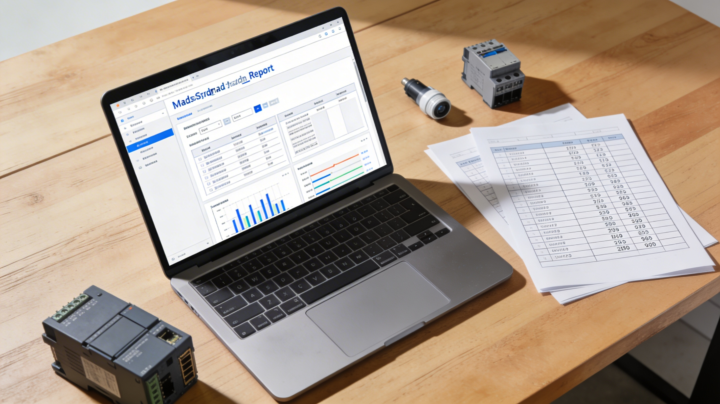
I wanted to share a prompt I use when I’m evaluating industrial automation / electrical lots (auctions, liquidations, surplus deals) for eBay reselling. This has saved me hours of manual research and helped me avoid bad buys while spotting hidden winners. Here’s the exact workflow the AI follows: - I upload the seller’s inventory sheet (PDF, Excel or CSV) - It reads the file and extracts: item name, manufacturer/brand, model/part number, quantity - It groups everything into logical categories: PLC modules, contactors, soft starters, sensors, grippers, power supplies, heating elements, safety relays, etc. - For each item (or per model if there are many of the same): Then it generates a structured markdown report that includes: - A table for each category with: quantity, model/part number, brand, approx. retail price, expected eBay price per unit, short notes - Estimated eBay revenue per category - Estimated total eBay revenue for the entire lot - A short priority list of “high‑value” items I should list first - Recommendations on what to sell individually vs what makes more sense to bundle in lots - It assumes everything is new/unused unless the sheet clearly marks it as used, and automatically uses lower multipliers for used items (and labels that clearly) - Finally, it writes a short conclusion + recommendations in Danish, in a direct, business‑like tone, aimed at a professional eBay seller (that’s for me, but you can change language/tone for your own use case) How I actually use this: - When I get a big industrial lot list from a broker or auction house, I drop the file into the prompt. - Within minutes I have a data‑driven view of: realistic resale value, which parts are worth the most, and whether the deal makes sense at the asking price. - It also doubles as a listing roadmap: I start with the high‑value SKUs, then move on to the long tail and bundle‑friendly items. If you’re running any kind of reselling / flipping operation where you’re offered bulk inventory lists (especially technical/industrial stock), feel free to swipe this prompt, adapt the categories to your niche, and let the AI do the boring part of the due diligence for you.
0 likes • Apr 7
and use deep research for tasks like this
0 likes • Apr 7
and here is the prompt I have received an inventory sheet with industrial automation and electrical components that I am considering buying for resale on eBay. Carefully read the attached file (it may be PDF, Excel, or CSV) and extract all lines with products: item name, manufacturer/brand, model/part number, and quantity. Group the items into sensible categories (e.g. PLC modules, contactors, soft starters, sensors, grippers, power supplies, heating elements, safety relays, etc.). For each item (or representatively per model, if there are many identical ones): Find the current approximate retail/distributor price for a new item (RS, Farnell, the manufacturer’s site, etc.). If possible, check eBay “completed/sold listings” for the same part number and note the typical selling price for new vs used items. If specific eBay data is not available, estimate a realistic eBay price as a percentage of retail (state clearly what you assume, typically 40–60% for new, 20–40% for used industrial components). Create a structured markdown report with: A table per category with: quantity, model/part number, brand, approx. retail price, expected eBay price per unit, and short notes. Total estimated eBay revenue per category and for the entire lot. A short priority list of “high‑value items” that I should list first. Recommendations on what should be sold individually and what makes the most sense to sell in lots. Assume that all items are new and unused, unless the sheet clearly marks them as used. Use lower multipliers for used items and make this clear in the report. Write the conclusion and recommendations in Danish in a short, concrete business tone, aimed at a professional eBay seller.
Mar 18 •
How I Set Up AI Agents to Browse Sourcing Sites Daily — and Report Back to Me
I Let an AI Agent Browse Auction Sites While I Slept — Here's What It Found One thing I hear a lot: "How do you keep up with all the auction sites without spending hours every day?" Here's exactly what I've been running this week. I set up an AI agent that browses Troostwijk, Surplex, Klaravik, and NetBid every morning, filters for my core brands and product types, scores each lot, and sends me a ranked report before I've had my first coffee. This is what yesterday's report looked like: The top find: a 430-lot industrial electrical auction in Zonhoven, Belgium (Troostwijk A1-43714). One company's entire inventory going under the hammer — 60 Siemens lots, 62 ABB lots, 14 Schneider lots, plus sensors, contactors, relays, and cables. Lots starting from €50. The agent flagged this as 10/10 and it closes Friday. I would have missed this entirely if I was browsing manually. Other standouts from the same report: - 50x Siemens SIMATIC ET200 I/O modules (Surplex, Netherlands) — starting price €10. Zero bids at time of scan. These sell for €15–40 each on eBay. - 2 lots of 5x Danfoss VLT FC-302 frequency converters (Surplex, Netherlands) — €100 start per lot, no bids. FC-302s go for €150–400+ each depending on spec. - Siemens S7 CPU + I/O modules lot (Surplex, Germany) — €100 start, complete set including power supply. CPU alone sells for €200–500+ on eBay. - Batch of Siemens + Allen-Bradley PLC modules (Troostwijk, Belgium) — already 12 bids at €210. Demand confirmed. The agent also found a Danish pallet box of electrical components on Klaravik in Vejen — 0 DKK start, no reserve, Danish pickup. Low risk, low cost. 10 ranked lots. Total browsing time for me: 4 minutes. The scoring logic is built around my actual inventory — Siemens, Omron, SICK, ABB, Danfoss, Allen-Bradley, Festo — and prioritizes bulk lots over single items. Every lot in the report includes current bid, closing time, location, and a direct link. This isn't theory. That Troostwijk Belgium auction is real, it closes in two days, and I'd never have found it without the agent running overnight.
1
0

Mar 11 •
🚨 Common Mistakes New eBay Dropshipping Sellers Must Avoid
Many beginners start eBay dropshipping with excitement but make some common mistakes that slow their growth. 1️⃣ Sourcing from the wrong platform – Slow shipping, poor quality, or unreliable suppliers can lead to cancellations and unhappy customers. 2️⃣ Not understanding eBay policies – Many new sellers ignore eBay rules, which can cause account warnings or suspension. 3️⃣ Scaling too fast on a new account – New accounts should grow slowly. Sudden high sales can trigger account reviews. 4️⃣ Poor product research – Listing random products without checking demand, competition, and profit margins. 5️⃣ Ignoring customer service – Slow replies and poor handling of returns can hurt your seller metrics. 💡 Avoid these mistakes early to build a stable and profitable eBay store. If anyone needs help, feel free to ask me. I’d be happy to help.
1 like • Mar 12
Great post — this nails the biggest pitfalls new eBay sellers run into. I especially agree on the “scaling too fast” point. Many get excited after their first few sales and push too hard, only to trigger eBay’s account review process. Taking it slow, keeping metrics clean, and focusing on reliable suppliers makes a huge difference long-term. And don't rely on dropshipping.... I’ve been selling on eBay for over a decade, and the most sustainable growth I’ve seen comes from building solid operations first, then scaling once everything runs smoothly
Mar 12 •
How I Use AI to Write Facebook Marketplace Ads
One thing members keep asking me is: "Klaus, how do you actually use AI in your day-to-day business?" Here's a real example from this week. I had 3 boxes of mixed electrical equipment — industrial plugs, fuses, cable fittings, lighting — stuff I picked up from a lot. Before AI, writing ads for Facebook Marketplace for each of those would take me 10-15 minutes per item. Looking up the right product names, writing Danish copy, figuring out a fair price range. It adds up fast when you're running 80,000+ listings on ebay too. Here's what my workflow looks like now: 1. I photograph each lot and drop the images into a dedicated OneDrive folder. One subfolder per item. 2. I open Perplexity Computer and say: "Go to my OneDrive folder, find the DBA and Facebook subfolder, and write a title, ad copy, and price suggestion for each lot — end every ad with my standard pickup address and PostNord shipping line." I leave the Perplexity Computer to do the task, and I do other stuff while it works. 3. The AI looks at the images, identifies the products (brand names, specs, quantities), writes the Danish ad copy, and suggests realistic price ranges based on what's in the photos. 4. I review, copy-paste, done. What came out this week: - A mixed electrical lot (OSRAM, Philips, OBO, Thorsman) → fully written ad in Danish, price suggestion 200–300 kr. - ~20 red CEE industrial plugs (400V, 3-phase) → identified correctly from photos, priced 250–400 kr. - Diazed 63A fuses + WAGO connectors → spotted the brand names on the packaging and wrote a technically accurate ad. The AI doesn't just write generic fluff. It reads the images closely enough to name the specific products, mention quantities, and flag that items are used vs. new-old-stock. That's the part that used to eat my time. /Klaus KLJ Trading
0 likes • Mar 12
And yes, I could fully automate it to list automatically on facebook. I prefer to have a human-in-the-loop when dealing with AI at this present state.
Mar 11 •
Turn any shipping PDF into a “voice assistant” (my postal hack)
If you ship a lot of parcels, you know the pain.Every time you need a rate, you open a giant PDF, scroll, zoom, search… and lose 2–3 minutes on something that should take 5 seconds. I solved that with ONE shortcut and a simple prompt. The prompt I use I keep this as a keyboard shortcut and reuse it every time: “Use the PDF I’ve uploaded called ‘postnord pakkepriser 2026’. Find the price for a parcel to this country for a parcel with this weight: [COUNTRY], max [WEIGHT].” Then I just change country and weight. Example: “Use the PDF I’ve uploaded called ‘postnord pakkepriser 2026’. Find the price for a parcel to this country for a parcel with this weight: Netherlands, max 0.5 kg.” In a couple of seconds, I get the exact prices for Service Point, Home and Parcel, pulled directly from the PDF – no manual searching, no scrolling through tables. Why this is powerful - You stop “looking” in PDFs and start asking them questions. - With voice mode, you literally talk to your shipping price list. - You get consistent, structured answers you can paste straight into eBay, your SOPs, or messages to buyers. How I use it day-to-day - While listing or sending offers, I quickly check if my shipping price still makes sense. - When a buyer asks “Can you ship to X and what does it cost?”, I ask the PDF in voice mode and reply within seconds. - I don’t have to remember anything – the PDF and the model do the work. If you’re using AI for your ecom / eBay reselling workflows and still opening PDFs manually, this is an easy 10x quality-of-life upgrade. Set up the shortcut once, attach your shipping PDF in Perplexity Spaces, enable voice – and your “Postal service assistant” is ready.
0
0
1-10 of 61

@klaus-jrgensen-2996
AI-powered Danish eBay seller & automation expert. 80K+ listings in vintage & industrial. Helping you scale with smart systems & real market insights
Active 37d ago
Joined Aug 21, 2025