Activity
Mon
Wed
Fri
Sun
Jun
Jul
Aug
Sep
Oct
Nov
Dec
Jan
Feb
Mar
Apr
May
What is this?
Less
More
Memberships
Pathway To Salesforce (PTS)
755 members • Free
5 contributions to Pathway To Salesforce (PTS)

Mar 14 •
Help
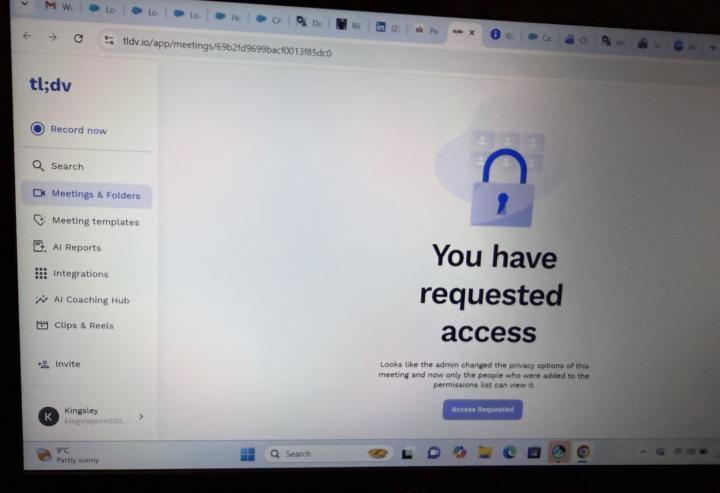
I’m unable to access the live recording video for Team Delta (Wednesday session) 11/03/2026. please accept my request
1 like • Mar 19
@Divine Lantum Yes. Thank you

Mar 17 •
TEAM DELTA: PRACTICAL PROJECT: Customer Tracking System for a UK Fitness Gym
🏢 Company: FitLife Gym UK FitLife Gym is a growing fitness company with branches across London. They offer: • Monthly gym memberships • Personal training sessions • Fitness classes ⚠️ Business Problem Currently, FitLife Gym is using spreadsheets to manage their customers. This is causing problems: • Customer information is scattered • Staff cannot quickly find member details • No clear record of who signed up and when • Difficult to track which members are active • No structure for managing customer data 🎯 Objective The gym wants to start using Salesforce to: • Store all customer information in one place • Track gym members properly • Make it easy for staff to view and update records • Bring structure and organisation to their data 🧩 YOUR TASK As the Salesforce Admin, your job is to build a simple system to manage gym members. 🔹 1. CREATE A CUSTOM OBJECT Create a new object: Object Name: Gym Member Plural Name: Gym Members 🔹 2. CREATE THE FOLLOWING FIELDS Add these fields to the Gym Member object: • Full Name, Text • Email Address, Email • Phone Number, Phone • Membership Type, Picklist Options: Basic, Standard, Premium • Membership Status, Picklist Options: Active, Inactive • Join Date, Date • Payment Status, Picklist Options: Paid, Pending 🔹 3. CREATE SAMPLE RECORDS Create at least 5 Gym Members with realistic data. Examples: • A member with Premium membership and Paid status • A member with Pending payment • A member who is Inactive 🔹 5. UNDERSTAND THE SYSTEM Be ready to explain: • Why the gym needed Salesforce • What problem your system solves • How staff will use the system daily 📈 EXPECTED RESULT By the end of this project: • All gym members are stored in Salesforce • Staff can easily view and manage members • Data is organised and structured • The business no longer depends on spreadsheets 🎤 PRESENTATION REQUIREMENTS You will present: The problem FitLife Gym was facing The object you created The fields and why they are important

1 like • Mar 18
Practical project completed ✅
Feb 25 •
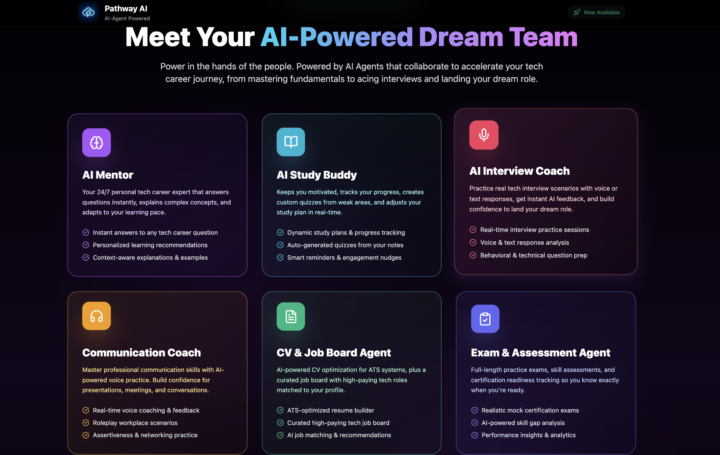
😊 Pathway AI goes LIVE TOMORROW EVENING for everyone to access, here’s what’s new
Family, Pathway AI is ready ✅ Since the launch, we’ve upgraded it heavily up to 70% and it’s now way smarter than what you saw on launch day. This isn’t a course. It’s six AI agents working together to get you certified and hired faster. • The AI Mentor is sharper, it actually understands where you’re stuck and adapts to your level in real time • The dashboard now tracks everything, study time, quiz scores, projects, your overall readiness, all in one view • Voice coaching is dialled in and fully optimized, six different AI voices you can personalise, plus a Natural Teacher mode that makes lessons sound human • Interview Coach is ready, you can practise with different interviewer personas, from friendly recruiter to tough panel • Coommunication coach now, you can now practice and improve your communication and build real confidence. • CV Optimiser now puts a clean, ATS-ready Google Doc that’s actually built to get past the ATS filters and get you hired. Any many more suprises inside the new version. Access opens tomorrow evening. You’ll get your link when it’s live. Kind regards Godwin Tech Mentor & Coach
2 likes • Feb 25
That’s awesome
Feb 19 •
🔥MUST ATTEND: LINKEDIN TAKEOVER, TURN YOUR LINKEDIN INTO A CASH COW, SATURDAY 8PM REGISTER BELOW
This Saturday at 8 p.m., we are doing something different. The Team Delta class is officially converted into a LinkedIn Takeover Session. Why? Because you can have skills. You can have certification. You can even have projects. But if your LinkedIn is weak, invisible, or poorly positioned, opportunities will pass you by. On Saturday, I will be walking you step by step through: • How to set up your LinkedIn properly • How to position yourself as a serious tech professional • What recruiters actually look for • How to optimise your headline, bio, and experience • How to attract opportunities instead of chasing them REGISTER HERE: Click here to register I will be pouring out the real strategies. No surface level talk. This is not optional if you are serious about thriving in tech. If you want to stand out, get noticed, and move faster in your career, this is a must attend session. Saturday. 8 p.m. REGISTER HERE: Click this link to register Kind regards Godwin Mbah

2 likes • Feb 21
Registered
1-5 of 5

Active 19m ago
Joined Feb 20, 2026
Powered by