

1d •
Special Saturday Support Session 8PM, Let’s Get You Going
On Saturday 4th of July (tomorrow) at 8 p.m., we are holding a powerful support session for anyone who needs extra help, extra clarity, or a stronger foundation. This session is for you if you are struggling with things like: • Getting started properly • Understanding the basics • Navigating Salesforce • Using your computer confidently • Finding your way around the platform • Knowing what to study next • Feeling behind or unsure We are going to break things down from the ground up so nobody feels lost. This is not a session to miss if you know you need more support, more structure, and more guidance. Come ready, come honest, and come prepared to ask questions. Tomorrow, 8 p.m. Let’s help you get clarity and move forward properly. Hope to see you there! Olutosin

2d •
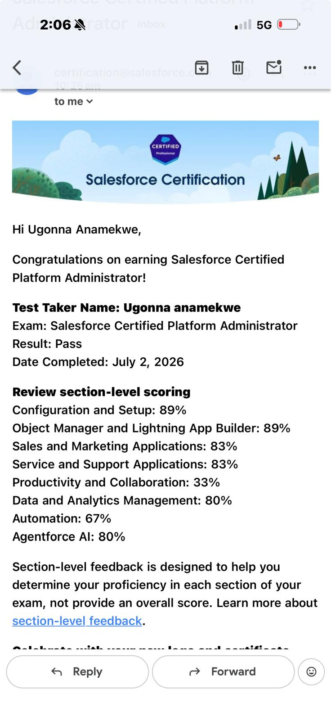
🎉 I Passed My Salesforce Administrator Certification! 🎉
I’m excited to share that I have officially passed my Salesforce Certified Administrator exam! Balancing a full-time job with studying was challenging, but with consistency, determination, and God’s grace, I stayed focused and made it through. First and foremost, I give all the glory to God for His strength and faithfulness throughout this journey. A huge thank you to my coach, @Godwin Mbah for your guidance, encouragement, and unwavering support. Your mentorship played a significant role in helping me achieve this milestone. My sincere appreciation also goes to @Divine Lantum . Due to my work commitments, I couldn’t attend some of the live classes, but your recorded sessions filled that gap perfectly. The time, effort, and dedication you put into creating those videos made learning flexible and enjoyable, and they were invaluable to my success. I also want to appreciate the Pathway AI platform. Having an AI learning assistant built specifically for Salesforce made a real difference. The structured learning approach, guided explanations, and focused support helped reinforce key concepts and kept my preparation on track. It’s an excellent resource for anyone looking to build Salesforce knowledge in a more organised and practical way. Check TrustPilot.… Special thanks to @Iqmot Oladunni Yusuf for always being willing to help, answer questions, and encourage me whenever I needed support. To everyone in the Pathway to Salesforce community who is still on this journey, keep going. There will be challenges, but don’t give up. Stay consistent, keep practising, ask questions, and trust the process. Your hard work will pay off. Thank you to the entire Pathway to Salesforce community for creating such a supportive environment. I’m excited for what’s next and look forward to continuing this journey with you all!

4h •
LIVE on Saturday 4th July
Guys, despite the footie and tennis, we are live now! You might have an eye on the TV though, but not recommended : )
0
0

10h •
SERVICE VS SALES IN SALESFORCE
So I missed the first class for Team Delta on the 27/6. While I was going through the recorded session. Some questions were raised and one of it was the difference between the Sales cloud and the Service cloud. I related this question to my previous work background. So in the financial institution we have the sales department and the Service department and from my understanding this not different from the SALESFORCE Sales and Service cloud Team. In the financial institution or say in the banking system. The SALES Department handles what we call Leads and Opportunities in the Salesforce Sales. They are the ones who go out in search of customers for the company. They meet a customer that shows interest in the company’s product like opening and account with the bank, that makes the person a potential prospect in banking and a potential Lead in Salesforce. When the customer now turns his interest to action by opening the account, they have bought a product from the company and that makes the person a potential customer in banking and a potential Opportunity in Salesforce. At this point the Sales department are done with their basic task of bringing in a customer to the company and selling a product to them. So in Salesforce the Leads and Opportunity taps have been closed. For business to continue seamlessly the customer will start transacting with the product purchased and at this point the Service department are the main people the customer will be contacting with. Say the Cashiers, Customer service reps and the service advisors. This department are the people who ensures the customers needs are being met after purchasing the product. They attend to every complain and questions from the customers making sure they are satisfied with the services. Same is applicable to the Salesforce Service cloud Team, they ensure that the Opportunities that have been brought in are satisfied with whatever product they purchased by making sure all issues and complain arising has been logged in Cases and are being handled to the customers satisfaction.
0
0

1d •
# Pathway AI Is Very Helpful, Is a Most Have tool For Overall Salesforce Progression #
I most say that this Pathway AI mentor is very helpful when dealing with all learning and practical exercise. During one of my practical exercises, I ran into error, so I took a screenshot of the error message and shared it with Pathway AI Mentor. It quickly identified exactly where the issue was coming from and explained step-by-step on how to fix it. that really took a lot of waisted time and stress off my shoulder. Just feed the Pathway AI Mentor exact question or doubt, and it will work you through the right answer . This experience showed me that Pathway AI isn't just useful for answering questions, it actually helps you to understand your mistakes, troubleshoot issues, and learn by doing it. Having a Pathway AI at hand, is like having a personal trainer or mentor 24/7 whenever you need one. at some point I was feeling bad for the Pathway AI Mentor , thinking that, it was getting tired or call it off. but then I remember that is not like me😉, he never get tired or unless I human is tired and needed a break. One thing I really appreciate about Pathway AI , is how practical and supportive it is in this learning joinery . You can practical ask it any question , share your progress , learning and doubt with the Pathway AI Mentor. and is very encouraging , just like you having a human mentor who cheers you up . So what are you still waiting for,? or are you still thinking about it,? Grab your now while the promo last .Sign up now and enjoy the Full benefit of Pathway Al Mentor.
1-30 of 3,045

skool.com/pathway-to-salesforce
A community to help you transition into tech, master Salesforce skills, and unlock career opportunities with hands-on learning and real-world support.
Leaderboard (30-day)
1

+337
2
+150
3

+81
4

+79
5

+64
Powered by