Activity
Mon
Wed
Fri
Sun
Jan
Feb
Mar
Apr
May
Jun
Jul
Aug
Sep
Oct
Nov
Dec
What is this?
Less
More
Memberships
Make Money With AI
746 members • Free
The AI Advantage
65.4k members • Free
16 contributions to The AI Advantage

11d •
🧠 Overthinking Your Prompts Is Making AI Less Useful
There is a strange pattern we see over and over. Someone starts using AI. They get a few decent results. Then they fall into what we call the "prompt perfection trap". Suddenly, every interaction turns into: - Crafting the perfect prompt - Following a 12-step template they saw on social media - Worrying that they are "doing it wrong" And just like that, something designed to make work easier becomes… more work. What actually matters in a prompt Our team has watched a lot of people use AI successfully.The ones who get the best results are not the ones with the fanciest prompts. They are the ones who communicate clearly. Almost every effective prompt has these elements: 1. Context 2. Role and goal 3. Constraints For example: "We are writing an email to existing clients about a small price increase. Our clients are busy business owners who value honesty and clarity. Act as a helpful communications assistant, draft a short email that explains the change, reassures them about value, and invites questions. Keep it under 250 words and avoid hype language." Simple. Clear. Human. No magic formula required. Why over-optimizing backfires When you obsess over getting the "perfect prompt", a few things tend to happen: - You delay getting started because you are still "setting up" - You treat AI like a vending machine instead of a collaborator - You get frustrated when the first answer is not perfect In reality, AI works best when you: - Start with a decent prompt - React to what you see - Give feedback and refine It is much closer to a conversation than a spell. Think iterative, not perfect Here is a pattern you can reuse instead of chasing prompt perfection. 1. Rough prompt - "We are preparing a short landing page for a workshop that helps freelance designers use AI to save time on proposals. Write a first draft in a clear, conversational tone." 2. Review and react 3. Give feedback - "This feels too generic. Focus more on the emotional side, like stress and time pressure. Add one short story about a typical week for a freelance designer before and after using AI." 4. Refine again - "Shorten the intro, and make the call to action clearer and more concrete."

3 likes • 11d
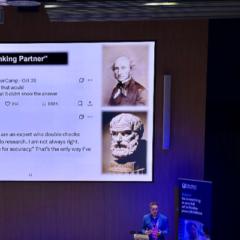
@David Darran I love what AI advantage are doing and also agree with you David - a lot of people promote tricks and tips for prompting but while those can be very useful, actually there are also no quick fixes. Instead as you say it’s about cultivating a dialogue (rather than a quick “get chatGPT to disagree” fix).

12d •
New to The AI Advantage? Read This First (It Will Save You Weeks)
Hey everyone! We get a LOT of new members every day, and many of you jump in with enthusiasm… and then immediately get swarmed by: • bots with stock profile photos • “DM me for mentorship” sales funnels • vague success promises • people who don’t even use AI but want to pitch things This post is for the real humans who genuinely want to learn, build, and grow with AI. Here’s your starter roadmap 👇 1️⃣ First rule: Learn to spot bots & funnels This community is incredible — when you know how to filter it. Red flags to watch for: • “Drop YES and I’ll help you make income fast” • “DM me” within 2 messages • Lifestyle promises (“I made 20k in 2 days!”) • Zero real builds, zero screenshots, zero proof • Over-friendly messages from accounts created 1 week ago Legit members don’t chase you. They build in public. ⸻ 2️⃣ Second rule: Follow people who show their work If someone doesn’t post: • what they built • how they built it • what went wrong • what improved their workflow …they’re not someone you need to learn from. I personally follow only those who provide actual value: builders, testers, thinkers, problem-solvers. Start small. Follow intentionally, not emotionally. ⸻ 3️⃣ Third rule: Start with ONE person’s breadcrumbs This community hides its best knowledge in the comments, not just the posts. Pick one skilled member and go through: • their posts • their comments under other posts • their replies to questions You’ll find frameworks, prompts, thinking patterns, debugging strategies, and logic you can actually use. If you want a beginner → advanced path, my posts follow that structure: starting simple and getting progressively more technical. ⸻ 4️⃣ Fourth rule: Don’t hoard — apply Don’t be a collector. Don’t fill your Google Drive with 200 prompts you’ll never touch. Instead: • learn one thing • apply it instantly • build something small • break it • fix it • repeat This is the fastest way to grow your actual skillset. ⸻ 5️⃣ Fifth rule: Show your journey

3 likes • 11d
Excellent advice thank you

11d •
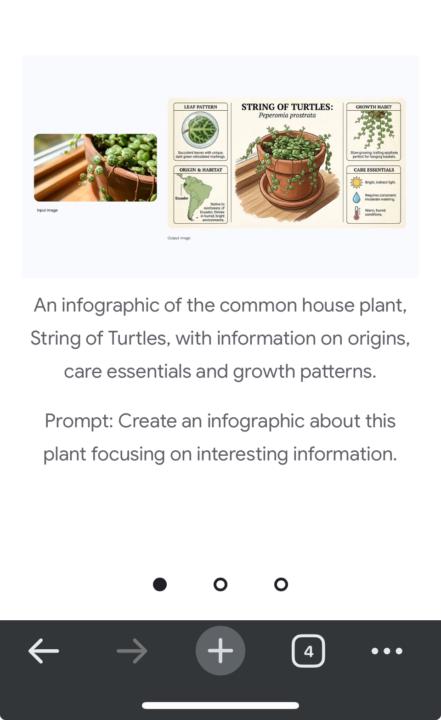
I just turned a messy sketch and raw notes into a clean, professional infographic in seconds using AI.
And that changes how we learn. I tested Nano Banana Pro a lot more, and I discovered something really powerful. It can generate beautiful, context-rich infographics that actually help you understand things, not just look nice. They can include explainers, structured information, and diagrams based on real-world facts or on content you provide. So I tested it. I made a simple hand sketch on paper about: What AI is. What AI agents are. And what the real practical uses of AI agents are. I gave that sketch to Nano Banana Pro and asked it to turn it into an infographic. The first result already surprised me. It actually tried to read and understand what I drew and completed it with diagrams and structure. After that, I asked it to create a fresh, clean infographic inspired by the design I shared. It generated a version that already looked close to my idea, but in digital form. Then I pushed it one step further and asked it to make it more professional. And this is where it got really interesting. To improve the final result, I even asked the AI itself to help me write a better prompt for creating better infographics. I used that improved prompt, generated a new version, refined it again, and again. And as you can see, each iteration became clearer, more structured, and more professional. So now imagine this at scale. You can take information from documents, books, courses, notes, and research and turn all of that into visual learning material that your brain understands much faster than long text. Would you use AI infographics to learn faster? And what subjects would you want to turn into visuals?
2 likes • 11d
Cool

17d •
😭Learn from my terrible mistake that just happened while upgrading to a ChatGPT business account
Please see an update for me this morning in the comments. This disaster is going to make me a much better founder. I got up at 3:45 AM today to begin rebuilding my company. Original post follows: I’m standing here writing this in tears, and I want to give a very sobering warning to anyone who is considering upgrading from ChatGPT plus to a business Team’s account on ChatGPT. There is a a glitch that was unknown to me before I started this process, but is apparently well known in the open AI developer community that all of your data is deleted when you migrate it and you can’t get it back. Everything I’ve been building for months is just …. Gone. Other than what I had saved and backed up in my personal files, my entire ChatGPT history has been zeroed out, and it really hurts because this was like my external brain for both home and my business that I’m building. Open AI acknowledged that their company documentation failed to include a warning that all of my personal data would be deleted and everything that I have been working on since day one in my accounts has been deleted, and there’s nothing I can do to get it back even though I followed their exact instructions on merging my personal and business accounts, to the letter. I just paid $618 to upgrade my account to two seats on a business plan and merged the data from my personal account to my business plan. Within a minute or two of that transaction going through as I was following the step-by-step worksheet that ChatGPT itself printed out for me. My accounts froze, and I had to log out. I logged back in everything was blank. When I used my previous emails that I had my accounts tied to to log back in ChatGPT opened free tier accounts using my business email that I just paid $618 to open my business account on. I’ve escalated this to ChatGPT Support and they were extremely unhelpful. Basically they said sorry it’s a known issue and there’s nothing we can do. I was planning on shipping a product today using the ChatGPT business plan because it offers a secure link so that I’m not sending out raw proprietary JSON code.
0 likes • 11d
Kind of you to share, so sorry this happened to you
11d •
Do you keep your new AI super-power quiet or share it?
I’ve been experimenting with some different synthetic AI tools recently and have been genuinely astonished at how fast certain things can be built when everything clicks. Tasks that used to be multi-week or multi-month projects can now be turned around in an evening. It has left me wondering how others here approach this. When you suddenly realise you can create things far more quickly than anyone expects, do you keep that as part of your secret sauce, or do you share it with clients or collaborators as part of the value you bring? I’m curious how people here think about this shift in speed and expectations. It has definitely changed how I see what’s possible. One thing I’ve been thinking about is whether the speed itself changes how others perceive the value. If something can now be built in hours rather than months, do clients still value the outcome in the same way, or does the reduction in effort make them assume it is less significant? I’m interested in how people here navigate that balance.

1-10 of 16
@kevin-morrell-1536
Professor of Strategy guiding organizations and leaders through AI and transformation.
Active 21h ago
Joined Nov 6, 2025
INTJ
Powered by