Activity
Mon
Wed
Fri
Sun
Apr
May
Jun
Jul
Aug
Sep
Oct
Nov
Dec
Jan
Feb
Mar
What is this?
Less
More
Memberships
EmailRanker (FromSpamToInbox)
193 members • $9/month
SaaS Agency Community
101 members • Free
Kourse (Free)
113.3k members • Free
Agency Growth
4.2k members • Free
Frankie Lee Community
421 members • Free
Q's Mastermind
5.6k members • Free
[CLOSED] ItsKeaton Group
1.8k members • Free
Elite Sales Alliance
22k members • Free
Agency World
6.4k members • $1
46 contributions to Assistable.ai

5d •
Best Approach for avoiding AI repetition? | SMS
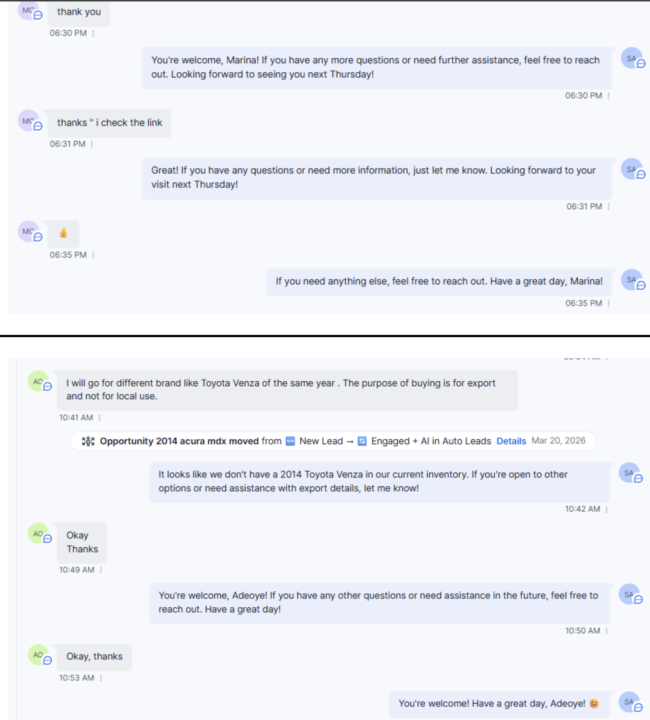
Many customers will end by saying thank you, then send like an emoji, then liking the message and the AI will respond to all of those messages and sound SUPER repetitive. Any way to avoid this? See attached!
6d •
Reduce double message?
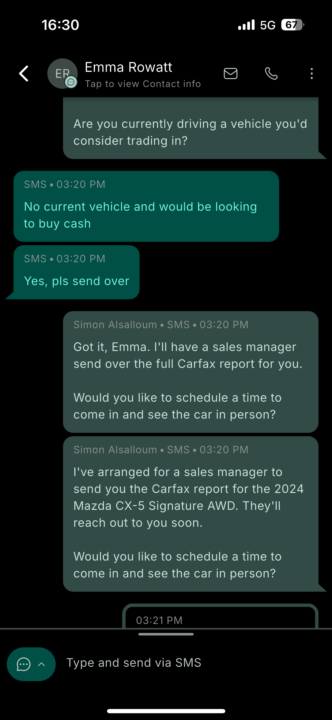
So I changed the ai to respond after 10 seconds. If I increase it to maybe 30 seconds would it only respond to 1 message? (Even if people double message) It always responds to every message even though it sounds so repetitive.
0 likes • 5d
@Bernie White Yeah okay cool just did that thanks!
Feb 20 •
Sleep Mode May Be Useless? | SMS
How can I set Sleep mode for SMS to only fire when a manual SMS message is sent and not trigger when an Automation SMS workflow fires? We had to turn off Sleep mode, cause i had it set for 1 hour but even when an Automation SMS would fire it would activate sleep mode, this makes sleep mode pretty useless.
1 like • 23d
@Anthony Castiglia interessttiiinnggg mmm kk good call, this might be the move here. thanks!
1 like • 11d
@Johnny Ringold Chat follow has been glitchy the last 24 hours FYI. I actually decided to go with Chat GPT for follow up messages.
12d •
Chat Follow Up | ISSUE (SMS)
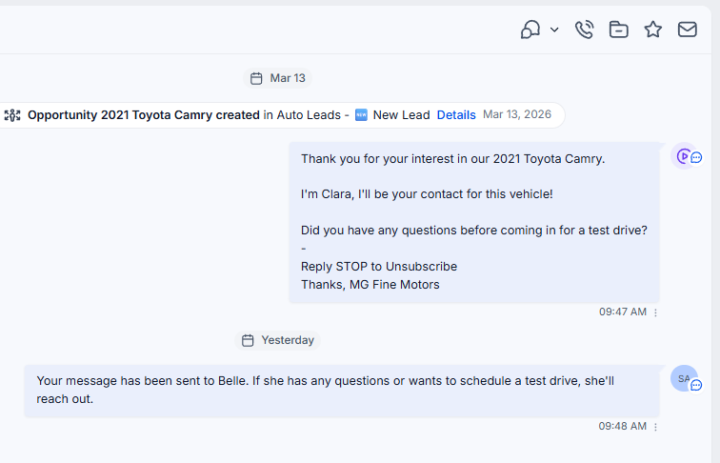
Anyone have chat follow up ever send a message like this to a customer... "Your message has been sent to Belle. If she has any questions or wants to schedule a test drive, she'll reach out." _________ Here is my Chat Follow Up Prompt: {{contact.first_name}} is in our lead follow-up workflow. They have been in this automation for {{contact.days_in_automated_followup_sequence}} days but have not responded or taken any action (such as schedule appointment, etc.). Your job is to follow-up with {{contact.first_name}} via SMS to re-engage them. Here is some of the information on them, use some of it for your messaging to them {{contact.key_conversation_points}}. Also use conversation logs as reference. Do not send the same message more than once. Be creative in your messages. Use intrigue, curiosity, etc. ** Keep each SMS message under 100 characters.
0 likes • 12d
its been sending to all my customers like this for the past 24 hours, but when i test it the messages are perfect.
0 likes • 11d
we were not able to find a solution, i had to resort to GPT generated responses.
18d •
SLEEP MODE - Upgrade Idea | FOR SMS
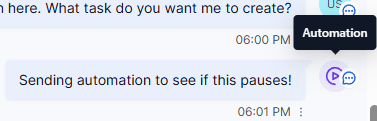
SOO, as we know. Sleep mode for SMS will get activated if: A) An SMS automation is triggered in the workflow or B) A user sends a manual SMS. A) makes this feature pretty much useless (Unless you build some complex automation around it with Chat Follow up - still don't know how to do it). Anyway - it looks like GHL now shows you when an SMS is from an Automation VS a user!! Can you feed this info to Assistable, so that sleep mode IS NOT ACTIVATED for automations? Would be a game changer, thank you!
1-10 of 46

@karl-brussolo-4024
Agency owner for 4 years now, we focus on scaling SaaS companies through our Customer Acquisition Infrastructure Build & Release Model.
Active 2d ago
Joined Mar 20, 2025
Toronto, Canada
Powered by