Activity
Mon
Wed
Fri
Sun
Jun
Jul
Aug
Sep
Oct
Nov
Dec
Jan
Feb
Mar
Apr
May
What is this?
Less
More
Memberships
AI Founders
1.8k members • Free
AI Automation Agency Hub
315.4k members • Free
AI Automation First Client
1.6k members • Free
AI Accelerator
18.5k members • Free
SW
SWS Private Community
3.2k members • Free
Web Agency Mastery Community
4.2k members • Free
Web Agency Accelerator (FREE)
15k members • Free
Online Business Friends
92.1k members • Free
15 contributions to AI Automation First Client

🔥
3d •
$47,200 in Client Overpayments - How I Found My Niche 🔥
Finance team processing 320 invoices monthly. All manual. Error rate: 12%. Built a document extraction system. Found $47,200 in overpayments in 8 months. That discovery became my entire pitch. THE AUTOMATION: Invoice hits inbox → Extract vendor, amount, line items → Match against purchase orders → Flag discrepancies over 2% → Human approves Nothing fancy. Just document parsing and matching logic. THE CLIENT ACQUISITION LESSON: I did not pitch "automation services." I pitched: "I find money hiding in your invoice errors." Same skill. Different positioning. Completely different response rate. THE OUTREACH THAT WORKED: "Hey [Name], most finance teams lose 2-5% of spend to invoice errors - wrong amounts, duplicate payments, missed discounts. I built a system that catches these automatically. One client found $47K in 8 months. Worth 15 minutes to see if similar issues exist in your AP?" THE NUMBERS: Old pitch (generic automation): 2% response rate New pitch (money discovery): 14% response rate Same service. Different angle. THE REPLICABLE PATTERN: Document processing → Find errors → Quantify the cost → Pitch the savings Works for: - Invoice processing (overpayments) - Contract review (missed deadlines = penalties) - Insurance claims (denied claims from data errors) - Medical billing (rejected claims from coding mistakes) What hidden money could you find in your target client's documents?

2 likes • 3d
Your outreach message says, "One client found $47K in 8 months." What was your message before having that client stat? @Duy Bui
🔥
Nov '25 •
If I Lost Everything Tomorrow - This Is The Exact 30-Day Plan I'd Follow 🔥
If I had to start over today, here's EXACTLY what I'd do in the next 30 days. WEEK 1: LEARN AND PREPARE DAY 1-2: Choose invoice processing (universal pain) DAY 3-5: Learn Make.com basics - Make Academy (free) - YouTube tutorials - Build 3 sample workflows DAY 6-7: Build demo workflow with PDF Vector free plan Templates: Make | Zapier | n8n WEEK 2: POSITION AND REACH OUT DAY 8-9: Join communities - 10 local business Facebook groups - 5 LinkedIn industry groups - 3 Reddit communities DAY 10-12: Search for pain points - Keywords: "manually entering", "tedious" - Find 20 posts complaining about manual work DAY 13-14: Engage genuinely - Comment helpful advice on 20 posts - NO pitching yet WEEK 3: FIND AND CLOSE DAY 15-17: Identify leads - Find 5 people with document processing pain - Start conversations via DM DAY 18-20: Discovery calls - Book 3 calls - Use discovery call framework - Listen more than talk DAY 21: Send proposals - Use winning template - Clear next steps - 50% deposit structure WEEK 4: BUILD AND DELIVER DAY 22-24: Build workflow - Use template library - Customize for client - Test thoroughly DAY 25-27: Demo and revise - Walk client through - Make adjustments DAY 28-30: Deliver and celebrate - Go live - Train client - Collect final payment REALISTIC EXPECTATIONS Not everyone closes in 30 days. Some take 45. Normal. People who follow this plan: 70%+ get first client within 30 days. People who stop at day 15: 0% success. MOST COMMON MISTAKE Stopping when you don't see immediate results. Days 10-20 feel slow. That's when most quit. Push through. Momentum comes. TOOLS TO SET UP Make.com (start free) PDF Vector (free plan for testing, $25/month for clients) Gmail (free) Stripe or PayPal TOTAL COST: $0-25/month initially RESOURCES CHECKLIST
3 likes • Nov '25
May it’s just me, but I’m finding that it’s one thing to get the technical side of building the workflows and another to be able to speak to the business owner about how this works within their business. @Duy Bui Can you speak about learning about the business niche we would be speaking to? How were you able to speak to the various businesses about how this fits into their particular business?
Nov '25 •
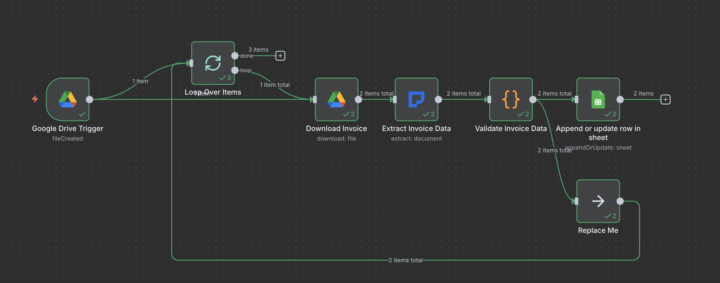
It took me 6 days to get the invoice workflow going 🤦🏾♀️
You would think I would be able to just follow the directions @Duy Bui laid out so simply in the classroom and just knock them out. Not this smarty pants 🙄. I have to know why each node exists, have my own ideas, and know what it does. I was making mistakes on every node, but the AI assistant in n8n and this community were super helpful and taught me a lot. Here is my version of the workflow that finally worked...
Oct '25 •
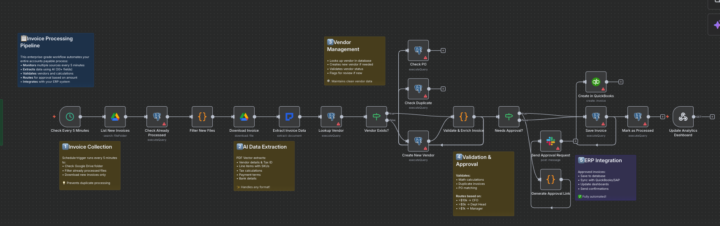
I resisted n8n long enough. I'm pushing through the confusion. Help!
I finally get the JSON for the invoice workflow in there and I get all of this! The example @Duy Bui has is about 5-6 nodes. Are we just editing what the JSON spit out to match Duy's example?
1 like • Nov '25
@Duy Bui I'm stuck on the SQL database. Which database am I supposed to connect to? I'm not hosting locally on my computer.
1 like • Nov '25
@Duy Bui thank goodness, that was driving me nuts!
🔥
Oct '25 •
How I Turned $47/Month in Tools into $3,200/Month in Revenue
My entire tech stack costs $47 monthly. Last month's revenue: $14,200. Monthly recurring: $3,200. You don't need expensive tools to build a real business. THE COMPLETE STACK: Make.com - $9/month (Free tier works initially) PDF Vector - $25/month (Free tier for testing) Google Workspace - $6/month (Drive, Sheets, Docs) Calendly - Free tier (booking calls) Notion - Free tier (CRM and page builder) Loom - Free tier (video messages) Slack - Free tier (client communication) Total: $40/month ($47 with occasional overages) THE MAKE.COM USAGE: 9 active client automations running 847 operations monthly on $9 plan 10,000 operations included Using 8.47% of capacity Could serve 100+ clients on same plan. THE PDF VECTOR USAGE: Basic plan: $25/month for 3,000 credits Average per client: 180 credits monthly Could serve 16 clients on this plan Currently serving 11 clients. THE GOOGLE WORKSPACE USAGE: Individual plan: $6/month Shared drives for client documents Google Sheets for data staging Gmail for professional email THE FREE TOOLS THAT WORK: Calendly free tier: 15-min meeting type, unlimited bookings Notion free: Client CRM, proposals, tracking Loom free: 25 videos monthly (enough for outreach) Slack free: 90-day message history (plenty for support) THE COST BREAKDOWN PER CLIENT: Make.com: $0.82/month per client PDF Vector: $2.27/month per client Google Workspace: $0.55/month per client Total cost per client: $3.64/month Average revenue per client: $165/month Profit margin: 97.8% THE REVENUE LAST MONTH: Setup fees: $11,000 (5 new clients) Monthly recurring: $3,200 (19 clients) Total: $14,200 Tool costs: $47 THE TOOLS I DON'T NEED: ❌ Fancy CRM ($99+/month) - Using Notion free ❌ Project management ($29+/month) - Using Notion free ❌ Email marketing ($49+/month) - Direct outreach works better ❌ Expensive automation tools ($299+/month) - Make.com handles everything
4 likes • Oct '25
Are you not using n8n anymore?
2 likes • Oct '25
@Duy Bui interesting! I wouldn’t have thought they would have an opinion of what automation tool to use if they never had this service before…
1-10 of 15

Active 20h ago
Joined Sep 22, 2025
INTJ
Los Angeles