Activity
Mon
Wed
Fri
Sun
Apr
May
Jun
Jul
Aug
Sep
Oct
Nov
Dec
Jan
Feb
Mar
What is this?
Less
More
Memberships
Ep - reMarkable Tablet Support
790 members • Free
13 contributions to Ep - reMarkable Tablet Support

13d •
🚀 CalSync 1.0.32 is Now Live
We’ve just released CalSync version 1.0.32. This update focuses on addressing an issue that some users reported when saving settings and switching IP addresses while connecting to their tablet. What was fixed • Settings Save Issue – Resolved a problem where some users experienced issues when saving their connection settings. • IP Switching Improvements – Improved reliability when switching between IP addresses while connecting to your tablet. • General stability improvements. We Need Your Help Testing If you experienced issues saving settings or switching IP addresses, please update to version 1.0.32 and try it again. Your feedback will help us confirm that the fix is working correctly across different systems and network setups. Download the Update You can download the latest version here: https://www.skool.com/einkpads/classroom 💬 Please let us know in the comments: - Did the issue resolve for you? - What operating system are you using (Mac / Windows / Linux)? Your feedback helps us quickly validate fixes and keep improving CalSync.

0 likes • 12d
The new update does not allow me to enter the WiFi IP address and when I turned off the "Carousel" it leaves a blank space in the middle of the standby screen and automatically reverts back to "Enabled" when I open the application.
Feb 9 •
✅ Binder Cloud Update — Version 5.0.13
We’ve shipped a new Binder update focused on custom screens, clarity, and restore control. Here’s what’s new: We just released a Hotfix for version 5.0.12 - we noticed slow navigation and issues with template restoration. What’s new in this release: - Custom screens now display cleanly without being covered by the default startup carousel - Added a one-click Restore option to re-enable the original reMarkable startup carousel - Improved screen upload handling for more reliable results - Enhanced restore feedback with clearer progress indicators - General stability improvements and performance optimizations - noticed an issue where update window was opening at the wrong times If you’re already using Binder, we recommend updating to get the latest improvements. As always, thanks for the feedback — it directly drives updates like this. To download: Windows: https://www.einkpads.io/api/binder/win32/releases/latest MacOS: https://www.einkpads.io/api/binder/darwin/releases/latest
0 likes • 14d
@Jason Smith I am using a Windows system. The extraction of the zip files was strange this time. The original file extracted and then I had to extract the subfolder.
1 like • 12d
@Jason Smith it works.
Feb 23 •
🚀 CalSync v1.0.27 is Live
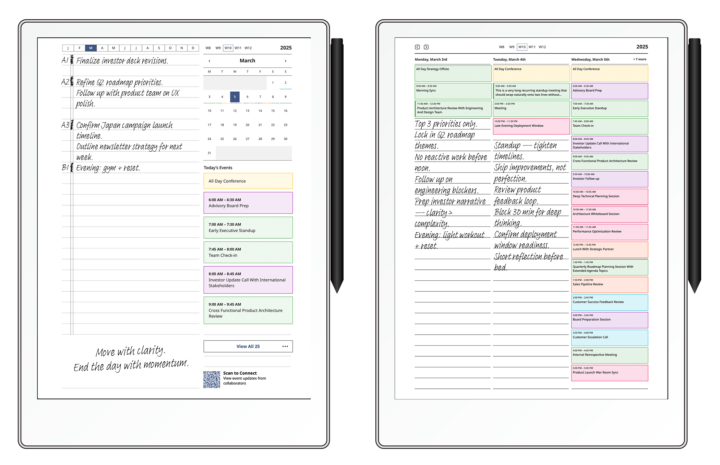
We’ve officially released Version 1.0.27 — and this one brings meaningful refinements to planner rendering, week logic, and overall stability. This update continues polishing the experience so your reMarkable planner feels smooth, predictable, and clean across every layout on your tablet. ✨ What’s New • Improved week numbering logic for both Sunday and Monday week starts • Corrected year overview week alignment (no more mismatched week labels) • Grayed out out-of-range weeks for better visual clarity in year view • Strengthened internal linking between year → month → week → day views • Improved stacked planner layout rendering • Enhanced event card border styling and visual structure • Better recurring event indicators • Improved text wrapping for long event titles • Continued fixes for ghosted all-day events • Theme stability improvements (grayscale + color modes) • General performance optimizations This release is all about consistency and polish — especially around week logic and planner navigation. If you’re running CalSync, update now and let us know what you notice 👇 Your feedback continues to shape this app. — Jason Download: MacOs https://www.einkpads.io/api/calsync/darwin/releases/latest Windows https://www.einkpads.io/api/calsync/win32/releases/latest
0 likes • Feb 24
This version shifted all of my hand written items to later days (2 days).
Jan 26 •
🚀 New Update Released - version 1.0.22
☑️ Better wireless support. ☑️ Improved reliability when pushing planners to your device ☑️ Safer device connection handling to prevent sync conflicts ☑️ Better protection of handwriting/content files during updates ☑️ More stable carousel uploads ☑️ General bug fixes and stability improvements Download: MacOs: https://www.einkpads.io/api/calsync/darwin/releases/latest Windows: https://www.einkpads.io/api/calsync/win32/releases/latest
0 likes • Jan 29
@Jason Smith, thanks for letting me know. Sometimes I have to go back and look at a previous event but I can rely on my computer or phone for that. I did however notice this morning that even without manually updating, all of my handwritten notes, tasks, plans for the rest of the week have disappeared.
0 likes • Jan 31
@Jason Smith I just realized the reason my handwritten notes disappeared. The update is creating duplicate pages for each day. When I "finger swiped", there were my original notes on the original calendar page.
Jan 22 •
🚀 CalSync Update — Version 1.0.21
Fix to some issues related to calendar feed limits on the settings section. Windows https://www.einkpads.io/api/calsync/win32/releases/latest macOS https://www.einkpads.io/api/calsync/darwin/releases/latest
0 likes • Jan 23
Jason, I just installed the newest version and noticed that it is not importing my "Outlook" appointments again and all of my appointments prior to today have disappeared.
1 like • Jan 24
@Jason Smith this new version 1.0.21
1-10 of 13

Active 2d ago
Joined Nov 11, 2025
Powered by