Activity
Mon
Wed
Fri
Sun
Jul
Aug
Sep
Oct
Nov
Dec
Jan
Feb
Mar
Apr
May
Jun
What is this?
Less
More
Memberships
AI Automation Club
580 members • Free
AI Automation First Client
1.8k members • Free
Ai Titus
914 members • Free
AI Automation Society
407.8k members • Free
DIGITAL EMPIRE
112 members • $39
AI Automation Agency Hub
325.7k members • Free
AI Automation (A-Z)
159.6k members • Free
AI Automation Mastery
29.8k members • Free
AI Automation Agency Ninjas
21k members • Free
27 contributions to DIGITAL EMPIRE

19d •
The era of BYOK is ending.
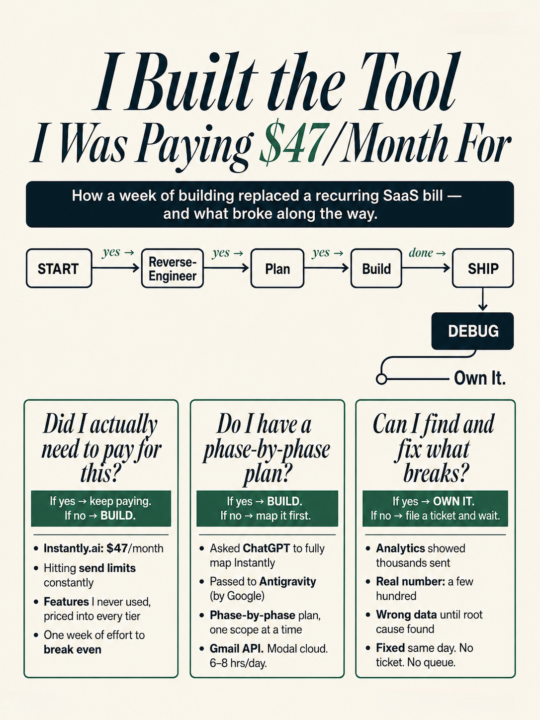
I asked ChatGPT to reverse-engineer a $99 tool. Then I built my own version for $2 a month. A year ago, the smart move was BYOK. Bring Your Own Key. Plug your API key into someone else's tool. Use their infrastructure, their limits, their roadmap. That era is ending. BYOS, Bring Your Own Software, is what comes next. Alex Hormozi coined the term. The premise: coding agents have reached the point where building your own tools is a founder's decision. You scope it, you run the agent, you own what comes out. I wanted to test whether this was real or just another thing people say on the internet. I was paying $47/month for Instantly.ai. Good tool. But their sending limits and built-in SOPs kept capping how far I could scale my outreach. I was paying for a ceiling. So I built Emailify in a week. Six to eight hours a day, treated it like a real project. This is what I do, so it doubled as a way to sharpen my skills with the new generation of coding agents. The process: I asked ChatGPT to fully reverse-engineer Instantly, every feature, every function, the complete picture of what the software does. Then I passed that to Antigravity (by Google), an IDE coding platform, and we built a phase-by-phase plan. Each phase had a clear scope. Each phase fed the next. By the end, I had fully functional outreach software. Multiple campaigns, hundreds of thousands of prospects, unlimited sends, Gmail API, cloud-hosted on Modal. Monthly cost: $2 to $4. A one-week build against $47/month recurring. One month to break even. After that, every month is margin. Now... the bugs. There were bugs. Plenty of them. The analytics kept breaking in a particular way that was genuinely painful to debug. It would report that I had sent thousands of emails when the real number was a few hundred. Completely wrong data, which meant I could not trust my own reports until I found and fixed the root cause. Every SaaS you subscribe to also has bugs. The difference is you cannot see them, cannot touch them, cannot fix them. You file a ticket. You wait. You work around the issue or you upgrade to the tier where it supposedly gets fixed.
0 likes • 19d
@Kanyi Foly ehke Love to hear it
20d •
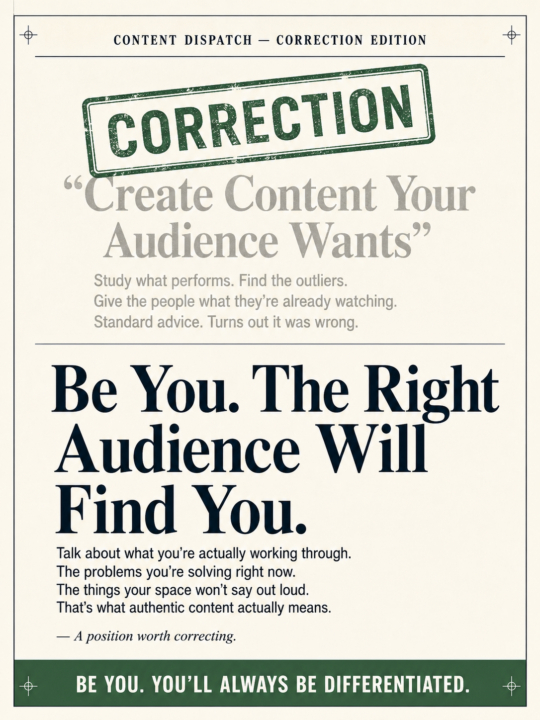
I told you to create content your audience wants. I was wrong.
I picked this up from Alex Hormozi recently. He called it "becoming the algorithm." You find what performs, you reverse-engineer the format, you chase the outlier. Makes sense on paper. The problem is you end up feeling like you're feeding the machine, not your audience. I know because I was doing it. Studying what worked in my space. Picking topics based on what I thought people wanted. Publishing consistently. Dreading every session. The content was fine. The metrics were ok. And it sounded exactly like twelve other people running the same playbook in the same space. Because they were. Here is what I actually believe now... Talk about what you are genuinely working through. The problems you are solving right now. The things your space dances around but won't say directly. Two reasons this works better: First, if you're dealing with it, other people are dealing with it right now. You're looking forward, not in the rearview mirror. Second, you won't look like a "cover band." You'll be making original songs. And cover bands never build the audience the original artist has. The right people find you because of that specificity. You cannot sound like what people already follow and expect them to choose you. Be you, and you'll always be differentiated. That's what authentic content actually means.
0 likes • 19d
@Kanyi Foly ehke Thanks. More to come
May 2 •
Best video to learn about cold emailing. Check it out
https://www.youtube.com/watch?v=uSTGNHGFOAo
0 likes • 19d
@Kanyi Foly ehke Thanks
21d •
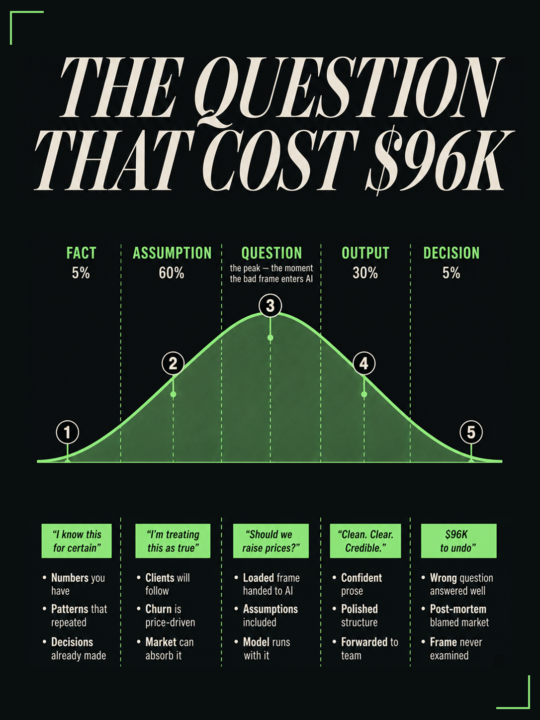
How to avoid getting tricked by AI sycophancy.
"Sycophancy refers to the behavior of offering insincere, excessive flattery to someone powerful or wealthy, usually in order to gain a personal advantage, promotion, or special favor." Simply said: AI agrees with everything you say. AI gave you the answer in 28 seconds. But cost you $96K to undo. What happened was... You gave AI a messy decision. It came back in under thirty seconds. Clean structure. Clear recommendation. You forwarded it to your team. Six weeks later you dropped the pricing model it suggested. Two clients didn't follow you into the new structure. At roughly $4,000 a month each, that's $96,000 in ARR you spent the next quarter trying to replace. You gave it a bad input and the AI just returned a polished version of that bad input. You asked: "Should we raise prices?" when the real question was: "Why are clients churning before month three?" The model answered what you asked. The answer was coherent, supported, and built on a frame that was already broken. This is the failure that never shows up in the post-mortem. When a decision goes wrong, founders blame the market, the timing, the execution. Almost never the question they handed AI. Because the output looked credible. Because confident prose signals rigorous thinking. The failure is structural. You were stressed. You opened the chat. You typed the question already forming in your head, assumptions included. The model took your frame and built on it. It does not push back on a loaded question. It runs. Here is what to do before you hand a real decision to AI. Write two things before you open the chat: 1. What you know for certain: Facts you can point to, numbers you have, patterns that have repeated 2. What you're assuming: Things you're treating as true that you haven't verified The second list is where most decisions break. For the pricing example, the fact list had one item: "margins were tighter than last year." The assumption list had five: - "clients would follow the new pricing",
24d •
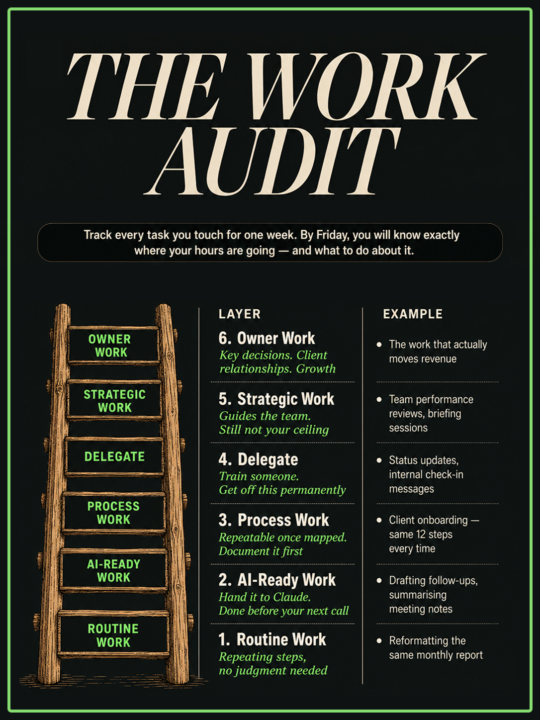
Here's how to fix your calendar in 1 week.
The business is at seven figures. The founder is still doing $20/hour work. Running a seven-figure digital business and still working nights? That is a calendar problem. And you can diagnose it in one week. Here is the exercise. At the end of each workday, write down every task you touched and how long it took. Just the name and the time. Nothing else. By Friday, a founder at that revenue level typically has a list that looks something like this: - Writing new client briefs: 4 hours - Monthly performance reports: 3.5 hours - Client check-in messages and status updates: 5 hours - Internal team handoff notes: 2 hours - Content for the agency's own channels: 3 hours Seventeen hours. In one week. On work that sits outside the actual service you sell. Sort that list into two groups. Work that requires your specific judgment and client relationships. Work that follows roughly the same steps every time. Everything in the second group is recoverable time. Some of it you delegate. Some of it becomes a process. A big chunk of it, you hand to an AI tool today and the hours come back this week. Claude, Grok, whatever is already in your stack. These tools exist precisely for this category of work. I used to build every piece of social content by hand. Writing, designing, formatting. Hours every week. Now AI handles it, trained on my examples and my preferences. It runs at about 90% accuracy. The remaining 10% takes less than 10% of the time the whole thing used to cost. One category cleared. Find yours. The audit takes one week. What you build with the hours after that is the actual business.
1-10 of 27

Active 12d ago
Joined Apr 16, 2026
INTP
Powered by