
Write something
Pinned

May 17 •
How to prompt like a pro
The AI gave you exactly what you asked for. That was the problem. The AI output is messy because the task was messy first. Most people skip the step between "I want to automate this" and opening the tool. That step is writing down how you actually do the task right now. Including the inconsistent parts. The judgment calls. The things you quietly fix before anyone else sees the result. If you cannot write that down in four or five steps, the model cannot do it either. You are just moving the mess into a prompt. Before you touch any AI tool, do this with one repeated task: - Write one example of good output. A real one you have produced before, not a description of what it should look like. - Write one example of bad output. The version you would fix before sending. - Write the steps you actually follow. The real process, not the ideal one. Now you have something the model can work with. The prompt is the last thing you write. The brief is the work.
Pinned
May 19 •
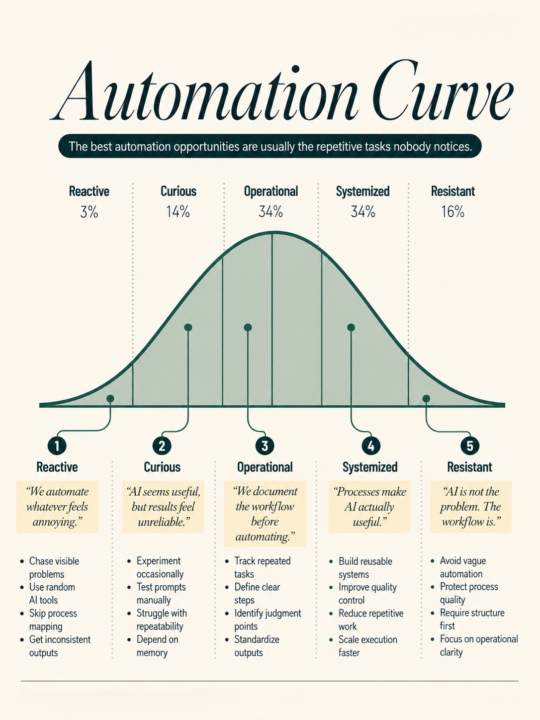
You are probably automating the wrong task.
The one you picked is visible, annoying, and feels like a good candidate for AI. But it is the quiet tasks that eat your week. - Drafting the same response for the third time this month. - Reformatting the same report. - Writing a brief from scratch when you already wrote a similar one in January. You do not notice those because they do not feel dramatic enough to fix. Here is a better way to find what to automate: For one week, write down every task that takes you longer than 20 minutes. Just the name and the rough time. Nothing else. At the end of the week, look at the list and find the most repeated task that follows roughly the same steps each time. That is the task worth mapping before you touch any tool. Map it first. Write the steps in plain language. Include what a good output looks like. Include what a bad output looks like. Note the one decision that requires your actual judgment. Now you have something AI can actually help with. Most people skip the map. They drop a vague task into a prompt, get a vague result, and walk away thinking AI is not ready for their work. A clear process is what makes AI useful. The tool just runs it faster. Which task did you automate this week?
Pinned

🔥
Dec '25 •
Introduction
Welcome! Introduce yourself + share a career goal you have 🎉 Let's get to know each other! Comment below sharing where you are in the world, a career goal you have, and something you like to do for fun. 😊
May 20 •
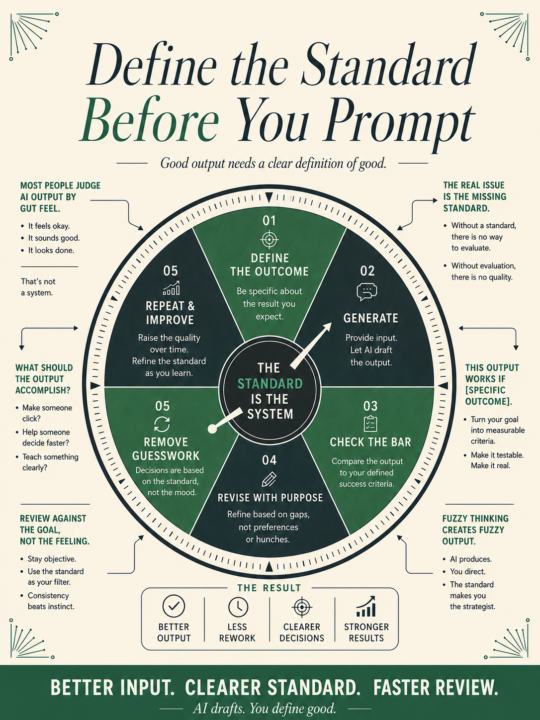
The output feels off but you cannot say why
You judge AI output by gut feelings Sounds a bit off. Too generic. Could be better. But ask "better how?" And nothing specific comes out. That is the real problem. Not the model. Not the prompt. The missing standard. Before you generate anything, write down what the output needs to do. Not what it should contain. What it needs to accomplish. Is it supposed to make someone click? Get a response? Replace a call? Help someone decide faster? Move someone from skeptical to interested? If you cannot answer that before you prompt, the review after is just guessing. You end up revising in circles because the target keeps moving with each read. Here is the fix. One sentence, written before you open the tool: "This output works if [specific outcome]." Fill that in. Then generate. Then check whether the output clears that bar. It takes thirty seconds. It changes everything about how you review the draft, because now you are checking against something concrete instead of a feeling. You will also notice something useful: sometimes you cannot fill in the sentence. The job is still fuzzy. That fuzziness would have ended up in the output, buried under polished sentences that sound confident but go nowhere. Writing the success criteria first forces the thinking that should have happened before the tool opened. Better input, clearer standard, faster review. That is the whole loop. AI handles the drafting. You handle the definition of good.
May 21 •
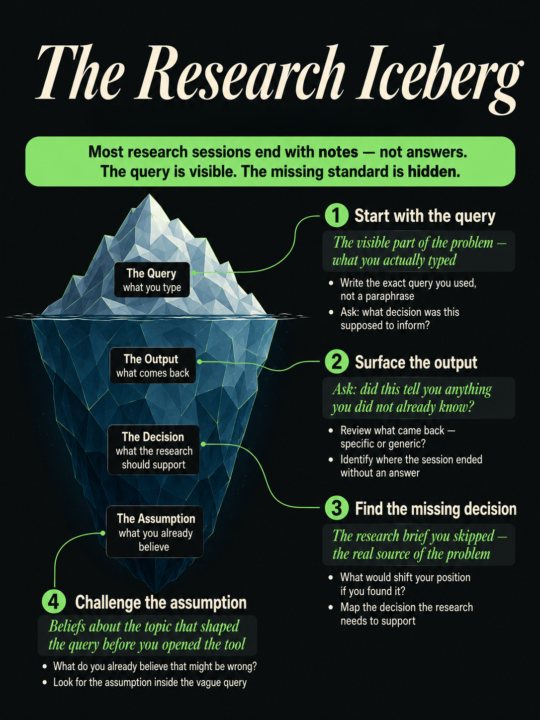
Your AI research takes longer than it should. The query is the problem.
The tool is fast. Most people open the research tool the same way they open a search engine. Type a topic. See what comes back. Scroll until something looks useful. That habit made sense for browsing. For research with a decision at the end, it wastes time. Vague queries return summaries of things you already know. You get a confident paragraph that confirms the obvious, with no real signal about what you were actually trying to find out. The session ends. You have notes. You still do not have an answer. The issue is that the model cannot read your intent. It only works with what you give it. And "latest trends in B2B sales" tells it almost nothing about what you need. Before you open any research tool, write three things down: - What decision does this research need to support? - What would shift your position if you found it? - What do you already believe that might be wrong? That takes two minutes. It also changes the query completely. Suddenly you are asking the model to find evidence that challenges a specific assumption, or to surface data that would justify a specific move. The model has a job now. A real one. The output gets more specific. The session gets shorter. You end with something you can act on. The research was always one clarifying question away. Most people skip writing it down.
1-30 of 148

skool.com/digitalempireacademie
Where ambition meets success. Learn, earn, and grow your digital empire. Empower. Educate. Elevate. 👑
Leaderboard (30-day)
1

+12
2

+9
3

+1
Powered by