Activity
Mon
Wed
Fri
Sun
Aug
Sep
Oct
Nov
Dec
Jan
Feb
Mar
Apr
May
Jun
What is this?
Less
More
Memberships
Automation Network
7.3k members • Free
AI Automation Club
781 members • Free
AndyNoCode
34.8k members • Free
n8n Templates
1.4k members • Free
Brendan's AI Community
25.9k members • Free
n8n ⭐
1.2k members • Free
AI Automation Skool
2.4k members • Free
AI Pioneers
8.5k members • Free
AI Outbound Academy
2.6k members • Free
49 contributions to AI Automation Society

3h •
#7dayAISChallenge - Day 1
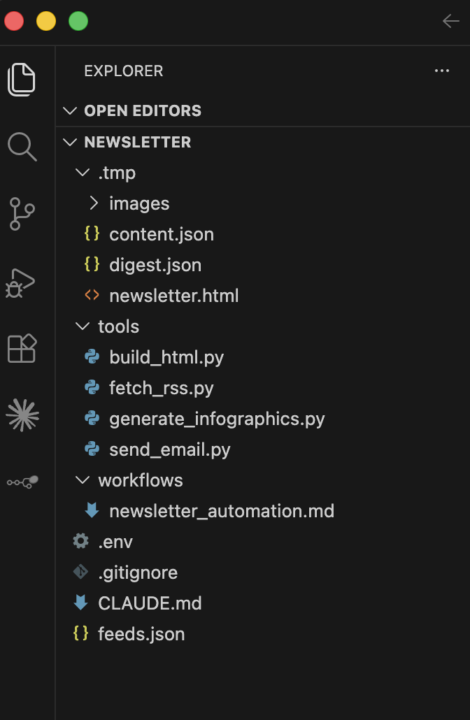
Built Newsletter Automation Day 1: built my first newsletter using Claude Code. Not a tutorial. Not a template. Just me figuring it out as I went. Along the way I learned how Claude Code actually works under the hood, what it takes to build a newsletter from scratch, and where my current process still has gaps. It wasn't perfect. It wasn't fast. But it worked, and I learned more in this one session than I would have from a week of just reading docs. More hands-on builds coming. Day 2 next.
2d •
Built a workflow that reads long contracts and answers questions on WhatsApp
Every procurement or contracting team has the same problem: someone has to sit down and read a 60-page tender or contract just to find one deadline, one clause, one number. That takes hours. And once it's read, the knowledge just disappears — filed away in a PDF nobody wants to reopen. Ask the same question three weeks later, and someone's re-reading the whole thing again. I built a workflow that fixes this. Upload the document, and it automatically: → Pulls out key details — deadlines, insurance requirements, compliance terms — into a tracker → Becomes something you can message on WhatsApp or Telegram → Ask it anything — "what's the insurance requirement?" — and it replies with the answer, cited to the exact section Here's the part that almost didn't work: early on, the system would confidently say "this information isn't in the document" — even when it clearly was. The document was being processed in a way that split important details apart, so the system genuinely couldn't find the full answer. Fixing that one thing took accuracy from unreliable to 100% correct on every question I tested. Now it's 30 seconds instead of 3 hours. No app, no dashboard. Just a message. Happy to walk through how it's built if anyone wants to see it — drop a comment.

0 likes • 2d
If this is something your team could use for tenders, contracts, or any long document you keep re-reading. I'd love to understand your use case first before anything else. Book a free discovery call and let's see if this is the right fit for you. 👉 https://topmate.io/divyanshubistudio
0 likes • 2d
Check the free template here : https://n8n.io/workflows/16798
12d •
Every n8n builder hits this problem. I just built the solution.
I just shipped my first n8n community node. I built it because workflows that ran perfectly on 10 items kept throwing API rate limit errors on 500. The only workaround most people know is the Wait node where you literally guess a delay and hope it's enough. So I built the Rate Limiter node to fix this properly. Here's how it works: 1️⃣ Check your API docs for the rate limit (Gemini 2.5 Flash = 10 req/min, Airtable = 5 req/sec) 2️⃣ Drop the Rate Limiter node before your API call or HTTP node 3️⃣ Set the exact number, requests per second or per minute 4️⃣ Run your workflow. The node automatically processes each item with the right delay in between, ensuring every single item goes through without hitting the API limit. No more guessing the delay time. Now live on n8n Cloud ✅ To install: Search "Rate Limiter" directly in your n8n canvas and drop it in. For more details, Here is the npm link 👇 https://www.npmjs.com/package/@divyanshu00

0 likes • 12d
@Frank van Bokhorst yes just search Rate Limiter in n8n canvas
0 likes • 12d
@Frank van Bokhorst Thank you🙌🏻
16d •
I Built an AI Assistant That Works While I Sleep (Using Hermes Agent)
Most AI tools stop working the moment you close the tab. Hermes Agent doesn't. I built a Personal AI Assistant that reads my emails, sorts them by urgency, and sends daily stock market updates to my WhatsApp — all automatically, without me touching anything. Here's why I chose Hermes Agent over everything else: 🧠 Persistent Memory Remembers every preference and pattern permanently. Gets smarter the longer it runs. Unlike ChatGPT — it never forgets you. ⚡ Works Without You Asking No prompting needed. Set it once — it runs on a schedule automatically. Every. Single. Day. 🔗 Connects to Real Tools Gmail. WhatsApp. Telegram. Stock APIs. Cron Jobs. All natively — zero complex setup. 🖥️ Computer Use Browses websites, clicks buttons, fills forms and scrapes data — just like a human using a browser. 💻 Start Local. Scale to Server. Start testing on your Mac using Hermes Desktop. Deploy to a server when ready — runs 24/7 even when your laptop is off. 🔄 Self Improving Skills Every task it completes gets saved as a reusable skill. It literally gets better at your work over time — automatically. Real use cases working right now: → Email triage — sorted by urgency to WhatsApp → Daily stock snapshot — Nifty, Sensex & Bitcoin at 9AM → Morning briefing — emails, tasks, calendar in one message → Competitor intelligence — weekly auto report → Meeting prep — auto briefing 30 mins before every call → Browser automation — forms, scraping, clicking automatically → Lead generation — finds and enriches contacts automatically ▶️ See it in action, live demo in the attached video Have questions about Hermes Agent or how to get started? Drop them below 👇
0 likes • 16d
If you want help setting up your own Personal AI Assistant using Hermes Agent, I'm offering a FREE Discovery Call on Topmate. In this call we'll cover: → Which use cases make sense for your business → How to connect Gmail, WhatsApp and other tools → How to set up your first cron automation → Whether to run it locally or deploy to a server No pitch. No pressure. Just a genuine conversation to help you get started. 🔗 Book your free slot here → https://topmate.io/divyanshubistudio/2095328
20d •
Hot take: n8n is the wrong tool for AI workflows in 2026
I know this might ruffle some feathers but hear me out. n8n is incredible — 400+ integrations, visual builder, self-hostable. For business ops it's genuinely unbeatable. But the moment you need: LLM calls running 30–120 seconds Auto retries when scraping fails Batch processing 100+ items Long-running agent pipelines It starts to struggle. That's where Trigger.dev comes in. I put together a full no-fluff comparison covering exactly when to use which — with a head to head, cost breakdown, and honest verdict. PDF in the comments. Would love to hear what the community is actually shipping with.
0 likes • 19d
@Reece Marcel for beginners, i would suggest to get start with n8n first
1-10 of 49

@divyanshu-gupta-6220
A space for creators, builders, and automation lovers. Learn how to combine AI + automation to create tools that save hours every day.
Active 1m ago
Joined Oct 14, 2025
Powered by