Activity
Mon
Wed
Fri
Sun
May
Jun
Jul
Aug
Sep
Oct
Nov
Dec
Jan
Feb
Mar
Apr
What is this?
Less
More
Memberships
Ep - reMarkable Tablet Support
808 members • Free
Learn Microsoft Fabric
16.6k members • Free
5 contributions to Ep - reMarkable Tablet Support

8h •
Macbook theft, need to reinstall Binder, how?
Because of macbook theft I need to reinstall my Binder program. Order number was #42397, how and where can I find a download for the program?
0
0

Nov '25 •
🙏🏾 A Saturday Morning Thank You
I woke up this Saturday morning just feeling grateful. Grateful for all of you who’ve been with us since 2017 — through the ups, the downs, and especially the years after the pandemic when we were just trying to find our footing again. We released products that had holes and flaws, and even today we’re still far from perfect. But you stayed. You believed in what we were building, even when it wasn’t polished. You didn’t bad-mouth us or walk away — you supported us, encouraged us, and gave us room to grow. I don’t take that lightly. From the bottom of my heart, thank you for being part of this journey and for helping us keep moving forward.
1 like • Nov '25
As a Binder user I say: keep up the good work and thank you!

Nov '25 •
CalSync Payments and Paper Pro developer mode
Hi all, do you have someone information about subscription model? It is one-time payment for permanent access? Or there are some quota for sync, or for other years planner creation? How it is with reMarkable Paper Pro -is it necessary to turn on developer mode? How is two way sync works? Thanks a lot R
1 like • Nov '25
Hi Rene, I am not a CalSync user yet, but yes, you do need developer mode for all stuff you put on your RMPP. It enables ssh access, the only way to communicate with the RMPP outside of the official RM software. I do use other products with my RMPP that make use of wifi sync, so I assume that CalSync should be able to. And to reassure you a bit: putting the RMPP in dev mode is not a big thing, and it has the added benefit (if you wish to do so) to put the RM beta software versions on your machine as well.
Oct '25 •
Making your own template?
Hi all, how many templates have you bought, and what is your preferred use case or workflow with them? I own a RMPP, use it for reading and annotating pdfs but mainly using a calendar for my weekly and daily stuff (including tasks). Per day I create an empty page in it to write my daily journal. I made my own screen files for sleep screen and starting screen, using photoshop-like software. Nice to add a personal touch to your Remarkable, right? I am very interested in your setups. Have a wonderful day!
0 likes • Nov '25
I am a business consultant in a government organisation, but mainly use my RMPP for personal stuff: e-reading books, annotating or viewing pdf's (with building plans for my new house, so these are images in pdf), keeping a diary which I like to write by hand, keeping my to do lists and calendar in good shape (for which I use a sync tool other than Calsync), and for keeping track of habits and random ideas, which I hand-sync to Devonthink 4.
Nov '25 •
🎉 Introducing Ep CalSync — New Update ver. 1.0.1
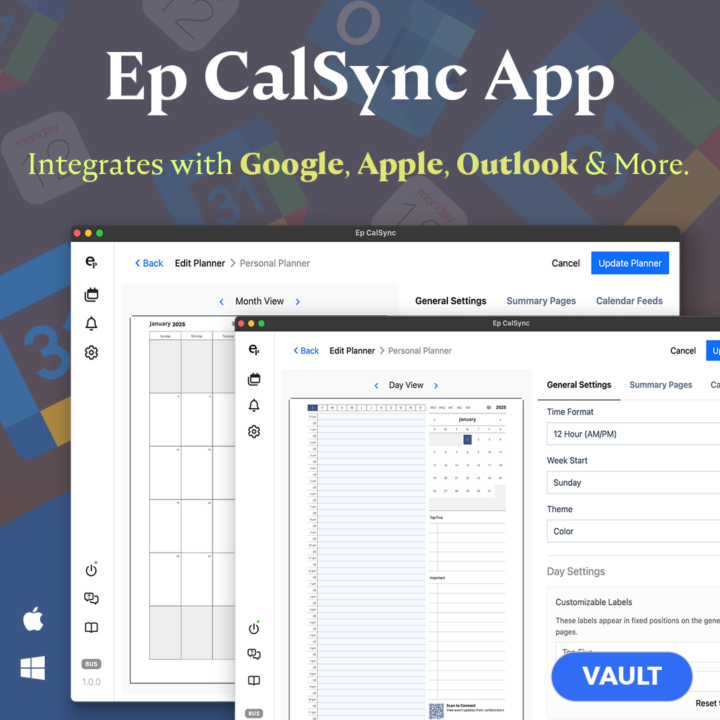
We’re excited to officially launch Ep CalSync, our brand-new desktop app that connects your external calendars directly to your reMarkable tablet. We've updated the pricing to offer a one time lifetime purchase if subscriptions is not your thing. With Ep CalSync, you can finally: 🗓️ Sync events seamlessly from Google, Apple, Outlook, or any iCal-compatible calendar. 📝 Annotate freely on your planner without losing your notes — CalSync keeps your handwritten edits safe while updating your events in the background. 📅 Choose your view: Day, Week, Month, and Year summary pages all included. ⚙️ Customize layouts and templates — pick from our growing template library to match your planning style. 💻 Local + Cloud options for storage and syncing. 🔒 No cloud lock-in: Your data stays securely on your computer unless you enable cloud backup. This is the first public release of Ep CalSync, and we’re thrilled to share it with our incredible community. Your feedback and encouragement have helped shape every part of this journey — from early testing to design to final release. To thank you for your support, we’re offering special introductory pricing available exclusively here for a limited time. 👉 Download & Learn More: MacOs: https://delivery.shopifyapps.com/-/11767a4e3fd20dc3/aada8d15fc008c2c Windows: https://delivery.shopifyapps.com/-/23c2921b4b9b3e19/d8e2a5c30a2bfb6a Thank you again for being part of the eInkPads family — this is just the beginning!
0 likes • Nov '25
Ah, funnily enough my comment on the difficulty of finding info on pricing has dissappeared from the forum (you actually have to download, install and run it before becoming aware of cost), but good news as well: the one time purchase has dropped dramatically (and rightly so, see Remarcal pricing). Also funny that a yearly subscription is now more expensive than the one-time, this is the earlier mentioned 'introductory pricing' I think. But thank you for reconsidering pricing!
1 like • Nov '25
Yes, correct, did not have to connect. And I understand things need to be set up for official release, no worries. Aha, the vault being a single device plan escaped my attention, this explains it. Anyways, lots of success.
1-5 of 5

@derek-verweij-9822
Business Consultant at government organisation, present on LinkedIn.
Active 8h ago
Joined Sep 20, 2025
Powered by