Activity
Mon
Wed
Fri
Sun
Nov
Dec
Jan
Feb
Mar
Apr
May
Jun
Jul
Aug
Sep
What is this?
Less
More
Atlassian Everything
314
Free
45 contributions to Atlassian Everything

24d •
Usage Based Pricing
Everyone using Automation Rules and Rovo is going to be impacted, let's talk about it! https://www.skool.com/live/nPHB2P6gbjy

1 like • 23d
Good conversation today, sorry if I got a bit too ranty
Jul 22 •
New Jira Reports - Let's Talk about it
Jira has some new reporting capabilities and we are going to review it and test them out. Join us now! https://www.skool.com/live/nPHB2P6gbjy
0 likes • Jul 22
Great chat as always!
Jun 24 •
Join us LIVE!! Now!!
https://www.skool.com/live/nPHB2P6gbjy Also, we are hosting a FREE 2 day in-person even in Dallas on Oct 27-28. You should register! https://ace.atlassian.com/events/details/atlassian-the-jira-life-presents-build-it-together-2026-bit-2026-dallas-in-person-only/
1 like • Jun 25
@Alex Ortiz and @Josh Golosinskiy - It turns out there was an automation incident that Atlassian confirmed through the support ticket (but not on Statuspage) :P
May 29 •
You know what really grinds my gears...
The 'c' to create a Jira issue shortcut. I personally hate how it can be triggered in the weirdest places, where I would almost never create an issue (like setting a field context with an issue type and a project that both have the letter c in them). I know keyboard shortcuts can be disabled per user, but it's only that particular shortcut that grinds my gears. What's your Jira/Confluence pet peeve?
0
0


May 19 •
Need Some Votes for an Assets Dashboard Suggestion
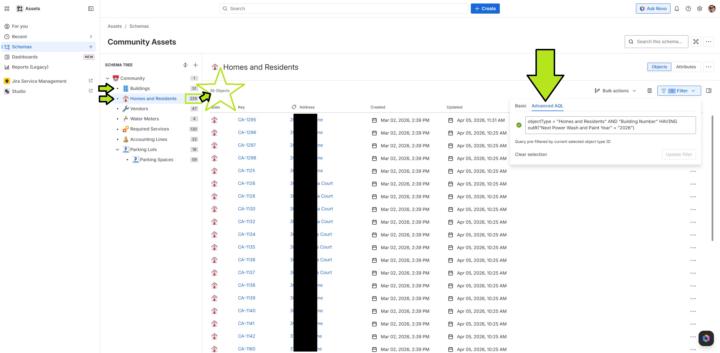
Hello everyone, May I have your vote? Link to the suggestion: https://jira.atlassian.com/browse/JSDCLOUD-18979 My implementation and description of the issue as it relates to it: Right now, I have to use this Advanced AQL and then format the columns correctly, just to see the information stored in attributes under objects from one object type that has an outbound reference to objects from another object type in the same schema: objectType = "Homes and Residents" AND "Building Number" HAVING outR("Next Power Wash and Paint Year" = "2026") I want to use the above AQL in Assets Dashboards so non-technical users can repetitively observe the correlation of this information between two objects without constant technical intervention. Further description of the setup: Currently, in the Assets schema tree, I have two particular object types "Buildings" and "Homes and Residents." In my community there are multiple homes or units in each building. Each "Buildings" object has two particular attributes named, "Building Number" and "Next Power Wash and Paint Year." "Homes and Residents" has a majority of home information to include the attribute "Building Number", which is the reference to a unique object from the "Buildings" object type. Do I have your vote yet? What do you think the chances are of Atlassian implementing this anytime soon? Thanks all!
1 like • May 19
Upvoted!
0 likes • May 19
No problem! I created an upvote channel in our Microsoft Teams so I can get upvotes from my colleagues on things that vex me :)
1-10 of 45

@chris-rogers-3182
Atlassian Certified Administration Expert and overall Atlassian enthusiast
Active 1d ago
Joined Nov 5, 2025
Edmonton, Alberta, Canada
Powered by