Activity
Mon
Wed
Fri
Sun
Oct
Nov
Dec
Jan
Feb
Mar
Apr
May
Jun
Jul
Aug
Sep
What is this?
Less
More
Agent Zero
2.8k members • Free
76 contributions to Agent Zero

Mar 25 •
🧩 Plugin System LIVE in Testing. Try it today!
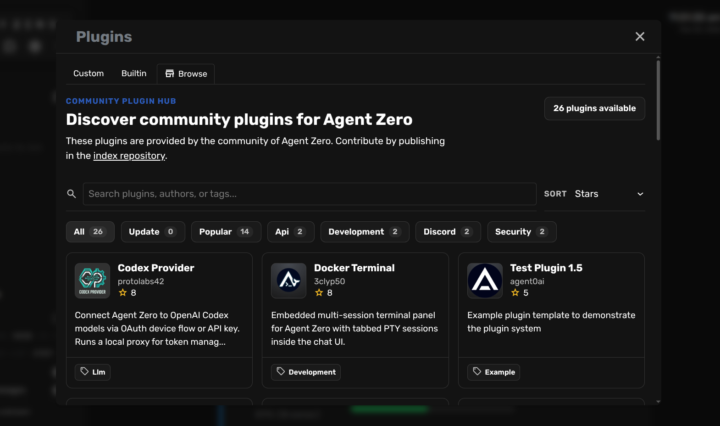
Hey everyone! Big update: Agent Zero Plugin System is now available in the testing Docker image! Install community plugins, update them, or create your own. Thanks to all the devs that started building plugins even before its release. How to Run the Testing Branch 1. Go to https://agent-zero.ai and copy the install script 2. Open your terminal (Windows PowerShell, Mac Terminal, or Linux) 3. Paste and run the script. A0 will download in about 3-4 minutes 4. While it downloads, open your preferred AI provider dashboard (OpenRouter, OpenAI, Anthropic, Google, etc.) and create a new API key --- 🧩 How to Use the Plugin Hub 1. Click the puzzle piece icon in the left sidebar 2. Click Browse to explore the A0 Community Plugin Hub 3. Install, uninstall, and update plugins with one click! 📂 Our Plugin Index listing is on GitHub, and provides additional guidance on contribution: https://github.com/agent0ai/a0-plugins --- ⚙️ First-Time Setup - When download completes, your terminal will show a browser link - open it - You'll see a "Missing LLM API Key" banner in the A0 UI - Click "Configure model settings", and paste your API key there - Pick your preferred models in model config for Chat and Utility tasks --- 🔄 Updating? Use Backup & Restore! Old A0 → Settings → Backup & Restore → Create Backup New A0 → Settings → Backup & Restore → Restore Backup → Upload zip All your settings & API keys migrate instantly. --- 📱 Connect A0 to Your Phone - Settings → External Services → Click "Flare Tunnel" - Click "Create Tunnel" - Scan the QR code with your phone - Access your Agent Zero instance from anywhere! --- 🛠️ Create Your Own Plugins Want to build and contribute? Just ask Agent Zero about its "plugin skills" - it knows exactly how to guide you. Or check the internal docs. Let's see what the community builds! Share your experiments in the Skool or Discord communities of A0. See you in today's Community Call, at 3PM UTC,

3 likes • Mar 25
[attachment]

Jan 6 •
Agent0: SwarmOS edition "Your personal AI, but it can securely collaborate with your friends' AIs?"
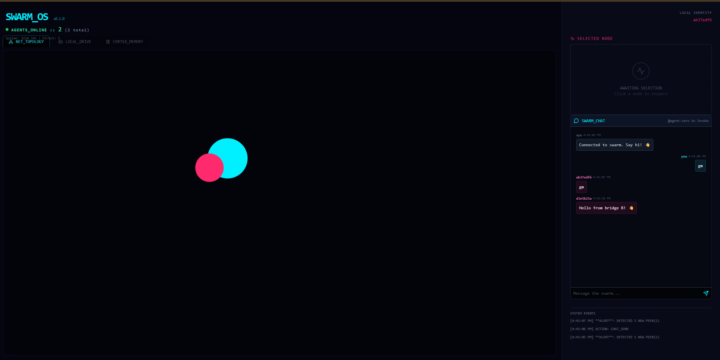
I really think I found something interesting for the future of Agent0, so in this thread I share some of the chaos. Started one way, switching Agent0, Pear Runtime and Hyperswarm = <3 Pivoting from "Fully autonomous machine-control swarm" idea to A private, encrypted multiplayer mode for Agent Zero idea The Pitch - You run your agent locally (like always) - You join a topic/swarm with people you trust - Your agents share research, split tasks, pool knowledge - Everything stays off corporate servers ______________________________ Current state ( older, going towards Fully autonomous machine-control swarm ) Agent Zero: SwarmOS Edition A decentralized, serverless agent swarm powered by Agent0, Pear Runtime and Hyperswarm. This branch extends Agent Zero with a P2P sidecar, enabling autonomous multi-agent collaboration, shared memory, distributed storage, and a real-time visual dashboard ("SwarmOS"). 🌟 Key Features 1. Decentralized Discovery (Hypermind) - Agents automatically discover each other via the Hyperswarm DHT. - Zero Configuration: No central server or signaling server required. - Self-Healing: Peers automatically re-connect if the network drops. 2. SwarmOS Dashboard A React-based "Mission Control" for your agent. - Live Topology: Visualize the swarm network graph in real-time. - Data Layer UI:Local Drive: Browse files stored in the agent's Hyperdrive.Cortex Memory: Watch the agent's "thoughts" stream live from Hypercore. - A2UI: Render custom JSON interfaces sent by other agents. 3. Distributed Data Layer - Shared Memory (Hypercore): An append-only log for agent thoughts and logs. - Distributed File System (Hyperdrive): P2P file storage for sharing artifacts (images, code). - Identity Persistence: Ed25519 key pairs managed via identity.json.
1 like • Mar 18
Super friggin cool! Nice work, @Proto Labs !!

Mar 17 •
A0 Docekr Ports or LiteLLM Issues?
Hello and Good Afternoon Everyone, Please forgive my wall of text. I will state that I'm not 100% familiar with docker, as I've only used it on my desktop and not in the wild. Also, when discussing technicals on AI products I do believe that "context" is important for transparency. I have installed A0 on my Debian VPS. I followed the instructions found here -> https://www.agent-zero.ai/p/docs/get-started/#installation Docker components would not install as stated. Had to first add docker source and key, then I was able to install. Followed everything else; was able to pull image and start with persistance just fine. For added layer of security I have installed Tailscale - private vpn from my home -> A0 host (for free). I was able to get to the WebUI just fine by exposing port 50080 to tailscale (tailscale serve) which gives me an https URL only available on the tailscale network. Now for my nftables firewall - I am only allowing all connections through tailscale inteface; everything else gets denied by policy. I can ssh in, ping out, etc. Secure two-way communitcation established at the host/network level. After I installed A0 and able to login to the WebUI - I went to settings as instructed to set API keys. I found the area for Embedding Model. I set my model provider (openrouter), set my model (as suggested in documentation openai/text-embedding-3-small), set my API key, and set the embedding model base URL. Click "Save". I go to open "new chat' and type 'hello' -- starts "Initializing memory database...". It continues to do this for some time. I look in the logs (docker logs --tail 100 -f agent-zero) and I see this: WARNING [huggingface_hub.utils._http] Retrying in 8s [Retry 5/5]. '(MaxRetryError('HTTPSConnectionPool(host=\'huggingface.co\', port=443): Max retries exceeded with url: /sentence-transformers/all-MiniLM-L6-v2/resolve/main/tokenizer_config.json (Caused by NameResolutionError("HTTPSConnection(host=\'huggingface.co\', port=443): Failed to resolve \'huggingface.co\' ([Errno -3] Temporary failure in name resolution)"))'), '(Request ID: f16d5bf3-43e9-493a-803a-d30b16d0f987)')' thrown while requesting HEAD https://huggingface.co/sentence-transformers/all-MiniLM-L6-v2/resolve/main/tokenizer_config.json
0 likes • Mar 18
@Martin M Glad you were able to maneuver over the hurdle and stick the landing! 🤘🏻
Mar 13 •
One-Line Installs are here! ⚡ (+ A sneak peek at what's next)
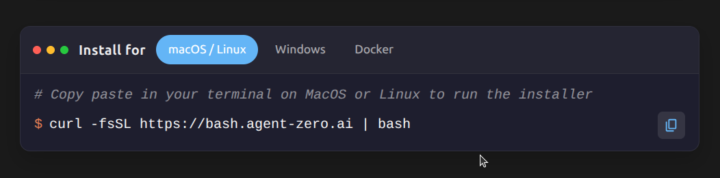
Hey everyone, Great news for anyone setting up a new instance or onboarding friends and clients to Agent Zero. We have officially launched our one-line install scripts! You no longer need to manually clone the repo. Just paste the command for your OS into your terminal: - Mac/Linux: curl -fsSL https://bash.agent-zero.ai | bash - Windows: irm https://ps.agent-zero.ai | iex - Docker: docker run -p 80:80 agent0ai/agent-zero Why is this important right now? We are currently polishing the Plugin System and the Community Plugin Marketplace. Very soon, you will be able to extend Agent Zero's capabilities by installing community-made plugins directly from the UI with a single click. Let us know how the new install scripts work for you!
2 likes • Mar 13
@Noga Ja You can still use docker pull. Certainly not being forced to use it. A one liner install is something the community has wanted for a long time.

Mar 5 •
Why we are exactly in the right place at the right time 🚀
I highly recommend giving this video a watch. The stats he shares are mind-blowing: Big companies wasted $285 billion on AI last year simply because they don't know how to actually build with it. The biggest takeaway? Only 0.05% of the world actually knows how to use AI to produce real results—like asking AI how to build something and having it do the heavy lifting for you. This video perfectly validates everything we're doing here with Agent Zero. The world is splitting into "consumers" and "producers," and by learning to build autonomous agents, we are positioning ourselves in that top 0.05% of producers. I haven't fully mastered my A0 setup yet, but seeing this data makes the learning curve totally worth it. Keep building. (P.S. Please excuse the language in the video's thumbnail. I definitely don't endorse that kind of thing, but the data inside was just too relevant to our community not to share!)
1 like • Mar 10
@Daniel ITwizard Fear of missing out
1-10 of 76

Active 3d ago
Joined Sep 1, 2024
Catchin' Tags!
Powered by