Activity
Mon
Wed
Fri
Sun
Apr
May
Jun
Jul
Aug
Sep
Oct
Nov
Dec
Jan
Feb
Mar
What is this?
Less
More
Memberships
Automated Marketer
3.4k members • Free
Google Ads Dropshipping (Free)
5.2k members • Free
Storebuild.ai - By Zendrop
2.2k members • Free
1C
1% Cashflow Blueprint.
12 members • Free
Automations Hub®
107 members • Free
Strength Purpose Legacy
47 members • Free
AI Bits and Pieces
579 members • Free
The RoboNuggets Network (free)
37.2k members • Free
eCom Messiah
7.6k members • Free
11 contributions to AI Automation First Client

Dec '25 •
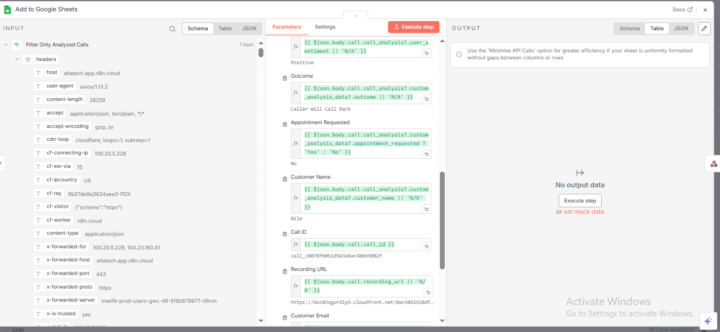
Retell AI to Google Sheets Automation with n8n
For this project, I built a complete automation that connects Retell AI call data to Google Sheets using n8n. The system receives real-time call events via webhook, filters only fully analyzed calls, and automatically logs structured call details such as caller info, call outcome, sentiment, appointment requests, recording URLs, and transcripts. This removes manual tracking and gives businesses a clear view of AI call performance in one place. The workflow also returns success or ignored responses to ensure stability. This solution is ideal for AI receptionists, AI calling systems, agencies, and businesses that need reliable call tracking, reporting, and insights without using a full CRM.

0 likes • Dec '25
@Ruby Chloe This is clean, Retell AI webhook → n8n → Google Sheets for structured call logs is a smart, low-cost win. Filtering only analyzed calls + returning responses for stability? Solid touches. Perfect for agencies running AI callers without wanting full CRM overhead. What’s the average call volume you’re seeing on setups like this?

Dec '25 •
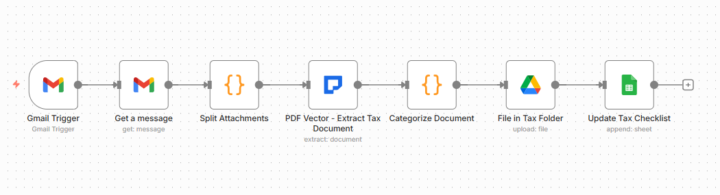
Accountant Client Saves 12 Hours Weekly With Tax Document Workflow 🔥
Accountant friend drowning in tax documents every January. Asked if automation could help organize client paperwork. Built tax document organizer using PDF Vector. Changed their tax season. THE CLIENT PROBLEM: CPA with 45 clients. Tax season: Clients email W-2s, 1099s, receipts. Everything arrives in inbox chaos. Manual process: Download documents. Read to identify form type. Create folders. File by category. Update tracking spreadsheet. 12-15 hours weekly just organizing. Not even doing tax prep yet. WHAT I BUILT: Workflow monitoring email. Tax document arrives, PDF Vector extracts form type, tax year, taxpayer info, amounts. Categorizes automatically. Files to Drive folders. Updates spreadsheet. Email → PDF Vector Extract → Categorize → Drive → Checklist. Seven nodes powered by PDF Vector extraction. WHY PDF VECTOR: Handles any tax form format. W-2 from employer A different than employer B. PDF Vector extracts consistently. Extracts structured data: Form type, tax year, taxpayer name/SSN, income amounts, deduction amounts, totals. Schema ensures all required fields captured. Perfect for tax accuracy. THE FIRST DOCUMENT: Tested with actual W-2. 30 seconds later: Form identified. Tax year extracted. Taxpayer captured. Amounts extracted. Filed correctly. Spreadsheet updated. Accountant: "It just read the entire W-2 and organized everything? Incredible." PROCESSING MULTIPLE: Client sends W-2, 1099-INT, mortgage statement. Workflow splits attachments. Processes each separately. All three organized in 90 seconds. THE ACCOUNTANT IMPACT: 45 clients × 5 documents = 225 documents. Before: 12-15 hours weekly organizing. After: 30 minutes reviewing folders. Saves 11.5 hours weekly during tax season. 46 hours monthly. Accountant does billable tax prep instead of filing. Testimonial: "Paid for itself first week. Can take more clients without hiring help." THE EXPANSION: Started with individual tax clients. Accountant wants small business version for quarterly documents. Same PDF Vector approach. Additional revenue.
1 like • Dec '25
@Duy Bui this is fire Saving a CPA 12 hours/week during tax season with PDF Vector extraction is huge turning chaos into 30-min reviews. Love how one solid workflow unlocks referrals + upsells (small biz quarterly + invoicing next). Seasonal pain points are gold for quick wins.
Dec '25 •
Built First Workflow In 43 Minutes (Client Watched Me Do It) 🔥
"Can you show me how this would work with our actual forms?" Instead of saying "I'll build a demo and show you next week," I said "Let me build it right now while you watch." Game changer. THE SITUATION: Medical clinic, patient intake forms. 25 forms daily, 15 minutes each to manually enter into EHR. Discovery call going well. They asked for demo. I opened my screen share. "Send me one of your actual forms. I'll build the automation live." THE BUILD (43 MINUTES): Minute 1-5: They emailed sample form. I uploaded to Google Drive. Minute 6-15: Built n8n workflow - Drive trigger → PDF Vector parse → Review extracted text Minute 16-30: Created JSON schema for their specific fields (patient name, DOB, insurance, medical history) Minute 31-38: Added Extract Structured Document node, tested extraction Minute 39-43: Showed how it would post to their EHR via API (didn't actually connect, just showed concept) THEIR REACTION: "You just built that? In less than an hour? With our actual form?" They saw their data extracted perfectly. Saw their field names in the schema. Saw it working. Signed $1,500 contract before call ended. THE TECHNICAL APPROACH: PDF Vector handles messy intake forms (checkboxes, handwriting, tables). JSON Schema lets you define exact fields you need. n8n connects everything. Template pattern in n8n here THE LESSON: Demos beat proposals. Live builds beat recorded demos. Their documents beat generic examples. When prospect asks "Can this work for us?" the answer is "Let me show you right now." Most powerful sales tool: Build while they watch. Ready to try live demos on your next call?
2 likes • Dec '25
@Duy Bui This is such a power move Live-building with their data removes all doubt no hypotheticals, no “we’ll see.”43 minutes to signed contract says everything about how effective real-time demos are. Big lesson here for anyone selling automation
Nov '25 •
Why Document Automation Is The PERFECT First Client Service 🔥
Everyone told me to start with chatbots or social media agents. Here's why I ignored them and went straight to document processing. When you're starting out, the hardest question is: WHAT SERVICE SHOULD I OFFER? There are hundreds of automation possibilities. It's paralyzing. Then I saw a comment in a business group: "Spending 12 hours a week manually typing invoices into QuickBooks." That changed everything. WHY DOCUMENT AUTOMATION IS YOUR PERFECT FIRST SERVICE UNIVERSAL PAIN POINT - Every business has documents - Invoices to process - Forms to extract data from - Contracts to analyze You don't need to find a specific niche. Document problems exist everywhere. CLEAR, MEASURABLE ROI - Easy to sell - Client spends 10 hours monthly on manual entry - Your automation saves 9 hours - That's $450/month saved at $50/hour - Your $1,200 setup pays for itself in 3 months Try explaining chatbot ROI to a plumber. Now try explaining "you'll save 8 hours per month on invoice entry." Which one closes faster? NOT TRENDY - Less competition - Everyone's chasing AI chatbot clients - Document automation feels "boring" - That's exactly why it's PERFECT NO CODING REQUIRED - You can start today - Use Make.com or Zapier (drag and drop) - PDF Vector handles the parsing - Connect to Google Sheets or QuickBooks THE NUMBERS THAT MATTER Found my first invoice processing client in week 2 Closed the deal in week 3 Charged $1,200 setup fee Built the workflow in 4 hours using Make plus PDF Vector Client saves 10 hours monthly They've renewed 8 months at $200/month maintenance That's $2,800 total from one client I found in a Facebook group. COMPARE TO OTHER FIRST SERVICES Chatbots require ongoing training. Hard to prove ROI. Social media automation is crowded. Race to the bottom. Document automation? Clear problem. Clear solution. Clear value. Clients renew because the automation KEEPS saving them time. THE TOOL STACK Make.com for the workflow (visual, no coding) PDF Vector for document parsing (invoices, receipts, forms)
5 likes • Nov '25
100%
Nov '25 •
What Businesses Get Wrong About Client Experience
It’s not about fancy portals or colorful dashboards. It’s about removing friction from every client touchpoint. If clients ever say, I didn’t get that email or I can’t log in, you have a system problem — not a communication problem. How do you currently make your clients feel seen and supported?
1 like • Nov '25
@Ruby Chloe So true, client experience isn’t about flashy tools, it’s about clarity and consistency. When systems run smoothly, clients feel supported without even noticing the tech behind it. I’ve learned that eliminating small friction points often builds more trust than any big “wow” feature ever could.
1-10 of 11

@chad-samuel-1098
I help wholesalers close more deals by automating follow-ups, organizing leads, and setting up landing pages that convert sellers into contracts.
Active 3h ago
Joined Oct 8, 2025