Activity
Mon
Wed
Fri
Sun
Jun
Jul
Aug
Sep
Oct
Nov
Dec
Jan
Feb
Mar
Apr
May
What is this?
Less
More
Memberships
AI Money Lab
73.2k members • Free
AI n8n Automation Collective
2.8k members • Free
AI Video Mastery
8.7k members • $5/month
AI Automation Network
4.8k members • Free
WotAI
762 members • Free
eCom Messiah
7.6k members • $1/month
Brendan's AI Community
24.7k members • Free
Dopamine Digital
6.7k members • Free
Ai Automation Vault
15.2k members • Free
15 contributions to AI Automation First Client

Jan 5 •
AI-Powered Email Classification & Auto-Labeling with n8n
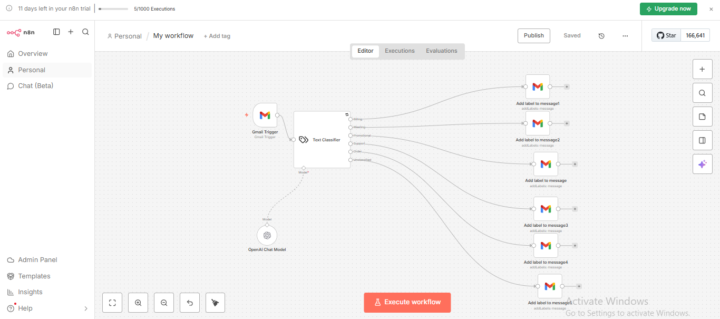
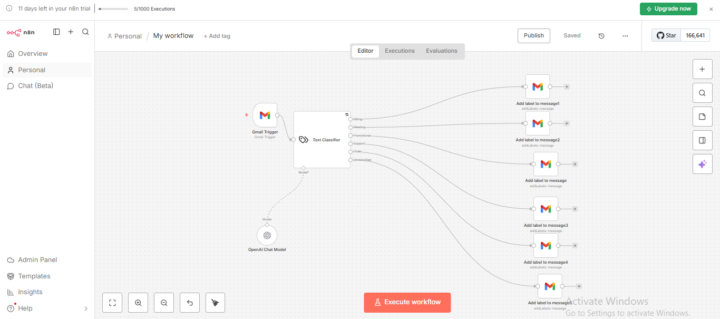
I built an automated email classification workflow using n8n that intelligently labels incoming emails in Gmail based on their category — without any manual sorting. 🔧 What I Did - Set up a Gmail Trigger to listen for new incoming emails - Combined the email subject + body into a clean format for analysis - Used an AI Text Classifier (OpenAI) to categorize each email - Automatically applied Gmail labels based on the classification 📂 Email Categories Covered - Order / Purchase confirmations - Customer support & help requests - Newsletters - Marketing & promotional emails - Meeting invitations - Payment provider notifications - Uncategorized (fallback) 🧠 How It Works (High Level) 1. A new email arrives in Gmail 2. n8n reads the subject and body 3. AI determines the email category 4. n8n applies the correct Gmail label automatically 5. Inbox stays organized — in real time 💼 How This Helps a Business ✅ Key Benefits - Zero manual inbox sorting - Faster response times for support and sales emails - Never miss important messages (payments, orders, meetings) - Clean, organized inbox for teams - Scales effortlessly as email volume grows 📈 Why Businesses Need This - Teams waste hours every week manually triaging emails - Important emails get buried under newsletters and promotions - Support requests need immediate visibility - Automation reduces human error and improves productivity This workflow turns Gmail into a smart, self-organizing inbox that works 24/7. 🔁 Real-World Use Cases - Auto-route support emails to a helpdesk - Flag urgent payment or billing issues - Separate newsletters from actionable emails - Trigger follow-up workflows (CRM, Slack, databases) 🛠️ Built With - n8n - Gmail Trigger & Gmail nodes - AI text classification - Smart routing & labeling logic
0
0
Jan 5 •
AI-Powered Email Classification & Auto-Labeling with n8n
I built an automated email classification workflow using n8n that intelligently labels incoming emails in Gmail based on their category — without any manual sorting. 🔧 What I Did - Set up a Gmail Trigger to listen for new incoming emails - Combined the email subject + body into a clean format for analysis - Used an AI Text Classifier (OpenAI) to categorize each email - Automatically applied Gmail labels based on the classification 📂 Email Categories Covered - Order / Purchase confirmations - Customer support & help requests - Newsletters - Marketing & promotional emails - Meeting invitations - Payment provider notifications - Uncategorized (fallback) 🧠 How It Works (High Level) 1. A new email arrives in Gmail 2. n8n reads the subject and body 3. AI determines the email category 4. n8n applies the correct Gmail label automatically 5. Inbox stays organized — in real time 💼 How This Helps a Business ✅ Key Benefits - Zero manual inbox sorting - Faster response times for support and sales emails - Never miss important messages (payments, orders, meetings) - Clean, organized inbox for teams - Scales effortlessly as email volume grows 📈 Why Businesses Need This - Teams waste hours every week manually triaging emails - Important emails get buried under newsletters and promotions - Support requests need immediate visibility - Automation reduces human error and improves productivity This workflow turns Gmail into a smart, self-organizing inbox that works 24/7. 🔁 Real-World Use Cases - Auto-route support emails to a helpdesk - Flag urgent payment or billing issues - Separate newsletters from actionable emails - Trigger follow-up workflows (CRM, Slack, databases) 🛠️ Built With - n8n - Gmail Trigger & Gmail nodes - AI text classification - Smart routing & labeling logic
0
0
Dec '25 •
Why Most n8n & GoHighLevel Automations Fail (Quietly)
A hard truth I see over and over with n8n and GoHighLevel setups 👇 The tools aren’t the problem.The thinking behind the automation is. Many businesses jump straight into:• building workflows• connecting APIs• adding AI• stacking triggers But they skip the most important step: process clarity. Automation should come after you clearly answer:– What problem are we solving?– Who touches this process today?– Where do things usually break?– What decision should the system make vs a human? In n8n, powerful workflows fail when logic isn’t structured.In GoHighLevel, funnels fail when CRM stages don’t reflect real customer behavior. Automation doesn’t fix chaos.It amplifies it. When done right, though:✔ n8n becomes your backend brain (logic, data, integrations)✔ GoHighLevel becomes your front-office system (leads, conversations, follow-ups)✔ Your team stops firefighting✔ Your customers feel consistency Quick question for founders, agencies, and operators here 👇What part of your automation or CRM setup currently feels confusing, fragile, or manual? (If you answer honestly, you’ll already know what needs fixing.) #n8n #GoHighLevel #Automation #CRM #BusinessSystems #AIWorkflows #Operations
2
0
Dec '25 •
Retell AI to Google Sheets Automation with n8n
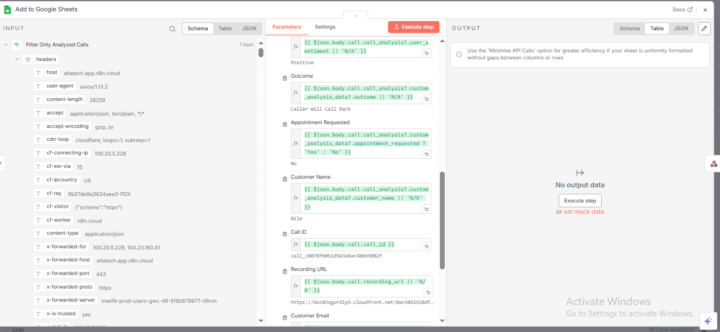
For this project, I built a complete automation that connects Retell AI call data to Google Sheets using n8n. The system receives real-time call events via webhook, filters only fully analyzed calls, and automatically logs structured call details such as caller info, call outcome, sentiment, appointment requests, recording URLs, and transcripts. This removes manual tracking and gives businesses a clear view of AI call performance in one place. The workflow also returns success or ignored responses to ensure stability. This solution is ideal for AI receptionists, AI calling systems, agencies, and businesses that need reliable call tracking, reporting, and insights without using a full CRM.
Nov '25 •
What Businesses Get Wrong About Client Experience
It’s not about fancy portals or colorful dashboards. It’s about removing friction from every client touchpoint. If clients ever say, I didn’t get that email or I can’t log in, you have a system problem — not a communication problem. How do you currently make your clients feel seen and supported?
1-10 of 15

@ruby-chloe-1257
Hi, I’m A systems builder & automation expert trusted by growing teams, agencies, & entrepreneurs. I specialize in CRM setup that drives real growth
Active 125d ago
Joined Oct 23, 2025