Activity
Mon
Wed
Fri
Sun
Aug
Sep
Oct
Nov
Dec
Jan
Feb
Mar
Apr
May
Jun
What is this?
Less
More
Memberships
AI Avengers Lab
2.4k members • Free
Automated Marketer
4.3k members • Free
Google Ads Dropshipping (Free)
7.1k members • Free
Storebuild.ai - By Zendrop
4.2k members • Free
1C
1% Cashflow Blueprint.
12 members • Free
Automations Hub®
106 members • Free
Strength Purpose Legacy
46 members • Free
AI Bits and Pieces
796 members • Free
The RoboNuggets Network (free)
54.2k members • Free
310 contributions to AI Automation Society

2d •
The right mindset shift that makes GHL AI Receptionist actually work for clients
After building AI receptionist systems for service businesses, I noticed something. The technology isn't the hard part. The mindset is. Most business owners hear "AI receptionist" and their first thought is: "Will it sound robotic?" "What if it says the wrong thing?" "My customers want to talk to a real person." And that resistance kills the conversation before it starts. The shift that works: Stop selling the AI. Start selling the outcome. The right conversation isn't: "I want to set up an AI that answers your calls." It's: "Right now, what happens when a customer calls you at 9PM on a Friday?" That question does the work. Because the business owner already knows the answer, voicemail, missed opportunity, customer calls the competitor. Once they say it out loud, the solution sells itself. GoHighLevel makes this even easier because everything lives in one place, the AI, the calendar, the CRM, the follow-up workflows. There's nothing to stitch together. The business owner doesn't need to understand the technology. They just need to see what happens when nobody answers, and understand that it doesn't have to be that way. That's the mindset shift. Sell the missed call. Not the AI. What objections are you running into when pitching AI receptionist systems to clients?
0 likes • 2d
@Thanh Dinh That's a really important point. I position it as an extension of the team, not a replacement. The goal is to capture the calls they're already missing, answer routine questions, qualify leads, and seamlessly hand off anything outside its scope. Showing those guardrails early builds trust much faster than talking about AI capabilities.
1 like • 2d
@Daniela Castillo Exactly. Once the business owner clearly sees the problem, missed calls, slow responses, lost bookings, the conversation naturally shifts to finding the right solution instead of questioning the technology.

2d •
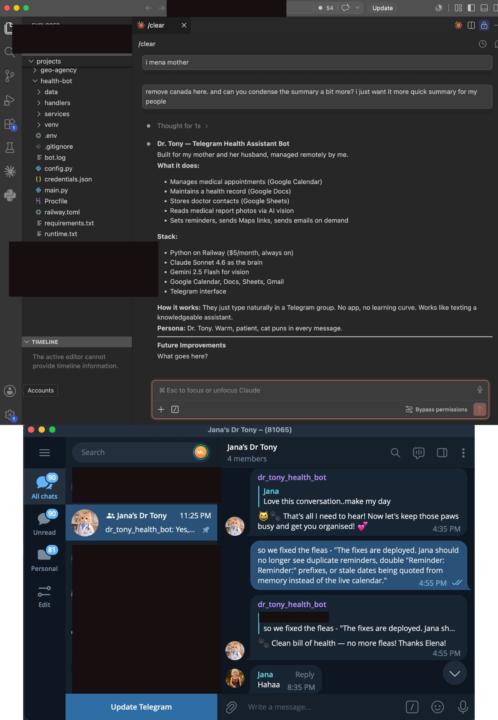
My first automation/bot delivery - Health Bot for my elderly parents
Hi, I wanted to share the first automation I built with Claude Code and VS Code. After my parents’ heart surgery, the number of doctor appointments, medications, and admin tasks became overwhelming. I built this to help them stay organised. Have a look. The explanation is in the image below. Runs in real time/ cat personality language through Telegram. The bot works, but it’s been a real learning experience. It kept running into memory issues. I’d fix one thing, then another would appear. Recently, instead of patching problems one by one, I had Claude review the entire codebase and optimise it properly. It’s now a working project running through Claude Code, VS Code, and Railway. I’ve asked a few friends whether they’d find something like this useful, and the answer has always been yes. What I’ve realised, though, is that building and tailoring these kinds of automations takes a lot of time. My takeaway: the people who benefit most from custom AI systems will likely be businesses or clients with budgets that match the time it takes to build them. That said, I’m grateful to have learned the skills to build tools like this for myself and my family. #AISOS
1 like • 2d
@Elle Lp This is such a meaningful first project. Building something that genuinely improves your parents' day-to-day life is an incredible use of AI. I also like your takeaway, custom AI systems create the most value when they solve real problems, and that's exactly what you've done here. Great work, and wishing your parents continued good health.

2d •
How I make narrated videos for $0 — one command, fully automated
A few weeks back I went looking for a way to pump out clean, narrated videos — explainers, case studies, the kind of thing you post to actually get noticed. Every option said the same thing: $30–90 a month. Synthesia, HeyGen, Pictory… great tools, but as a solo freelancer I wasn't about to bleed a subscription before I'd made a single video. So I did the stubborn thing. I built my own one command tool. I type a topic, walk away, and come back to a finished MP4 + thumbnail + YouTube title and description. No timeline, no editing, no manual steps. Here's the part that still makes me grin — the entire stack is free: 🔎 Research → DuckDuckGo (no API key) ✍️ Script → AI writes the narration (cents, not dollars) 🎙️ Voiceover → edge-tts, Microsoft's neural voices, completely free 🎬 Footage → Pexels stock library 🧑💼 Avatar intro → rendered once, then cached and reused at $0 🖥️ Render → Remotion + ffmpeg, both open source The magic isn't any single tool — it's that every paid service is optional and swappable. If I ever want a premium cloned voice, I plug it in. Until then, the free version ships real, finished videos. I've already used it for a client case-study video. Cost to produce: $0. The lesson I keep relearning: the subscription is usually optional if you're willing to wire the pieces together yourself. 🛠️ Anyone else here building their own tools instead of renting them? Drop what you've built 👇 #BuildInPublic #Automation #AIVideo #NoCode #FreeTools

6 likes • 2d
@Aamir Mustafa Love this mindset. Too many people assume they need expensive subscriptions before they can start. Building a modular stack with interchangeable components gives you far more flexibility and keeps costs low while you validate the idea. Nice build—thanks for sharing it!

3d •
How do you translate AI skills into a successful business model?
Hey everyone! Trying to learn more on the business side of running an AI Consulting agency or just independently consulting. I’ve been experimenting and building with AI for a while now (although new to this community!) and have 12+ years of systems architecture and engineering experience. What I don’t have is the sales experience or deep understanding of how to form relationships, get clients, and grow the business side of what I’m trying to build! Would appreciate any advice on how people in this community who have experience with landing gigs, clients, or running successful businesses go about getting leads, developing client relationships, and/or any workflows you’ve developed to help automate/increase your productivity in doing so!
0 likes • 2d
@Joey Lehning With your technical background, you're already ahead on the hard part. The biggest shift is to stop selling AI and start solving expensive business problems. Focus on one niche, build a few repeatable solutions, share case studies, and let the results become your best marketing. The relationships and clients will follow.

💎
⭐
3d •
🚀New Video: Stanford's Method Turns Claude Into a PHD Level Research Team
Stanford's STORM research method runs a topic through five different expert perspectives instead of a single prompt, so the blind spots one angle misses get caught by another. I turned it into a free Claude skill that spins up a practitioner, academic, skeptic, economist, and historian, maps where they disagree, then verifies every source before handing you a clean HTML briefing. I also put it head to head against Claude Code's built-in Deep Research, and walk through exactly how to install it and tweak the lenses for your own work.
3 likes • 3d
@Nate HerkThis is a brilliant approach. Looking at a problem through multiple expert lenses is a huge upgrade over single-prompt research. Excited to see how it compares with Claude's built-in Deep Research, thanks for putting this together!
1-10 of 310

@chad-samuel-1098
I help service businesses never miss a lead
using AI receptionists & automation.
HVAC | Plumbing | Dental | DM me "DEMO"
Active 14h ago
Joined Sep 8, 2025
Powered by