
Write something
Pinned

7h •
This Is What Commitment Actually Looks Like
I just want to take a moment to say this... I’m genuinely proud of you. Not because this is easy. Not because you have it all figured out. But because you’re leaning into the work anyway. Adapting is uncomfortable. Learning new tools stretches you. Changing how you think, move, and operate takes effort. And most people avoid that. Most people wait until it feels simple. Until it feels familiar. Until someone else proves it first. You didn’t. You are committed to the tools. You are staying in the room. You choose to get better instead of staying comfortable. That tells me everything I need to know. When things change and you don’t opt out… When you feel resistance and lean in anyway… That’s what separates the few from the many. This is how real growth happens. Not overnight. Not perfectly. But consistently. Keep going. You’re exactly where you should be.

🔥
11d •
THANK YOU !!
If l have been blinded side it’s not my intention But the value of community is key And conversations of sharing Finding your feet Help with teaching and understanding of complexities Setting up clones Experts at Hand Dean/ Tony and the many many more in our community Learning a new language connections in and out Makes every day a better one from the last YOU ALL ROCK


4h •
AI browser automation - reply to comments
Here's the prompt I'm using in Perplexity Comet AI browser to reply to lead magnet comments: (note: only do it for short bursts of time, don't leave it running for a long time) --- Reply to each comment that contains the word "Sabrina" (case insensitive) with the following message, without quotation marks: "MESSAGE" If you reach the end of comments and see a button "SHOW MORE REPLIES", click the button. This will load more comments, so you can continue replying to the additional comments.


36m •
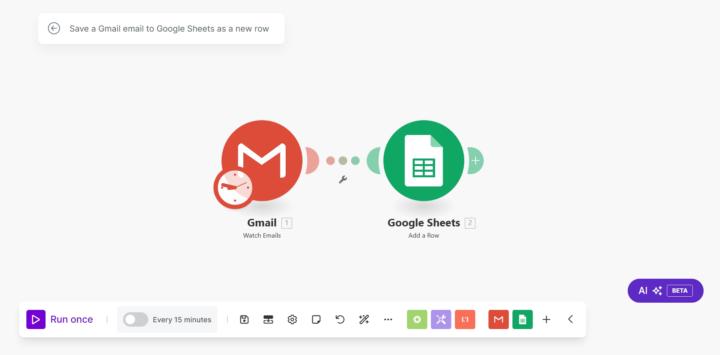
Sheet's Getting Real: Gmail Emails to Google Sheets
Hey everyone! Hope you're all doing great. I wanted to share a super simple yet powerful automation tool that can save you time and effort by automatically saving important email information. Whether it's email addresses, subject lines, or any other key details you receive on Gmail, this tool sends it straight to a google sheet. No extra steps required. Here's how it works: 1. Connect Gmail: Link your Gmail account to the automation tool. 2. Set Trigger: Choose what types of emails (like new messages) will start the automation. 3. Save to Google Sheets: Automatically add email details (like the sender and subject) to a Google Sheet, without doing anything manually. If you're stuck or need more details, just ask. Hope this helps someone!

Oct 21 •
Lets unlock our real potential!
Hello world, I am excited to be part of this AI Advantage group! Lets learn from each other & grow our businesses by leeps & bounds!
1-30 of 10,097

skool.com/the-ai-advantage
Founded by Tony Robbins & Dean Graziosi - AI Advantage is your go-to hub to simplify AI, gain "AI Confidence" and unlock real & repeatable results.
Leaderboard (30-day)
1
🔥
+1263
2

+872
3
+821
4

+781
5

+449
Powered by