
Write something
Pinned

Mar 15 •
Welcome to Clief Notes. Here's where to start.
1. Watch the intro video and introduce yourself in the intro post here 2. Start with The Foundation (free course). Concepts, folder architecture, prompting framework. Everything else builds on this. 3. Check in at the bottom of each lesson. Polls, discussion posts, other members working through the same stuff. Use them. 4. When you're ready to build real things, move to Implementation Playbooks (Level 2). When you're ready to build your own tools, Building Your Stack (Level 3). 5. Post your work. Ask questions. Help others when you can. What are you here to build?
Poll
4326 members have voted
Pinned
2d •
🌶️ CINCO DE MAYO FIRESALE — STARTS NOW 🌶️
Locked in for the next 5 days only. Ends May 5th at 10:00 AM EST. No exceptions. 🎉 Premium: $27 → $14/mo 🎉 VIP: $97 → $67/mo The closest you'll get to our original launch pricing. We're doing this because the community has shown up for us, and we want to show up back. 🤝 🔥 Already a member? Read this carefully. To lock in the new rate, you need to: 1. Cancel your current plan 2. Resign under the new price That's the only way the system can apply the new rate. We have way too many members for manual refunds, so we can't refund anyone who just signed up at current pricing. But the savings stack month over month, so if you plan to stick around (and you should 😁), the math works out fast. 🚫 A few ground rules: Please do not DM myself or Jake about pricing, exceptions, or extensions. We love you, but we're a small team and we need to stay focused on building. Everyone gets the same window. Everyone gets the same deal. If you miss it, you miss it. We'll do more things for the community down the road. ⏰ The clock: 🟢 LIVE NOW 🔴 Locks May 5th, 10:00 AM EST - Premium gets you The Vault and Afternoon Tea calls. - VIP gets you The Drawing Room, High Tea, and bespoke folder builds from Jake himself. If you've been on the fence, this is the moment. 🚀 Tag a friend who needs to be in here. Let's make Cinco a movement. 🎊 🌶️🌶️🌶️

21h •
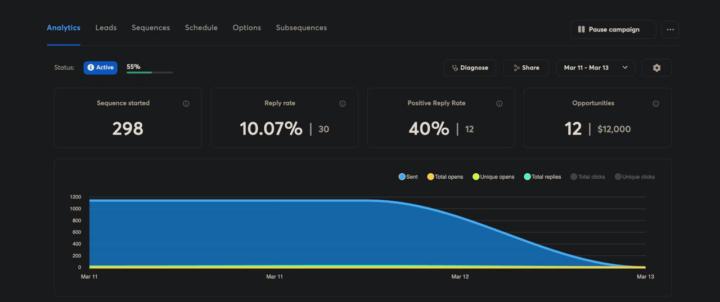
Why your cold emails get ignored (and how I fixed mine to book 9 calls/week)
I've been running cold email campaigns for clients for 3 years and the biggest shift I've seen isn't the tools. It's what actually gets a reply. Personalization used to mean scraping a name and company from LinkedIn, dropping it in the first line, and hitting send. "Hey {FirstName}, I noticed {Company} and thought..." That worked in 2022. It's dead now. Everyone's doing it and prospects can spot a mail merge from the subject line. What changed for me was treating personalization like actual research instead of a data field. Here's what I started doing: → I scrape the prospect's entire website. Not just the homepage. Blog posts, service pages, case studies, about page, even their contact form if it's there. → Then I feed all of that into OpenAI and have it analyze what they actually do, who they serve, and what problems they're likely dealing with. The AI doesn't just summarize. It finds the specific details nobody mentions in generic outreach. So instead of "I saw you work in logistics," the email opens with "Noticed you handle cross border freight into Mexico. Your blog mentioned customs delays eating 15% of delivery windows." That's the kind of line that gets opened because it doesn't sound like 500 other emails they got that week. The reply rates went from 2-3% with generic personalization to 8-10% with actual research. One prospect replied last week: "Your email won because you actually read our site. Everyone else sent the same template." The system I built does this automatically. Scrapes the website. Analyzes every page. Generates icebreakers that reference non-obvious details. It writes openers like a human who spent 20 minutes studying their business, except it does it for 1,000 prospects in an hour. Here's what I learned building this: Small prompt details make a massive difference. Having OpenAI shorten company names naturally (say "Stripe" not "Stripe Inc.") and reference specific pages beyond the homepage makes it feel real. The difference between "I saw your website" and "I saw your freight tracking dashboard lets customers get ETAs without calling" is everything.

20d •
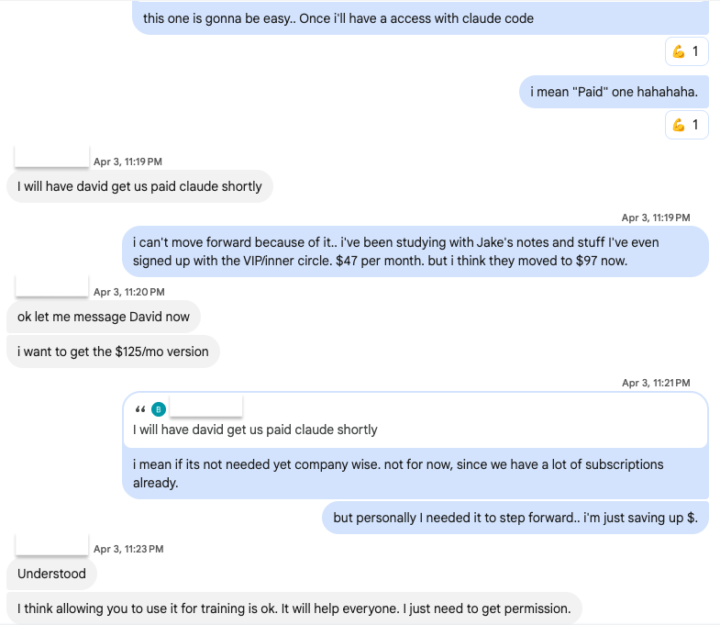
I should have shared this win! Claude Code Access...
I was sharing our community with our senior developer/director and telling him that what we’re doing here is going to change how we structure things in the company and create better results using Claude Code. I’m currently part of the lead team developing the company’s AI assistant model with multiple structured agents and layered analysis systems designed to support precise sales and marketing execution. I told him that I couldn’t really afford an enterprise-level account for Claude, so I haven’t been able to fully test everything I’ve been learning here as a VIP member. He spoke with the higher-ups and secured a 5-seat plan for me so I can continue applying what I’ve been learning, help the business grow in the future, and train the team using @Jake Van Clief notes...

11d •
Mini-Series Part 2: The "Token Crash" & The Keyboard Epiphany
In Part 1, I was riding high. I had Chrome, Edge, and Firefox all running simultaneously, tripling my speed on a massive D365 rebilling project. I felt like I’d cracked the code to being "efficiently lazy." Link: Mini-Series Part 1: The "Manual Hell" Rebill Project · Clief Notes But the victory was short-lived. I was driving the car at 100mph, but I didn't realize how much fuel I was burning. The Crash: 3 Hours to Zero The next morning, I fired up all cylinders. It was beautiful—until it wasn't. In under 3 hours, I burned through my entire token allotment. I was dead in the water with a 1.5-hour wait until my limits reset. With the clock ticking and sales reps still needing updates, I had to go back to doing it manually. And that’s when the "Aha!" moment happened. The "Tab" Breakthrough While I was clicking and typing manually to pass the time, I realized something: I wasn't really using the mouse. I was mostly hitting Tab and Shift-Tab to navigate the D365 fields. I asked Claude: "Can Playwright just 'Tab' through the browser instead of searching for elements and taking screenshots for every move?" Claude’s answer: YES. My jaw dropped. From "Visual Driving" to "Macro Speed" The old workflow relied on Claude "seeing" the screen via screenshots to make sure it was in the right spot. It was accurate, but heavy. I had Claude rewrite the interior workflow to a deterministic loop: 1. The Setup: I open the URL, set the filters, and select the first row. 2. The Loop: * Tab to Invoice → Enter. 3. Repeat. I added small buffers (100ms between tabs, 4s for page loads) to ensure D365 could keep up. See the video for how the flow runs in real life! The Result: 90% Savings & 10x Efficiency I asked Claude to evaluate the two methods. The numbers were staggering: Old "Visual" Flow: - Tool Calls: ~500 calls per 50 orders - Token Usage: 100% (High Burn) - Logic: Screenshot-dependent (Slow)
1-30 of 935

skool.com/quantum-quill-lyceum-1116
Jake Van Clief, giving you the Cliff notes on the new AI age.
Leaderboard (30-day)
1

+775
2

+721
3

+456
4

+397
5

+385
Powered by