
Write something

Sep 22 •
Useful free guide DCMA for P6 schedule assessment
I was involved in a project where the client required the schedule to pass the DCMA 14-Point Assessment. The checks are simple, and they make weak programmes easy to spot, very useful also for claims management: Missing logic under 5% No leads, and lags kept under 5% At least 90% finish-to-start relationships Hard constraints under 5% Activities and total float over 44 working days kept under 5% No invalid dates, and no negative float left unexplained Critical path test, CPLI and BEI to show whether the plan is realistic and being followed Steve Montgomery at Ten Six has published a free eBook, An Introduction to the DCMA 14-Point Assessment, and I find it particularly well done. Each point is shown in Primavera P6 with practical examples, along with what to avoid and where to use judgement. No registration needed. https://tensix.com/book-an-introduction-to-the-dcma-14-point-assessment/
0
0
Aug 11 •
When your progress update changes your schedule.
From a serious project planning book… to a Primavera P6 meme. After years of working with project schedules, you learn one important lesson: F9 doesn't change your schedule. Your progress update changes your schedule. F9 simply shows you the consequences. As planners, we know what happens during a progress update. Actual Start dates are entered. Actual Finish dates are entered. Remaining durations are adjusted. Expected Finish dates are updated. Activities are marked as complete or still in progress. And then… You press F9 – Schedule. And suddenly the schedule doesn't look quite like it did before. Activities move. The critical path changes. Float changes. Milestones move. The forecast finish date changes. Here's the reality behind the joke: F9 is not the problem. If your schedule is properly linked and the progress has been accurately updated, F9 is simply doing its job — recalculating the schedule based on the current project information. The important part is understanding why things moved. - Was the Actual Start entered correctly? - Was the Remaining Duration updated realistically? - Was the Expected Finish changed? - Did the activity actually progress as reported? - Did the logic reflect the way the work is now being executed? - Did a change in progress expose an issue that was already there? And here's one simple rule that every planner should follow: SAVE A COPY BEFORE YOU UPDATE. Keep a copy of the previous schedule before making your progress update. Because when the dates move after F9, you may need to go back and compare: What changed? When did it change? Why did it change? Sometimes the difference between a good planner and a great planner isn't just knowing how to schedule. It's knowing how to explain the movement in the schedule. Because… F9 didn't break your schedule. It just told you the truth. @planners: have you ever experienced F9 Schedule changing completely your schedule dates? https://lnkd.in/eKT63dVNhttps://www.linkedin.com/posts/virgil-andrei-14943a30_primaverap6-projectplanning-projectcontrols-share-7492958208093872128-C83n/?utm_source=share&utm_medium=member_desktop&rcm=ACoAAAZ4p0kBPTsKzcJA23Xdrd_RwhPAZoX8sL4
0
0
Feb 17 •
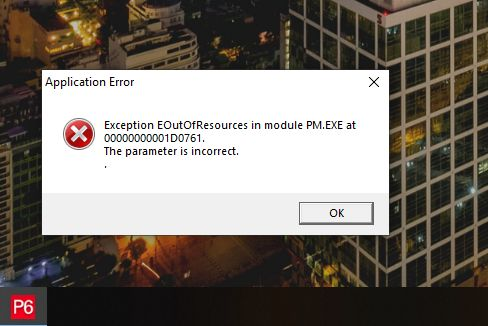
EOutOfResources in module PM.EXE at 0000000001D0761
Has anyone ever encountered the following error in Primavera P6? Application ErrorException EOutOfResources in module PM.EXE at 0000000001D0761.The parameter is incorrect. Context: - ~5,000 activities schedule - Resource-loaded (production schedule) - Using an advanced layout - Collapsed bar chart view - Custom bars enabled The error appears after working with the advanced layout setup. I’m trying to understand whether this is: - a known memory / resource limitation in P6 - related to custom bars or collapsed bar chart - layout corruption - or something else entirely - If you’ve seen this before or have a workaround (layout cleanup, preferences, settings, etc.), I’d really appreciate your insights 🙏 Thanks in advance! #PrimaveraP6 #ProjectPlanning #ProjectControls #PlanningEngineer #Scheduling #OracleP6
1-3 of 3
powered by

Suggested communities
Powered by