Write something

Oct '25 •
The “Success List” Trick (~10 minutes, big clarity)
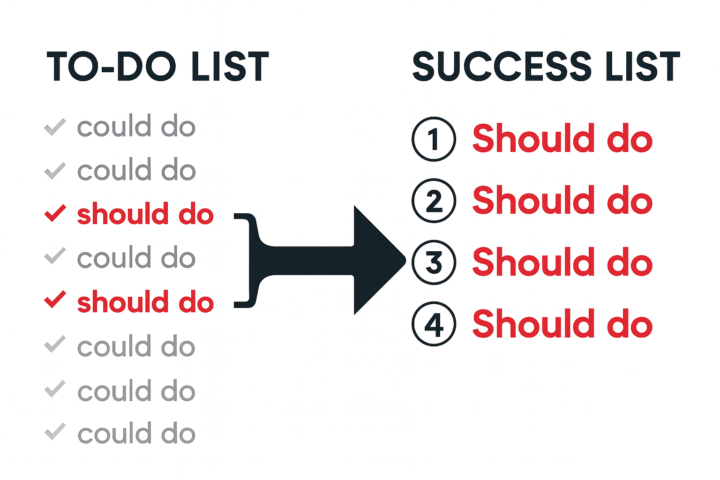
Last week we talked about how doing one thing deeply beats doing five things in parallel. This week: how do you choose what matters, when family, work, and life are all yelling for attention? The 3×3 Monthly Reset - 3 Personal Priorities (e.g., exercise 20 min, read 30 min, 3-min cold shower) - 3 Business Commitments (e.g., 30 min content creation, 30 min learning, 30 min deep work) I don’t hit 100%, but this keeps me honest and moving forward. How to try it: the day before a new month, pick your 3 + 3. Put them on your calendar (recurring reminders help). Done. The Daily Backup Plan (when monthly feels heavy) Turn your to-do list into a success list: 1. Brain-dump everything you could do. 2. Cross out all the “coulds.” 3. What’s left are the essential “shoulds” that’s your success list for today. 4. Do the top one first. Only then earn the right to do #2. Tip: if you’re unsure, ask “What’s the one thing that, if done, makes everything else easier or unnecessary?” Action Plan (pick one) - Set your 3×3 for next month (3 personal + 3 business), or - Do the success list trick today and complete one must-do. Question for you How do you keep yourself on track? Hit reply and tell me your system Work with me: https://tidycal.com/adileng/pi-mastery
May 6 •
Claude design animation tutorial
Create high-quality animations without After Effects using AI. In this video, I walk you through how to use Claude AI Design (Anthropic’s new tool) to generate motion graphics, explainer clips, and B-roll just by typing prompts in plain English. If you’re a beginner or content creator looking for an AI animation tool, this tutorial shows you how to create animations with AI, improve your prompts, and get clean, professional results fast without any traditional animation software.
1
0
Oct '25 •
Focus Wins (What I’m Learning)
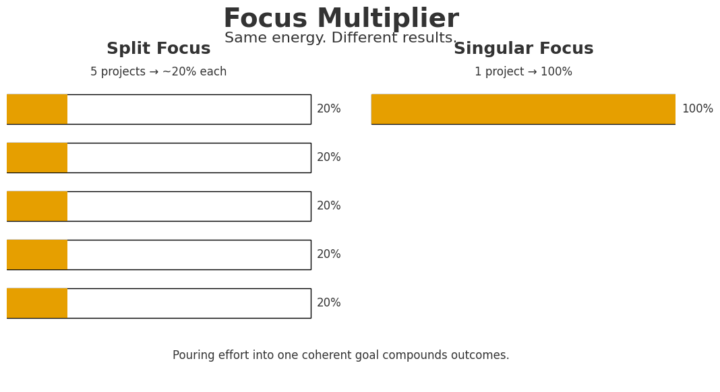
Hey makers quick honesty: I struggle with focus too. But the biggest reason Raspberry Pi Made Easy is growing (even if it’s small) is this simple rule: Do one thing deeply, repeatedly, a little better each time. When you spread your energy across five projects, each moves ~20%. Pour the same energy into one project and it moves 100%. I’m reminded of The ONE Thing how Apple created space for one extraordinary focus at a time: Macs → iMac → iTunes → iPod → iPhone. Not many things. One thing at a time, done exceptionally well. I get tempted to make videos outside my niche. I’m learning to ignore that. Staying on Raspberry Pi is what’s been compounding so far. This Week’s Challenge (join me) 1. Pick one outcome for the week (e.g., “Stable Home Assistant on Pi 5” or “Crisp timelapse with the Pi Camera.”) 2. Block two focus sessions (No multitasking, no new tabs, just the one outcome.) 3. Track one metric that matters. (Boot-to-automation time, frames captured, temps under load, error rate, etc.) Small, focused wins stack up. That’s how channels and skills grow. Accountability: Drop your one thing for the week in the comments. Coming soon: Maker Creator Lab I’m building Maker Creator Lab to help makers publish their first 3 videos in weeks using my Plan → Build → Publish system. 👉 Join the waitlist: https://tally.so/r/wdk4YV — Adil KA Raspberry Pi Made Easy P.S. Need a nudge? Skim a chapter of The ONE Thing, then apply it to your next Pi project and watch the difference.
1
0
Oct '25 •
Evergreen > viral: what worked on my maker channel
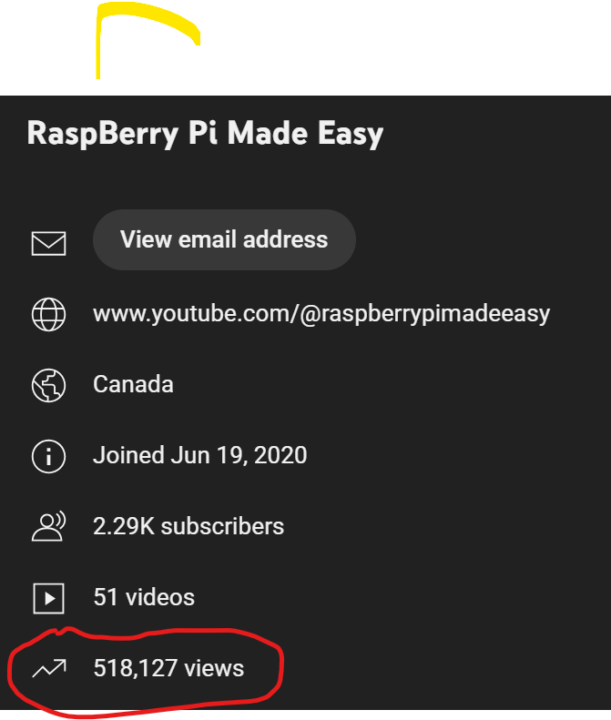
Hi Everyone, My channel in the maker space recently crossed 510,000 views with <2300 subscribers. The lesson appeared to be simple: when you solve a specific problem clearly, views compound for years. Case Study #1 — Evergreen slow burn (2020) “Ultrasonic sensor raspberry pi 4” - Week 1: 40 views - 1 year: 1,693 - 2 years: 7,456 - 3 years: 17,810 - 4 years: 36,000 - 5 years: 54,000 People keep searching for the same fix. Evergreen beats trendy. Case Study #2 — Clear intent = fast ramp (9 months ago) “Raspberry Pi 5 Setup Guide” Growth over Time - Week 1: 3,000 views - 2 months: 15,469 - 6 months: 36,000 - 9 months: ~70,000 How viewers find this video ? Title matched search intent, thumbnail promised the outcome, video delivered. 5 lessons for maker channels 1. Solve one pain clearly. “Connect X to Y,” “Set up Pi 5,” “Fix [error].” 2. Niche down. Hardware + use case beats “variety tech.” 3. Evergreen wins. Problem-solving tutorials keep earning views. 4. Think in years. Publish assets that rank; update them, don’t replace them. 5. Do basic keyword intent. Use the words your audience types, not clever phrasing. 10-minute task (do this today) Write 10 titles that start with: - “How to connect [part] to [board]” - “Set up [board/model] for [result]” - “Fix [common error] on [board]” I’m building Maker Creator Lab to help makers publish their first 3 videos in weeks using my Plan → Build → Publish system. If you want in when it opens: 👉 Join the waitlist: https://tally.so/r/wdk4YV
1
0
1-4 of 4