
Write something

1d •
Real Time Notifications
I'm building a canvas app that is my group is using to transition away from Microsoft Access. One feature the users really liked from Access was a 'real time' pop up that gave them relevant information. Usually this is centered around an event with a Datetime for either start or end. I believe in Access this was accomplished by running a check every 3 minutes for events (which are now stored in a few different SharePoint list, nothing premium here) which have a Start Time or End Time in the next 3 minutes. I'm trying to accomplish the same thing in Power Apps. I'm thinking of running a timer, but once the user navigates away from the screen the timer is running on, will the time continue to count down? Will the code execute when the timer runs out? I'm also thinking through if 3 minutes is the right amount of time. The timer will start when the user launches the app, and execute every 3 minutes, which means whatever code goes in there will check multiple SharePoint lists 20 times per hour.

8d •
I Learned Another Lesson on SharePoint Multiline Text Fields
I have been struggling with a multiline text field returning HTML DIV tags in the first and last record of a collection when I point it to this particular column. I don't remember how many times I have heard Darren say, "Make sure you select plain text when adding a text column in SharePoint." Well today CoPilot was able to give me a correct answer for why the text was showing up wrapped in HTML. It suggested checking the column type. When I looked at the settings, there it was, plain as day. The first record showed up with <div class="ExternalClass3EF1E2D3305044989EAF2F23DE178BF6"> where the class name changed each time I ran the app. The last record had </div> after the single digit number. No matter how I tried using the Substitute function, the next time I opened the app for editing the class changed, and the Substitue functions did not work anymore.


Jan 7 •
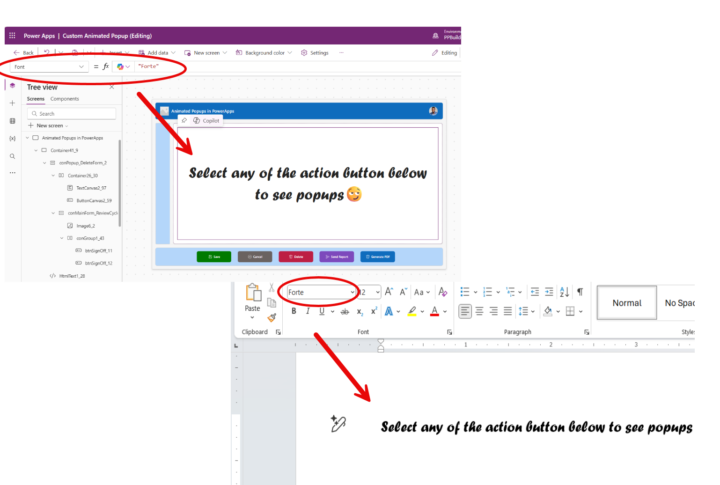
Use Microsoft Word fonts in PowerApps
Insert the name of any MS Word fonts (wrapped around in double quotes) in the font property of your text control and see the magic happen 😃😃

Jul '24 •
See where everyone here is at in the world!
See where everyone here is at in the world! - https://super-power-labs.skoolmap.io/

12d •
Bad Estimates Destroy Careers (Here’s What to Say Instead)
- Your mouth is cashing checks your body just can't cash! - Happens to the best of us. 😅😭
1-30 of 369

skool.com/learn-power-apps
A community of people who are enthusiastic about and trying to learn about Microsoft's Power Apps!
Leaderboard (30-day)
1

+9
2
+8
3

+6
4

+6
5

+3
Powered by