
Write something
Pinned

Oct '25 •
👋 New joiner? Welcome! Start here 👇
Welcome to all new members, here's some links and information to help you get started! 𝗤𝘂𝗶𝗰𝗸 𝗟𝗶𝗻𝗸𝘀 𝘁𝗼 𝗴𝗲𝘁 𝘀𝘁𝗮𝗿𝘁𝗲𝗱 - For an introduction to this community → Step 1: Design your learning journey - Welcome Pack · Learn Power Apps - New-ish to PowerApps? → Check out our Introduction & Overview - Power Apps Crash Course · Learn Power Apps - Getting Certified - Studying & Pass Power Platform Exams:🥇 CLICK ON THIS LINK! - Pass the PL-900 Five Day Challenge · Learn Power Apps - Want to get hands-on? → Check out Super Power Labs Accelerator 𝗛𝗼𝘄 𝘁𝗼 𝗲𝗻𝗴𝗮𝗴𝗲 𝘄𝗶𝘁𝗵 𝘁𝗵𝗲 𝗰𝗼𝗺𝗺𝘂𝗻𝗶𝘁𝘆? - Share your knowledge and experience! Even if you're relatively new to PowerApps, or the community, your opinion and experiences are valued here! A great way to earn your first point(s) is to introduce yourself in the thread below 👇😀 Thank you for engaging and joining us on this exciting learning journey! 🙏 Darren
Pinned
Sep '25 •
You won't believe what I've uncovered. Leverage AI in a Way No One Else Is!
Yes, this is Power Apps related! If you are an insider or accelerator member, please email us at [email protected] for a discount link. https://www.skool.com/learn-power-apps/classroom/a21805dc?md=36488c7d4e114958a28218a21f00872f https://youtu.be/oW9bQJwqics
Pinned
Jun '25 •
Our Roadmap
Currently, I'm creating an MVP (minimal viable product) for a site for you that will list out all my content based. ========================= - I could easily index and provide a great search feature to find any video, course, module, etc. that you're looking for! - Read-Only content (for now) - Full listing of YouTube videos - Showing Courses, Modules, Lesson, and, if you (or should have) access, videos - Authorization (account creation) ⬇️⬇️ Once I get this up and running for you guys (by end of day Friday), this is the next priority ⬇️⬇️ Every month, I plan to produce: ========================= - One Workshop (doing one a month rather than each week gives me more time to make the one that we do, be of higher quality) - One Substantial feature to the JumpStart template - One structured/well-planned YouTube video, released publicly - One Live Stream (around 3 hours, probably on a weekend in the month) - 30-50 Small videos (bite-sized, 5-10 min) - I will have a long recording session with Camtasia (my video editor) where I go over 30-50 small topics that would flow back to back making it much easier on myself to crank these out. :) - Video editing will have to be minimal - One virtual video meeting (office hours where anyone may ask any Power Apps related questions) ========================= What are you most excited about seeing? (after voting, comment below on topics you would want covered in the item you voted for). [email protected] 📨📨
Poll
27 members have voted
5d •
You're the man now, dawg!
AI says, "You know that's a deep cut reference". 😅 Movie reference: Finding Forrester. Great film.

Feb 16 •
App Deployment and Scaling Question
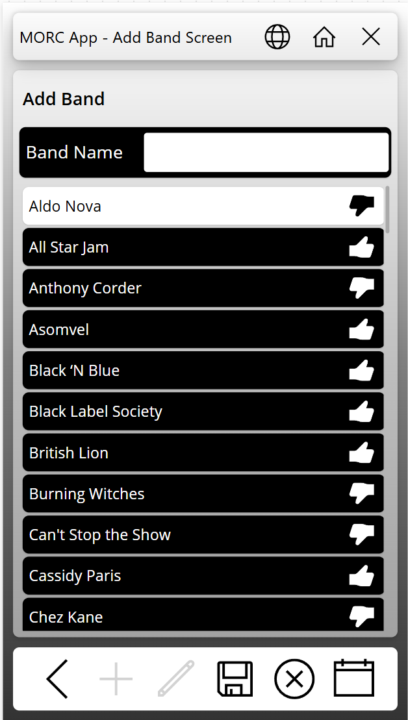
So, I have an app that I have been working on in my personal tenant for a music cruise we are going on in a few months. I posted screen captures in a Facebook group for people going on the cruise. There was interest from several people in using the app. Have any of you published an app for something similar where you may not know how many users will use it, or when? In looking at the PA licensing Microsoft is doing away with the Per-App Plan and going to a model where if someone uses it, then you get charged through Azure billing (Pay As You Go - or PAYG). The App is mainly going to be used during the one-week period of the cruise. Would it be better to remove the sharing of the app with the users, remove the connection between the app and Azure billing, or both? I don't want to be picking up the tab for 10$ per person per month in between. How would you go about billing the users to reimburse the cost of the Azure billing? I have attached some screen captures here in case anyone is interested.
1-30 of 1,205

skool.com/learn-power-apps
A community of people who are enthusiastic about and trying to learn about Microsoft's Power Apps!
Leaderboard (30-day)
1
+6
2

+2
3

+2
4

+1
5

+1
Powered by