Activity
Mon
Wed
Fri
Sun
Apr
May
Jun
Jul
Aug
Sep
Oct
Nov
Dec
Jan
Feb
Mar
What is this?
Less
More
Memberships
Learn Power Apps
2.6k members • Free
Power Apps Templates
120 members • $25/m
The Microsoft Stack
108 members • Free
152 contributions to Learn Power Apps

1d •
2026 will be the last year I create Power Platform content
💯 ... at least, those are my plans. Sometime between now and Jan 1st, 2027, I'll be releasing a good deal of Power Platform content, but, for those of you who took the Power Fx Coding course with me, you'll know that: - I'm developing a code generator that will generate all your canvas Power apps for you. So... - Will there be a need to know Power Apps if AI can generate it all for you? 📺 The attached video was made with AI of course. It needs a lot of work, but would your intelligence be insulted if I generated content with AI. It would still be my style of content: conversational tutorials, but it would be more concise and to the point. The first few would be trial & error & responding to your feedback on what you like/didn't like.📈 If you want to see the first draft of this video that was hilarious, look here: - 🤖 https://youtu.be/pcirnx8ac3M The one I have attached is here: - ✅ https://youtu.be/VJcFwtdc090 Super POWER (💪🏋️⚡🧨) Labs has always been about helping you develop your "super powers" as a professional "screen worker". I was going to say "office worker" (spanning all fields), but some of us work at home. 😅 The tech has definitely shifted after the "Chat GPT" moment and everything that's come out since. People are being laid off in droves. If you don't want to be
Poll
11 members have voted

1 like • 1d
It drives me crazy when the person's mouth doesn't match the audio. It's like watching old kung fu movies that were dubbed over in English.
10d •
You're the man now, dawg!
AI says, "You know that's a deep cut reference". 😅 Movie reference: Finding Forrester. Great film.
1 like • 10d
Ask it to open the pod bay doors...
Feb 16 •
App Deployment and Scaling Question
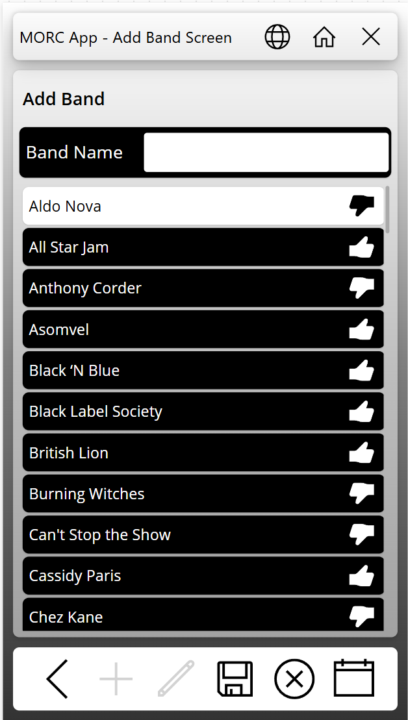
So, I have an app that I have been working on in my personal tenant for a music cruise we are going on in a few months. I posted screen captures in a Facebook group for people going on the cruise. There was interest from several people in using the app. Have any of you published an app for something similar where you may not know how many users will use it, or when? In looking at the PA licensing Microsoft is doing away with the Per-App Plan and going to a model where if someone uses it, then you get charged through Azure billing (Pay As You Go - or PAYG). The App is mainly going to be used during the one-week period of the cruise. Would it be better to remove the sharing of the app with the users, remove the connection between the app and Azure billing, or both? I don't want to be picking up the tab for 10$ per person per month in between. How would you go about billing the users to reimburse the cost of the Azure billing? I have attached some screen captures here in case anyone is interested.
0 likes • 25d
@Darren Neese say more... Here's the link to the cruise: Rock Music Cruise | Monsters of Rock Cruise
0 likes • 22d
With rock stars singing too
Feb 17 •
Screen Use Patch Statement in User Defined Function
I tried to move the screen use patching into a user defined function and then called the function from the various screens in my app. The patch is writing to a SharePoint list. I also have the App.OnError writing to another list. After changing the Screen Use patching I started noticing a bunch of errors stating that conflicts exist withe the changes on the server. Has anyone gotten this to work in a user-defined function?
0 likes • Feb 24
This is coming from App.Formulas and the only Patch statement there was patching Screen Use
1 like • Feb 26
@Rachell Jova the patches worked fine on each screen and info saved to the screen use list. I changed the app to just save to the collection on each page and then patch when the user submits the "form" at the end. I might lose visibility of some of the screens being visited but it was causing delays on the screen transitions that users were complaining about. I'm wondering if the information was cached from the function call from the first screen, and then it runs again trying to save the visit to the next screen before the screen name is updated causing it to conflict with the previously patched record.
Feb 3 •
I Learned Another Lesson on SharePoint Multiline Text Fields
I have been struggling with a multiline text field returning HTML DIV tags in the first and last record of a collection when I point it to this particular column. I don't remember how many times I have heard Darren say, "Make sure you select plain text when adding a text column in SharePoint." Well today CoPilot was able to give me a correct answer for why the text was showing up wrapped in HTML. It suggested checking the column type. When I looked at the settings, there it was, plain as day. The first record showed up with <div class="ExternalClass3EF1E2D3305044989EAF2F23DE178BF6"> where the class name changed each time I ran the app. The last record had </div> after the single digit number. No matter how I tried using the Substitute function, the next time I opened the app for editing the class changed, and the Substitue functions did not work anymore.

0 likes • Feb 10
@Darren Neese too smart for my good for sure
1-10 of 152

@dustin-rocksvold-6086
A hydroelectric operator delving deep into the Power Platform
Active 1d ago
Joined May 13, 2024
Pioneer, CA
Powered by