
Write something

24h •
Gems from my toolbox: booming clusters with almost no reviews - Week 30, 2026
Finally Choose Yourself: median BSR 15,210; median review count: 6. My KDP toolbox generates many more gems than I could humanly use. After weeks of thought, I decided it would be irresponsible to keep them to myself. It is not the "cherry-picking" so popular in a lot of YouTube videos: "Look, this book sells thousands of copies a day. It's so easy to make a similar book," with information about thousands of similar books that never had even one sale conveniently left untold. I will do the opposite, showing you clusters of books with very high BSR and review counts close to zero. And I will give you the words that are linked to the cluster - the first three words of this message. I started to use this technique to find good anomalies on Amazon about a month ago, and the first book I published as a result has a BSR steadily around 30,000 with zero reviews. ----- And now, the books (the links are affiliate, and yes, I know there is a low chance any of you will purchase them): I Owed Myself This: 100 Sessions to Finally Choose Yourself Without Guilt and Stop Tolerating Less Than You Deserve Loyal to Me: 110 truths to stop tolerating what drains you and finally choose yourself without guilt PEOPLE SKILLS: Master People, Master Conversations, and Master Yourself What do you think about this format? Would you like to have it in the future?

3d •
Royalty Guild Market Analyst. Version 2.2
Amazon updated their page structure, and the previous version of the extension cannot collect the reviews now. The version 2.2 is published: https://chromewebstore.google.com/detail/royalty-guild-market-anal/ikcabgjljchjihllhedncaiplfmhpmim Do not forget to update the extension, or just relaunch your browser for the update.
4
0

Jun 26 •
Word Search, Crossword, Sudoku Puzzle Books
My question to people who are already publishing puzzle books or want to start publishing them: what are your top three roadblocks? What are the three questions that, if solved, would help your income grow faster? For example, if next month you could get one major struggle solved for you for free, what would be the struggle you would want solved? 🔑 The question is not exactly theoretical; it could be that you will get the real magic wand, who knows.

Feb 3 •
Reviews at BookVillage for Guild Members and More
I finished my book and went back to the Guild in full force. This week will be dedicated to final tweaking and preparations for the launch of the "3-in-1 Review Toolkit" for the Guild members. One of the tools in the kit is the special offer from BookVillage for the Guild members: - The first 30 days are free - Performance guarantee (description below) - The next 2 months are 25% off ($15 a month) - A fixed price of $20 forever, as long as the subscription is active. Even if the price is raised for other users. To get the special conditions register by the link: https://bookvillage.pub/?via=guild What is Performance guarantee: "If at the end of your free trial there is a net difference between all the reviews you have posted and the ones you have received, and you have followed the guidelines BookVillage recommends, which are essentially based on requesting paid verified purchases as much as possible (for your safety), then BookVillage will extend the free trial". BookVillage invests significant effort in researching best practices for Amazon reviews and shares them with its users. It's really worth reading messages from the service and acting on its guidance. The second and third tools from the toolkit will be discussed at the online meeting on Friday, February 6th. Stay tuned.

May 15 •
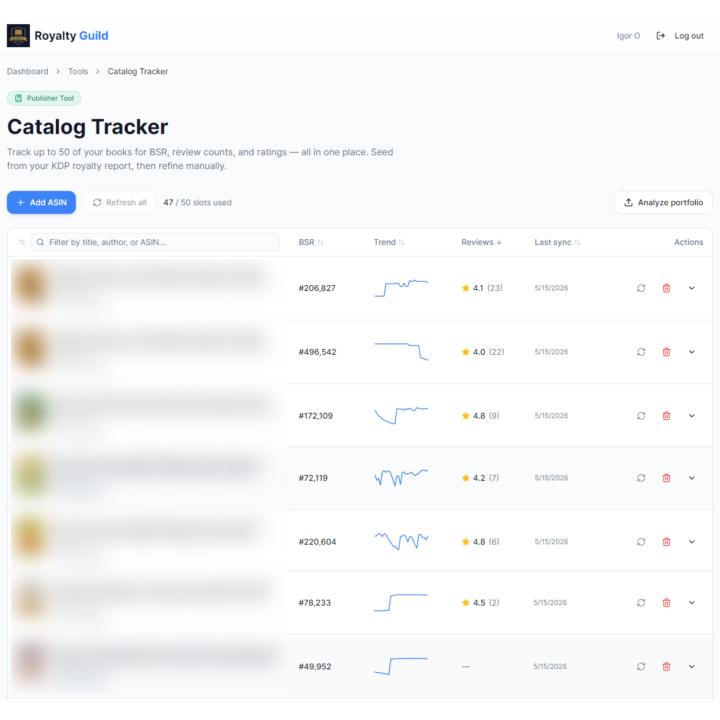
Track BSRs and Reviews of Your Book
✨ Reading Time: < 1m | Utility: High Answering questions about the tools I use for niche research, I realized that 90% of the time I use BookBeam is for the Book Tracker function to track BSRs and reviews of my books. BookBeam is a pretty expensive tool, and I started to question myself: Is it really necessary to pay for the subscription just to have the tracker? Of course, Publisher Champ has all the data, and I can look at BSR and reviews there, but Publisher Champ is so informationally dense that I still prefer to use the clean interface of BookBeam. It looks like a hard decision to make. Since I do not like to burden myself with unnecessary, hard decisions, I decided to choose the third option: create a Catalog Tracker for myself. Decision made → done. Now I have the Catalog Tracker. It is lightweight, clean, and highly functional. And if I did it and I like it, why not share it with others, right? So, you can try it right now. Comment "TRACK" below, and I'll message you the link to try it out for free. You can track up to 50 books. But the most important thing is that if you have a catalog of tens or hundreds of books, you do not need to make a decision which books are worthy of tracking - start from the Royalty Guild Sales Analyzer and add your most performing books to the Catalog Tracker automatically. If you are using your BookBeam subscription the same way I am, and the tracker helps you save on it, that would be great. P.S. If you do use it, let me know: What’s one feature you wish BookBeam had that could be added to this?
1-30 of 56

skool.com/guild
Amazon KDP publisher stuck at $50–$1k/mo? Break the plateau with the Guided Publishing System and grow businesses together with us.
Leaderboard (30-day)
1

+29
2

+20
3

+17
4

+9
5

+8
Powered by