
Write something
Pinned

May 9 •
🤯UNLOCK PREMIUM FOR JUST $97...(Mothers Day Special)
No catch, No tricks....Just pure value you can afford Have you wanted access to my trainings and snapshots, but could not afford the annual or month to month. Now you can move through the content at your own pace without worrying about wasting your money if you don't have time to get around to it right away. Here is what you get... Everything that is in the classroom.... 🔴-Database Reactivation Mastery 🔴-Database Reactivation Elite Bundle (With Snapshot) 🔴-Reputation Management Training and Snapshot 🔴-My High Ticket Sales Training 🔴-The exact training on how I have maid multiple six figures prospecting online 🔴-Database Reactivation Sprint Replays This is over $10,000 worth of trainings, snapshots, templates, everything you need to get going. For just $97 for the year. (If a year passes and you tell me you never got a chance to go through everything, ill give you the second year free 😎) Here is what to do right now.... Go to the classroom... Click on one of the modules that is locked... Then click on "upgrade to premium" and follow the steps. P.S. you might be thinking that im about to release some new a.i. trainings and try and upsell you....nope. Im going to be releasing those, but you will be grandfathered in. This deal ends the second I upload the first a.i. training "How to build 10k websites that earn super easy MRR using one a.i. platform only" almost done editing 😏
Pinned
Feb 19 •
🔥🔴How To Access My GHL Affiliate Bonuses🔴🔥
DISCLAIMER: THIS IS NOT A REQUEST TO ASK YOU TO SWITCH AFFILIATES👇 If you already have an account and/or are an affiliate of someone else, don't worry... Im going to show you how to get access to everything i'm going to go over. Quickly i'm going to go over what the bonuses are and how you can access them by being one of my GHL affiliates.. I recommend just watching the short video from here, or you can read this post... ***WHAT ARE THE BONUSES???*** Everything inside of the premium classroom, you go PREMIUM - Database Reactivation trainings and Snapshots - Reputation management trainings and Snapshots - Prospecting Blueprint and Scripts - Doctor/Prescription High Ticket Sales Course - Elite Database Reactivation Bundle - 0-Clients in 30 Days Training - ChatWidget Master Offer Module - Access to week "Office Hours" calls for questions and help - One 30 minute one on one session to help you get things set up - Premium Access To Future Trainings (Missed call text back, A.i. voice set up and prompting, A.i. conversational workflow builds and much more... ***HOW TO GET ACCESS AS AN AFFILIATE*** #1 - Go start a 14 day trial of GHL through my affiliate link. ( YOU MUST USE AN EMAIL THAT HAS NEVER BEEN ASSOCIATED WITH GHL BEFORE, I DO NOT CONDONE AFFILIATE HOPPING SO DON'T DO THAT) If you used to have an account and its no longer active to not reactivate that old account with my link.... you must use an email that has never been used with GHL before. AFFILIATE LINK: https://www.gohighlevel.com/?fp_ref=automate-a-business #2 - You must be a paying affiliate and not in the 14day trial. So once your account is set up > go to agency settings > click on billing > then click skip trial. It will charge you the $97 and once it does that you should get instant access to all the modules. If it still shows that things are locked just send me a message here on skool. ***HOW TO GET ACCESS IF YOU ALREADY HAVE AN ACCOUNT***

Pinned


3d •
Question about Reputation Management offer
Hey guys, if I have a client who doesn't have SMS consent, but wants to reach out to his past customers for Google reviews, is email still an effective way to do that?

12h •
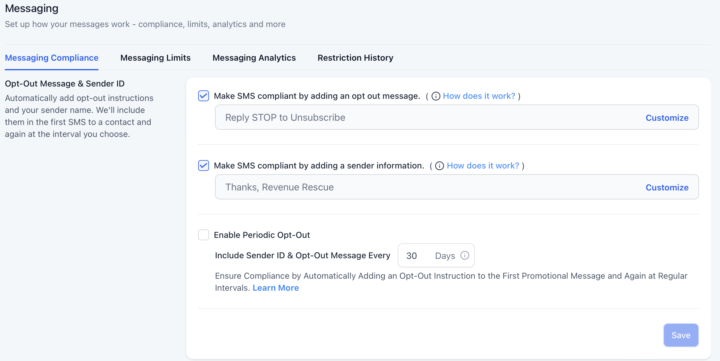
SMS compliance
I finally got A2P verified. So I'm on this screen and it has these check marked, which I understand means it's more compliant. But I feel like including this verbiage in the texts makes it come off to the recipient as more of a spam/mass text vs maybe looking like a one-to-one personal text. Is it recommended to still include have these check marked even still?
0
0
1-30 of 555
skool.com/ghl-blueprint
Need some help getting Go HighLevel or "GHL", set up. This is a beginner friendly group that will help get your GHL account up and running fast!!
Leaderboard (30-day)
1
+4
2

+3
3

+2
4
+1
5
+1
Powered by