

Jul 21 •
Live today: a look inside Thursday's "Get Seen by AI" workshop
We're live in the community today at 5 EST, and I'm using the session to walk you through everything we're packing into Thursday's Best Kept Secret No More workshop, the one on getting seen by AI. Here's the thing that's worth your time. When a buyer asks ChatGPT who they should hire in your space, your name either comes up or it doesn't. For most people it doesn't, and not because they aren't good at what they do. The AI just has nothing to pull from. No clear point of view on record, no proof it can quote back. Today I'll show you exactly what closes that gap. So in this session I'm going to preview the whole thing. The AI Visibility Audit we open with, the three-move shortlist you build, the one move we install live on Thursday, and what you actually walk out holding at the end. You get to see the full value before you decide whether to grab a seat. (If you are in the session already and want to sneak in for a quick look feel free to hop on as well) And everyone who shows up today gets access to my visibility GPT, so you can start diagnosing where you stand right now, before Thursday even gets here. The workshop itself is Thursday. Seats are capped at 25, and this is the last time it runs at $27 before it moves to $100. Today's session is where you find out if it's for you. If you can make it, jump in by going to https://www.skool.com/content-conversion-system-9386 and click on the link at the top and it will take you into the live session. Don
0
0
Jul 7 •
🔥 New Training: Build 30 Days of Content in 30 Minutes
Most people do not have a content problem. They have a content structure problem. They sit down, ask AI for a few posts, get something that sounds generic, and then wonder why the right buyers are not engaging. That is how AI slop happens. In this training, I walk through a better way to build content. You will see how to create a content calendar that is built around: ✅ Your ideal client ✅ The buyer journey ✅ Top, middle, and bottom-of-funnel content ✅ Your voice ✅ Strong hooks ✅ Clear post copy ✅ Follow-up CTAs ✅ Image prompts for every post ✅ A posting rhythm you can actually sustain The goal is not to “post more.” The goal is to create content that helps the right people recognize that you understand their problem and have a real solution. I also show how this can be structured in a spreadsheet-style format so you can load it into a tool like GoHighLevel or another social planner. Here is the challenge: Watch the video. Run the prompt for your business. Build your first 30-day content calendar. Then come back and tell us: 1. Did the topics match your ideal buyer? 2. Did the posts sound like you? 3. Were the image prompts useful? 4. Would you actually load and schedule this calendar? Drop your results below. This is how we stop guessing and start building a real content system. The drawing and the prompt are attached below: Prompt: https://docs.google.com/document/d/1bp0xwsWhP_3d88rSxQ6Rc8Jm_ryqGLz5nPvA-BVCAdU/edit?usp=sharing
0
0

Jul 2 •
When you're posting and still not getting leads, it's usually not the content
Quick recap from Tuesday's session, plus the replay and the skill we built live. Here's the thing we kept coming back to. When you're posting consistently and still not getting traction, the instinct is to write more content. Usually that's not where the problem is. The problem is upstream. You're either aimed at the wrong buyer, naming a pain they don't actually feel, or talking to someone who isn't the one making the decision. The content can be good and still not land, because it's pointed at the wrong target. So we spent the session working the target instead of the content. We used Michael's business as the live example (quality management and compliance in FDA-regulated industries) and walked the whole thing through in Claude, piece by piece: - Started at the top: the business, who it serves, and the actual customer segments. - Built that into a well-defined ICP, and then the anti-ICP. John had a great point here. Your messaging isn't just there to attract the right people, it should quietly repel the near-misses who aren't a fit. My own anti-ICP is CPAs and CFPs. Good conversations, no referrals, and then they want to sell me. - Turned the ICP into fictitious buyers, actual people you can picture inside a company, with a title, a location, and the specific thing pushing them to look right now. The test is simple: does this feel like a real customer, yes or no? If no, the fix is almost always back up in the ICP. - Built an interview structure to validate it with real people. This is the part most folks skip. Get on the phone, position it as research or an article you're working on rather than a pitch, and just ask whether the pain you're describing is real. Record it if they'll let you. Half the time those calls turn into sales conversations on their own, because you're uncovering where the person actually is. - Then turned the whole thing into a Sales Navigator search. Quick tip: start on the account filters (company head count is more accurate than revenue), save your companies to a list, then filter your leads by that list. You get a much cleaner target than starting on the people side.
0
0
Jun 11 •
Voice: How to Make AI Sound Like You Instead of Everyone Else
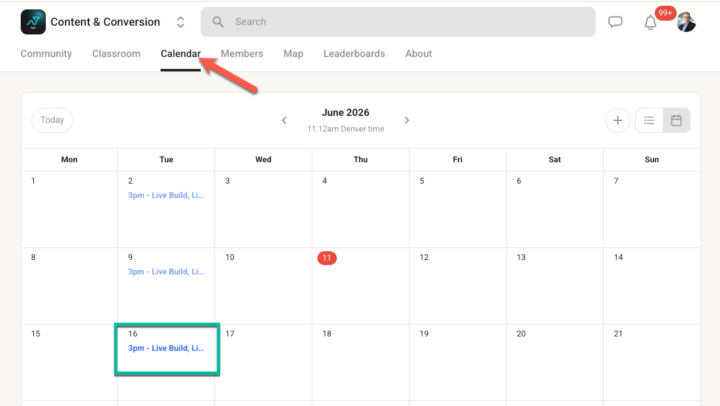
This coming Tuesday (6/16) in Content & Conversion, we are focusing on Voice. Inside WAVES, Voice is not just your tone. It is the content engine that turns your expertise into repeatable, useful, buyer-relevant content. The problem most people have with AI content is not that AI cannot write. The problem is that AI has not been taught how you think. It does not know: - What you believe - What you reject - What phrases you actually use - What examples you come back to - What your buyers need to hear - Where you are direct - Where you are careful - What proof you rely on - What stories shaped your point of view So it produces content that is technically fine but sounds like everyone else. In this class, we will walk through how to capture your voice in a practical way so your content starts to feel more like you and less like a generic content machine. You will learn: 1. Why voice is more than tone 2. What AI needs before it can write like you 3. How to capture your phrases, beliefs, stories, and boundaries 4. How to connect voice to Teach, Relate, Prove 5. How to turn one idea into many assets without losing the original point of view I am also including a voice capture prompt you can use immediately. If you are interested in attending make sure that you add the invite below to your calendar. If you know someone that could benefit from this make sure that you forward this message to them and let them know that they should attend, it is free. The only requirement is that you join my free Skool community. 1. Go to Content and Conversion: https://www.skool.com/content-conversion-system-9386/about 2. If you are a member sign in and click on the calendar (see image) 3. Click add to calendar 4. When it is time for our call 3PM MST, 5 PM EST join me live.
2
0
Jun 2 •
WAVES Framework (W = Web Presence): Build a Content System That Stands Out in the Age of AI
WAVES Framework (W = Web Presence): Build a Content System That Stands Out in the Age of AI Over the next five weeks, the I explain the WAVES system for business content, starting with “W” for web presence and foundation. I argue content should be built as a reusable system—leveraging AI, automation, and tools—grounded in clear market positioning, ICP, and brand identity to avoid sounding generic. Key elements include a strong home base website, social proof through individuals (people trust people), and multiple conversion paths rather than just one. I outline a funnel-based content strategy (top/middle/bottom) that balances proof (who you help) with counter-proof (what you reject) and emphasizes “what only you can say” to create an irreplaceable offer. Examples include automating daily posts with Claude CoWork, a “Content Path” tool, a targeting tool that builds Sales Navigator queries, GoHighLevel social planning, an SEO Content Writer tool, and lead-magnet pages that route YouTube traffic to a website and Skool community. Here is the companion document: https://docs.google.com/document/d/1U4RAhC08GIgjGPd5ImPwgYl3eiKoEf5ReyomZaBCo4A/edit?usp=sharing 00:00 WAVES Overview 00:47 Build Once With AI 01:47 Stand Out With ICP 03:01 Home Base Website 03:59 Social Proof Trust 04:52 Multiple Conversion Paths 05:56 Content Funnel Levels 08:12 Reject Generic Messaging 10:38 Only You Can Say 12:56 Content Path Tool 15:45 Targeting Sales Navigator 19:05 Social Planner Variety 20:55 SEO Content Writer 22:01 Lead Magnet Pages 23:41 Pipeline Recap 24:49 Resources Next Steps 25:51 30 Day Sprint Plan 26:57 Wrap Up Invitation
0
0
1-19 of 19

skool.com/content-conversion-system-9386
Stop being the best-kept secret in your industry. The free WAVES system that turns content into pipeline for founder-led B2B companies.
Powered by