
Pinned

Mar 15 •
Welcome to Clief Notes. Here's where to start.
1. Watch the intro video and introduce yourself in the intro post here 2. Start with The Foundation (free course). Concepts, folder architecture, prompting framework. Everything else builds on this. 3. Check in at the bottom of each lesson. Polls, discussion posts, other members working through the same stuff. Use them. 4. When you're ready to build real things, move to Implementation Playbooks (Level 2). When you're ready to build your own tools, Building Your Stack (Level 3). 5. Post your work. Ask questions. Help others when you can. What are you here to build?
Poll
6544 members have voted
Pinned
2d •
🇬🇧 GOOD MORNING FROM LONDON! 🇬🇧
Jake and I made it across the pond. We're here for London Tech Week all week. We got invited out for this one, which still feels surreal to type. We've got multiple pitch slots in front of investors over the next few days to talk about what we're building at Eduba and where this community is headed. Big moments lined up. Big rooms. Big swings. 🚀 If you're at the conference, DM me! Would genuinely love to meet anyone from the community in person. We'll be all over the Techscaler booth and floating between sessions. Even if it's just a hello and a handshake, hit me up. 🙏 And if you've got a second, send some good energy our way this week. We're about to walk into some rooms that could change the trajectory of what we're building. Wish us luck. Light a candle. Whatever your version of that is. We'll take all of it. Now to the real reason you're here. 👇 ---- 👇 🏆 7-DAY LEADERBOARD WINNER: @Bas Rosario 🏆 🔥 Bas just won it AGAIN. Back-to-back. Last week he won as a Premium member and we converted him to free Premium for life. This week he's already Premium for life, so we're bumping him up. ✨ Free VIP for life. ✨ The Drawing Room. High Tea. Bespoke folder builds with Jake. All of it. Forever. No charge. ---- ⏰ The 7-day clock just reset. Next Monday we crown the next winner. Could be you. 🎯 How it works: - 📝 Post bad ass stuff - 💬 Help people in the comments - 🛠️ Share what you're building, what's working, what's breaking - ❤️ Engage with other members' posts The leaderboard tracks all of it. Whoever sits at #1 next Monday wins. ---- 🎁 The prize, depending on where you're at: 🆓 Free member? You get lifetime Premium, free ⭐ Already Premium? We convert your Premium so you stop paying 👑 Already VIP? We convert your VIP so you stop paying Either way, you stop paying. Forever.
Pinned
2d •
🏆 WEEKLY COMP #7: THE OPERATOR 🏆
🎟️ PRIZE: FREE SEAT IN THE LYCEUM 🎟️ Pick your cohort. Technical, Business, or Creator. Your call. ---- 🇬🇧 We're back. Good morning from London. 👋 Thanks for the patience last week. Jake and I needed a few days to breathe before London Tech Week kicked off, and you all responded with nothing but support. We don't take that for granted. Now let's get back to building. ---- 📋 THE CHALLENGE Build a folder-based AI operator that handles ONE operational workflow end-to-end. You pick the workflow. This week's deliverable is one operator folder that someone could drop into a Claude project and use to handle a real business workflow without babysitting. ---- 🎯 PICK YOUR WORKFLOW The workflow is yours. Pick something specific. Pick something you'd actually use. A few sparks to get you thinking: - 🎫 Customer support triage (which tier handles this ticket?) - ✅ Content review and approval - 📨 Lead intake and qualification - 💸 Refund request handler - 🤝 Partnership pitch evaluator - 🎙️ Podcast guest pitch sorter - 💼 Freelance project intake - 📄 Resume screen for one specific role - 📅 Meeting request triage (book, decline, delegate) The more specific, the better. "Customer support" is too broad. "Refund request triage for an ecommerce store doing under 200 orders per month" is right. 📎 If you want a fully written client brief as a reference, the attached PDF walks through one example. Don't build the example. Use it as a template for how to think about scoping your own operator. ---- 🗂️ THE METHODOLOGY If this is your first comp, welcome. Here's what you need to know: This week (and every week) you're learning interpretable context methodology. Folders as architecture. Each file does one job well. Your operator is a folder with five things: - 📄 identity.md (who the operator is and what workflow they own) - 📐 rules.md (the decision logic: criteria, edge cases, escalation rules) - 💬 examples.md (decisions in action, including at least one edge case) - 📚 reference/ (checklists, templates, rubrics) - 📖 README.md (how to use it)

Apr 30 •
Helping your AI remember tasks between sessions (Session Aware Memory Management )
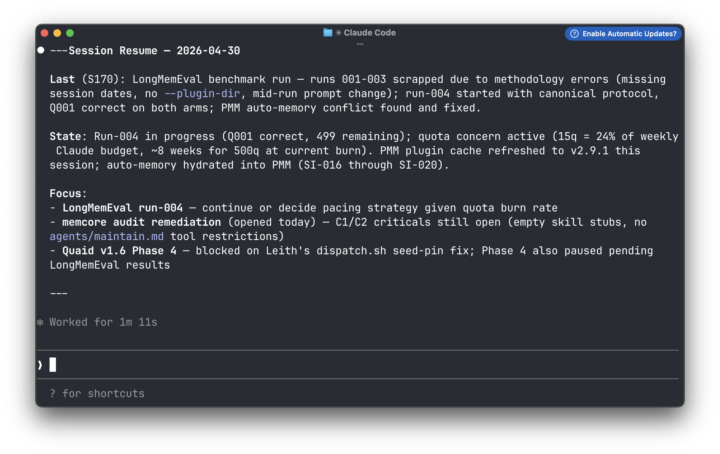
TLDR: LLMs forget everything between sessions. You re-explain yourself constantly, lose progress on long-running work, and have no reliable way to pick up where you left off — especially when switching between models or tools. I built PMM to fix that. @Deacon Wardlow helped me improve it by identifying a specific gap: session continuity — what changed, what’s still open, where you stopped. That’s now live in PMM v 2.8. Edit: I figured screenshots tell a better story => same memory on three different tools with 3 different models, where I've asked the LLM to basically recall outstanding tasks across the 4-5 current projects. Slightly different perspectives because I'm working a slightly different project with each model. I initially built PMM to remember stuff beyond the context window to fix an issue i had with the LLMs I use failing to remember and recall over long conversations. I used it to have the same conversation, while switching between Claude Code CLI and Co-work. Eventually it became a tool for helping me with continuity in my conversations with different LLMs on different apps and harnesses ( I switch a lot between Claude, OpenCode and GitHub Co-Pilot). I now use it to give multiple agents long-term memory (while they switch between different models on Claude, Gemini, Model Ark and a couple of smaller local models) without the use of model routing. I currently deploy it (along with with another agentic plugin I developed) to give agents long-term individual and collective organisaitonal memory in their conversations with multiple users over telegram in a small pilot. @Deacon Wardlow tested PMM in his own workflows, identified a gap in session memory management, and tried a couple of changes, which he outlined in another thread discussing Session Memory Layer + PMM

👑
⭐
Mar 2 •
Who's here? Drop your intro.
Tell us three things: 1. What you do (job, industry, student, career-changer, whatever) 2. What brought you to Clief Notes 3. One thing you're trying to figure out right now related to computing or AI I'll respond to every single one. And read each other's intros too because the person who's stuck on the same problem as you might already be in this thread. I'll go first I am Jake, I have been working in tech for 15 Years, building with Generative AI for 3 Years straight now! Excited to teach and learn! That's it. Simple, scannable, gives you data on who's joining and what they need, and keeps the feed clear for content that retains people past week one.
1-30 of 1,669

skool.com/cliefnotes
Jake Van Clief, giving you the Cliff notes on the new AI age.
Leaderboard (30-day)
1

+1456
2

+874
3

+634
4

+528
5

+483
Powered by