
Pinned

Sep '25 •
START HERE ----- Introduce Yourself. 👋
👋 Welcome to the Community! Let’s break the ice and get to know each other. Drop your intro as a comment on this thread. 👉 Share anything you want about yourself, but here are some options/ideas: - My name is: - My company is: - I live: - I specialize in: (e.g., brand strategy, event marketing, demand gen, trade shows, copywriting, content, paid ads, etc.) - My audience is: (who you help) - My experience with (industry) is: - I help them by: (how you solve their problems / what results you deliver) - What I post about: (topics we might see on your LinkedIn or socials) - My marketing “superpower” is: (e.g., turning boring copy into scroll-stoppers, making booths magnetic, spotting data insights others miss) - My current marketing challenge is: - What I want to get out of this community is: - A fun fact about me is: - LinkedIn URL: - Best way to connect with me: (call, DM, email, etc.) ✅ Next Steps 1. Post your intro below (bonus points if you drop a photo or GIF 🎉). 2. Like and reply to others to welcome them in. (This is how you’ll start building your network here fast!) 3. Keep it casual—this is your chance to show off your professional side and your personality.

5d •
Where were you on 9/11/2001?
Do you remember where you were? Were you directly affected? I know that time heals most things but every year on 9/11 I remember exactly where I was... I was half dressed, with a shirt still hanging from my hand, when the plane hit. On September 11, 2001, I lived in the Loop in downtown Chicago. Three blocks from the Sears Tower. Our windows went floor to ceiling, so that building felt like it was next door. I was getting ready for work with The Today Show on in the background. Then they showed that a plane had hit the tower. I stopped mid motion. Face about six inches from the screen, like a kid watching cartoons. My brain wasn't catching up. I just kept watching. Then the second tower. Somehow I had even fewer words than I did a minute before. My husband had already left for his job in the suburbs. So I finished getting dressed and knocked on my neighbor's door. We usually walked to work together. We decided the same thing. Get ready. Try to get there on time. See what happens. Handheld devices weren't common back then. But my neighbor had a little TV from Sharper Image, so we watched that the whole way in. You could see it on every face on the street. Confused. Worried. Nobody knew what came next. We half ran past the Sears Tower. We both figured it might be next. I'm not a runner, but I was doing the math anyway. Could I move fast enough? And if that tower came down, what were the odds it took our office building AND/OR my home with it? Home was a couple blocks behind me. My office was a couple blocks in front of me. I said goodbye to my neighbor at my office and she kept walking. When I got to inside, I told my boss I wasn't comfortable being there. About an hour in, I asked to leave. He wasn't happy about it. To be fair, nothing like this had ever happened before. He didn't know what the protocol was either. It took me a few tries to reach my husband. The lines were jammed. When I finally got through, I told him I was heading to a friend's place far from the city, and asked him to meet me there.
2
0

8d •
Free AI Summit coming up - YOU DON'T WANT TO MISS THIS!
Heads up, Alicia Lyttle is running a free AI Business Summit and I think a lot of you will get real value out of it. Dates: Sept 30, Oct 1, and Oct 2 Time: 11:00 to 2:00 CST Cost: FREE Register:https://aibusinesssummit.com/?fpr=heather54 Quick disclosure so nobody wonders: that's my affiliate link. I'm an affiliate because I use her stuff, not the other way around. I've looked, and I haven't found better AI training out there. She gives away a ton of free stuff, and every single time I show up, I leave with a new tool in my tool belt. Now, two warnings before you block your calendar. WARNING ONE: she almost always runs a couple hours long. Don't schedule anything right after unless you enjoy walking out in the middle of the good stuff. Pad your calendar. WARNING TWO: these sessions are like drinking from a fire hose. Alicia shows you how to do it live, in real time, and she talks fast and moves fast. There are usually thousands of people in the room, so it's not a slow, cozy workshop. Personally? I buy the replays. I'd rather pause, rewind, and actually go do the thing than try to keep up live while my brain is on fire. The replays are called VIP, they're $47, and the option pops up after you register for the free session. Totally optional. That's just how I personally learn best. Either way, the live sessions cost you nothing but your time. If you're going, drop a comment and tell me what you're hoping to walk away with. And if you pick up something good in there, bring it back and share it here. Let's all get smarter together.
1
0

Jul 21 •
Show me Your Team 💥
What if your AI team had names, faces, and actual jobs? This week I am handing you the EXACT PROMPTS to build yours. Two steps. That is it. _____________________ This week we're building something visual. Something you're going to want to show people. Your own AI agent team org chart. Here's how it works in two steps: **𝗦𝘁𝗲𝗽 𝟭:** Go to ChatGPT. Upload a photo of yourself and use this prompt: "Create a hand-drawn doodle style illustration, simple black line cartoon character of me, [your name], (see uploaded image as reference) with me sitting at desk with laptop, playful handwritten text, colorful marker highlights, minimal shading, off-white background, notebook sketch aesthetic, social media graphic." **𝗦𝘁𝗲𝗽 𝟮:** Once you've got your cartoon, add this prompt: "Now use this style to create an org chart for this person. This person has [number] AI Agents that work under me. [List your agents and their roles]." 𝗘𝘅𝗮𝗺𝗽𝗹𝗲: Now use this style to create an org chart for this person. This person has 5 AI Agents that work under her! Cody the Copywriter, Dolly the Graphic Designer, Frannie the Final QC + Feedback Coach, Betty the Author Bio Expert, and Lincoln the LinkedIn Strategist. Don't have agent names yet? Just pick five jobs you wish someone else was doing and give them names. That's how I started. Two prompts. That's it. You'll end up with a custom cartoon org chart showing YOUR AI team reporting directly to YOU. 𝗧𝗔𝗞𝗘 𝗔𝗖𝗧𝗜𝗢𝗡 𝗡𝗢𝗪: Once you've built your org chart, drop it below.

Jul 10 •
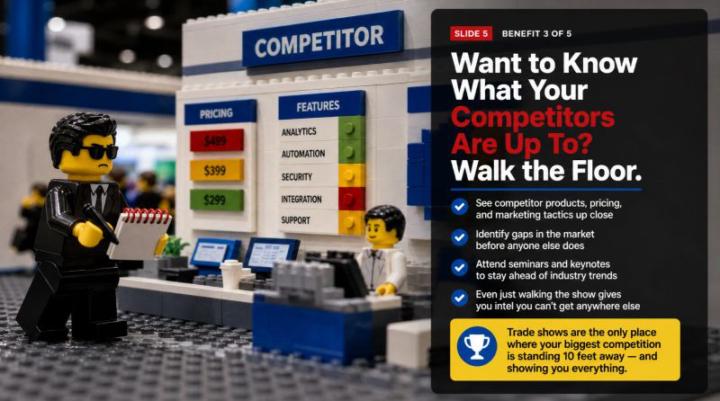
Create AH-MAZING Slides with Manus
That LEGO slide you're looking at? I built an 8-page LEGO slide deck. With Manus. With one prompt. 𝗪𝗵𝗮𝘁 𝗶𝘀 𝗠𝗮𝗻𝘂𝘀? Manus isn't a chatbot. It's an autonomous AI agent, which means you give it a goal and it goes to work on its own. Everything happens in the cloud, so you don't even need to keep your computer on. Once you start a task, Manus keeps working until it's done and then sends you a message with the results. Think of it like handing a project to a really capable assistant and walking away. 𝗛𝗲𝗿𝗲'𝘀 𝗷𝘂𝘀𝘁 𝗮 𝗦𝗔𝗠𝗣𝗟𝗘 𝗼𝗳 𝘄𝗵𝗮𝘁 𝗠𝗮𝗻𝘂𝘀 𝗰𝗮𝗻 𝗱𝗼: 💥Build full websites and web apps. 💥Create AI agents. 💥Generate presentations and slides. 💥Do deep multi-source research. 💥Connect to Telegram, Slack, and WhatsApp. 💥Write and run code. It's one of my VERY favorite tools. I use it sparingly because it takes credits to do things, but when I need it, there's nothing quite like it. 𝗪𝗵𝗮𝘁 𝗱𝗼𝗲𝘀 𝗶𝘁 𝗰𝗼𝘀𝘁? Manus runs on a credit-based system with four tiers: - Free at $0/month with 300 daily credits - Standard at $20/month with 4,000 credits - Customizable at $40/month with 8,000 credits - Extended at $200/month with 40,000 credits - Annual billing saves 17% 𝗡𝗢𝗧𝗘 - a single deep-research task can burn through 900 to 1,000+ credits, and Manus doesn't tell you the cost before you hit go. 💲My 8 LEGO slides cost me 555 credits. 💲A 1 minute video I created was 6,561 (it was really good though!) 💲The app I built took about 6,500 credits (I used Claude to write it first) 𝗣𝗿𝗼 𝘁𝗶𝗽: Have Claude write the slide content first. Pro tip 2: Break your project into smaller pieces so you can use your free 300 daily credits, or tell it to show you the first 5 slides and wait for your approval to proceed, and then tell it to proceed the next day with another set of slides. You HAVE TO be in Manus Lite for the 300 credits to be pulled first! 𝗛𝗼𝘄 𝗜 𝗺𝗮𝗱𝗲 𝘁𝗵𝗶𝘀: I inserted 5 pages of copy from a "history of trade shows" session. I uploaded it to Claude to create the copy for each slide. Then I went to Manus and used 1 prompt.
1-30 of 59
powered by

skool.com/booth-boss-bootcamp-6684
A place where busy marketing pros come to work smarter, not harder. Trade show strategy, AI tools, weekly hacks, and a community full of heart.
Suggested communities
Powered by