
Write something
Pinned

🚀
7h •
🔗 We just added an internal linking tool to DataWise
Internal links are one of the most underused SEO wins. Most sites have pages that nothing links to, and paragraphs that mention a topic you've written a whole guide on without linking to it. Finding those by hand on a 100+ page site takes days. So we built a tool that does it for you. 𝗛𝗼𝘄 𝗶𝘁 𝘄𝗼𝗿𝗸𝘀 Enter your domain and it reads every paragraph on your site. For each one, it shortlists the 4 most related pages. Then Jev, a decision model built specifically for yes/no judgements, decides which page (if any) a reader should go to next. 𝗘𝘃𝗲𝗿𝘆 𝘀𝘂𝗴𝗴𝗲𝘀𝘁𝗶𝗼𝗻 𝗰𝗼𝗺𝗲𝘀 𝘄𝗶𝘁𝗵: - the exact paragraph it belongs in - anchor text taken word for word from your own content, so nothing gets rewritten - a confidence level: Sure, Needs review or Not sure It also favors your under-linked pages, so the pages that need links most get them first. And it spreads links across your site rather than stacking them all on your homepage. Export the results as a CSV and hand it to your team. If your site is built with Claude, give Claude the CSV and have it add the links for you. It's cheap to run. A full 300-page site costs about 30 cents in API credits. Want access? DataWise is included free with your AI Ranking community membership, along with keyword research, rank tracking, AI visibility monitoring, the SEO assistant and everything else in the app. Members also get the full video walkthrough showing exactly how the tool decides every link. 👉🏼 https://www.skool.com/ai-ranking/

Pinned
🚀
26d •
DataWise is now inside ChatGPT and Claude
Most SEO work is copy and paste. Pull the keywords, export the CSV, paste it into ChatGPT, ask it to make sense of the mess. Half the time you are just moving data around. This week I killed that step. DataWise, the SEO platform I built, now plugs straight into ChatGPT and Claude. You ask a question in normal English (or any language) and the AI goes and gets the real data itself. "Build me a keyword plan for a roofing company in Brisbane." "Compare my site with my two biggest competitors and show the easiest gaps to go after." "Check my rankings and tell me what moved this week and why." No exports. No tabs. It runs on live search data, and it reads your own rank tracking, AI visibility and Search Console numbers too. Then the AI does what AI is good at: clustering, prioritising, writing the plan. Two things I learned building it, that apply whatever tools you use: 1. The bottleneck was never the data. It was the friction between having data and thinking with it. Every export, every paste, every reformat is a place where you stop thinking. Remove those and you do more actual SEO in an hour than you used to do in a morning. 2. Tell the AI which tool to use. Left alone it guesses, and it usually guesses wrong. Naming the source in your prompt is the difference between real numbers and a confident hallucination. This is live now for AI Ranking Premium members. DataWise comes free with the membership, this feature included, nothing extra to pay.

Pinned

Oct '25 •
Learn and take action = new clients = monthly recurring revenue
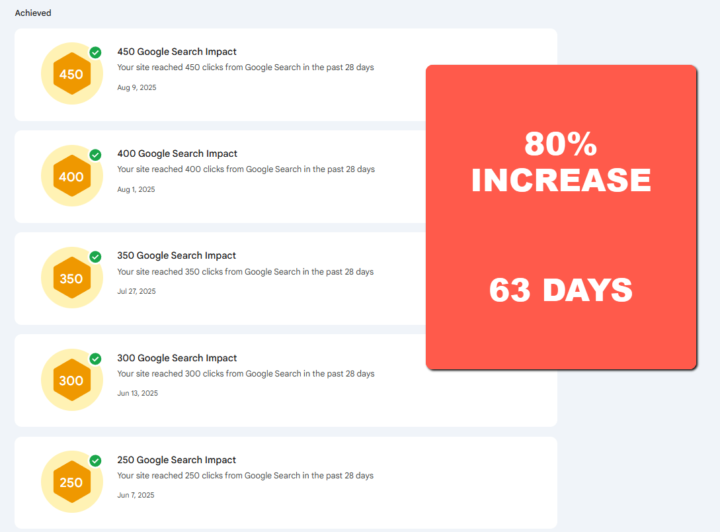
I used what I learned in the premium group to get results like: ⭐ Ranking new pages and blog articles page 1 fast. ⭐ Increased Click Through Rate by 80% in 60 days. ⭐ Increased page ranking from 30 to 10 in 60 days. Then I used those results to get a new client by showing the results. $997 for a website build - I did it cheaper up front - I want that monthly recurring revenue. The website is the vehicle to being able to upsell services. For less than what it costs me to take my wife out to dinner I've learned how to create Digital Assets that generate my clients new leads every month. I want this for you too! Click here and I'll see you over there! https://www.skool.com/ai-ranking/about?ref=9b7fd8e67d46429d917e363580ee565b
🚀
10d •
🔍 New in DataWise: see who's ranking in your city, and why
Ever wondered why a competitor outranks you on Google? This new feature in DataWise gives you a quick bird's-eye view. SERP Analysis works like this: pick a keyword, country and city, and you'll see: - 📊 Monthly search volume, cost per click (in your local currency) and a 12-month search trend - 🏆 Who ranks on page one in that exact location - 🔗 Why they might be ranking: Domain Rank, links to the page and the whole site, estimated traffic, and whether the keyword is in the title and URL - 🎯 Weak spots: competitors that look beatable - 📁 A CSV export you can hand to ChatGPT or Claude for deeper analysis It won't tell you everything about why a site ranks, but it's a fast, practical place to start. DataWise is included with AI Ranking Skool Premium membership: one tool for your SEO, keyword research, rank tracking and AI visibility.

🚀
17d •
Build and host an entire website for $0.99
(ZIP FILES ATTACHED - ON MOBILE SCROLL RIGHT) A dollar forty two. Once, not per month, and all of it was the domain. Free ChatGPT built it, Cloudflare hosts it for nothing, the template was free. Everything I used is here. THE FILES Template libraries. 40+ places to get free static HTML business templates, sorted by type. Pick one that already looks like the business you're building for. HERE Business information doc. Fill this in before you open ChatGPT. It's the part everyone rushes and it's what decides whether the site looks like yours or like a template. Pre-publish checklist. Run it before the site goes live. HERE THE PROMPT Have a look at the zip file. This is a website that I want to upload to Cloudflare Pages. Take a look at the business info text file and fill out the business information in that zip file, so that when I upload it into Cloudflare it is ready to go. Also make sure it has the correct schema for the business, and the main keywords in the headline: the service, and where they do it. Give me back the zip file, ready to be uploaded to Cloudflare. THE BIT I LEFT OUT The cheap domain is only cheap for a year. My 99 cent .site renews at around 32 dollars. A .com at cost is 10 to 11 dollars, every year, no first-year trick. Over three years the dollar domain is the expensive one. Use it to prove the thing works for the price of a coffee, which is what I was doing. For a real business that plans to still be trading in three years, buy the .com. And register it in the owner's name. Never let a web designer own a client's domain.
1-30 of 396

skool.com/ai-ranking-free
Your starting point for AI-powered SEO. Rank in ChatGPT, Perplexity and Google AI. Free 7-lesson Kickstarter, 3 days of DataWise & more
Leaderboard (30-day)
1

+8
2

+7
3

+7
4

+6
5

+5
Powered by