Activity
Mon
Wed
Fri
Sun
Aug
Sep
Oct
Nov
Dec
Jan
Feb
Mar
Apr
May
Jun
What is this?
Less
More
Owned by Vitalii
Where creators learn to build commercial AI visuals that actually convert. Realism, ads, influencers, video and workflows that make money.
Memberships
AI Creator Profits
27k members • Free
AI Creator School
8.8k members • Free
Zero to Hero with AI
12.3k members • Free
NextGen AI
44.2k members • Free
AI Creative Syndicate
32 members • Free
Ineffable.ai — Create with AI
491 members • $19/month
AI Realism Starter Hub
20k members • Free
Imperium Academy™
67k members • Free
Jack's Community
101 members • Free
147 contributions to The AI Advantage

11h •
🚀 Fable 5 x Higgsfield MCP is live
Higgsfield just re-upped their Fable 5 + Higgsfield MCP post, and it's worth a look if you haven't tried the combo yet Fable 5 is Anthropic's top-tier model. Higgsfield MCP is the connector that lets Claude talk straight to Higgsfield's generation models (Kling, Veo, Seedance, Soul, and 25+ others). Connect the two and Claude can plan a whole content pipeline, scripts, shots, generation, revisions, then hand the actual rendering off to Higgsfield instead of you juggling five tabs Higgsfield's claiming a month of campaign work in a day. Big claim, but the shift itself, one model planning and another producing, is real and worth testing if you're already in this stack

3d •
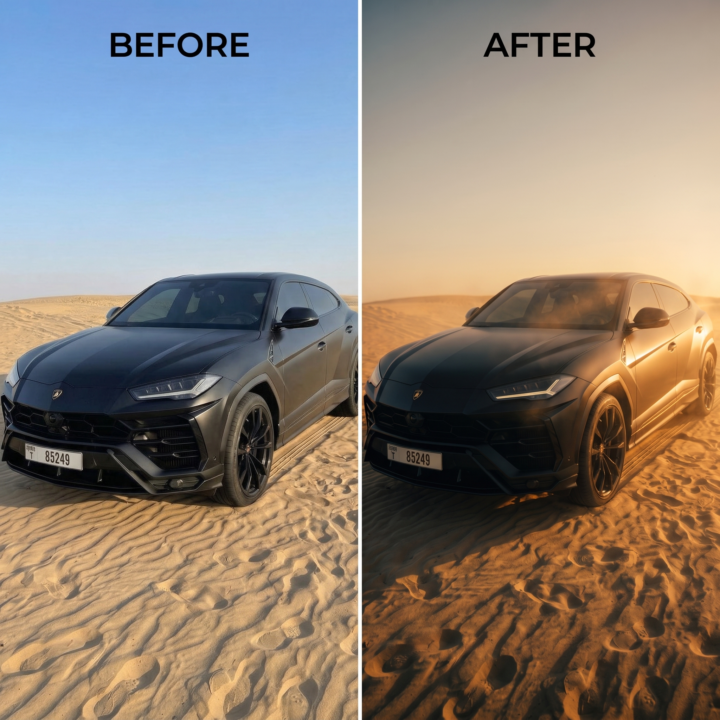
⚡ Professional Grading Matrix Prompt
Most AI modification workflows fail because they warp the original image. When you ask for "cinematic lighting," the engine usually hallucinates and alters the subject's face, posture, or the camera framing To apply a true, non-destructive color grade acting just like a professional LUT in DaVinci Resolve you must set absolute hard constraints 📐 The Master Grading Prompt Copy and paste this structural system block directly into your image editor canvas or image-to-image prompt console alongside your base asset: Apply a cinematic film-grade transformation to the uploaded image. This is a COLOR, LIGHT, and ATMOSPHERE edit only - preserve the original subject and composition with absolute fidelity. === HARD CONSTRAINTS (DO NOT ALTER) === - Keep the subject's pose EXACTLY the same. - Keep all facial features, identity, and skin texture EXACTLY the same. - Keep the camera angle and framing EXACTLY the same. - Keep body proportions, clothing, and subject placement unchanged. - Do NOT add, remove, or move any people or major objects. === CINEMATIC TRANSFORMATION GOAL === Color-grade the scene into a photographic, filmic still that looks captured on real cinema hardware - natural and organic, never digital or over-processed. LIGHTING: - Strong directional / low-angle light shaping the subject in the midground. - Defined specular highlights paired with deep, soft shadow pockets. - Subject visibly interacting with the directional light (rim light, falloff). ATMOSPHERE: - Soft dreamy haze and gentle particulate in the air to catch light rays. - Subtle volumetric god-rays where the light source allows. - Delicate halation and bloom blooming softly around the brightest areas. COLOR PALETTE: - Warm golden highlights contrasted against cooler, desaturated shadows (warm/cool split-tone) OR a warm analogous harmony - whichever suits the scene perfectly. - Medium-rich saturation with dense, filmic color depth. - Natural contrast curve with a controlled, gentle highlight rolloff.
8d •
🏆 Supercomputer 2.0: The End of Tool-Hopping
I’ve been keeping a close eye on how autonomous agents are reshaping creative workflows, and the launch of Higgsfield Supercomputer 2.0 marks a massive shift in how we produce media We are officially moving past single-model generation and entering the era of orchestration Supercomputer 2.0 isn’t just a video generator—it’s a cloud-native agent stack built on NVIDIA’s Agent Toolkit that commands over 35 distinct image, audio, and video models simultaneously Here is why this completely changes the game for production teams: - 🔄 Autonomous Error Correction: Powered by a customized "Hermes" logic engine, the system acts as its own Quality Checker. If it detects a visual glitch or warping face, it recursively adjusts its own parameters and regenerates without you having to manually step in - 🧠 Long-Term Brand Memory: The biggest bottleneck in AI video is consistency. This system features episodic memory that permanently remembers your exact brand voice, aesthetic style, and character geometry across completely different sessions - ⚡ Parallel Generation: It leverages Seedance 2.0 to generate pixel latents (video) and waveform latents (audio) in dual parallel branches, meaning perfectly synced dialogue without bouncing between five different tools The ceiling just got raised. We are no longer prompt engineers; we are creative directors managing autonomous studios Has anyone tested the recursive Quality Checker yet? Let me know how it handles complex structural physics in the comments! 👇

11d •
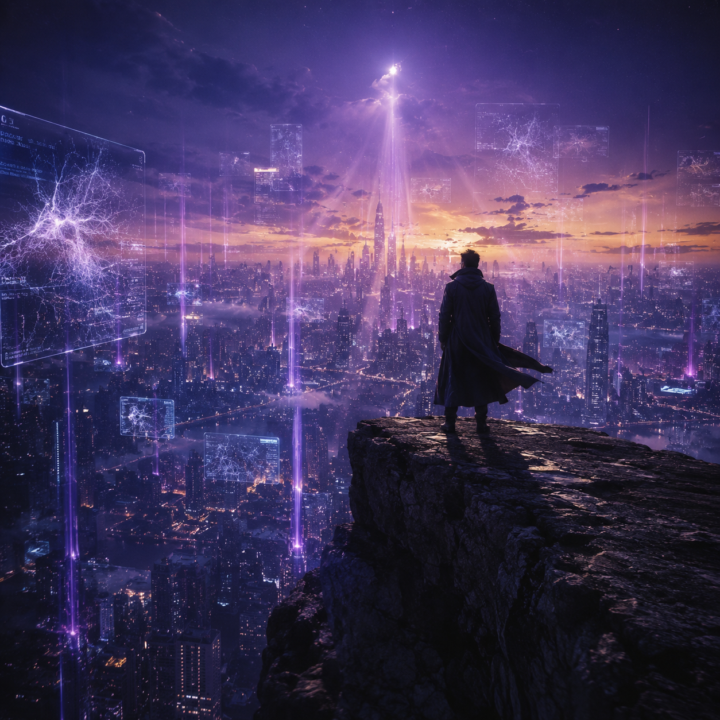
🔮The 5-Year AI Prediction
Genuine question for the community 👇 Five years from now is 2031. Five years ago we didn't have ChatGPT. We didn't have Midjourney. We didn't have Sora, Veo, Kling, Higgsfield, or anything close to what we use daily now. The leap from then to now is bigger than anything most of us predicted. So if we're sitting here in 2031 — what does the landscape actually look like? Drop your honest take on any or all of these 👇 🧠 Where do current models go? What does ChatGPT-equivalent look like in 2031? What does Claude become? Where does Higgsfield end up? Do we still call them models or has the entire interface changed? 🎬 What new categories emerge? What doesn't exist yet that you think will be standard by 2031? Personal AI agents that run your whole business? Real-time generative everything? Full AI feature films? Something we can't even name yet? 💼 What opportunities open up? What's the equivalent of "AI creator" in 2031? What jobs exist that don't exist now? What skills are people paying for that nobody's paying for yet today? ⚠️ What dies? What current job, tool, or industry doesn't survive the next five years? ⏳ And the wildcard — what's the surprise nobody's predicting? No right answers. I want hot takes, cold takes, optimistic, pessimistic, weird.
15d •
⚡ Unlimited Seedance 2.0 For 30 Days?!
🚨 Higgsfield just announced 30 days of unlimited Seedance 2.0 According to the launch, this is powered by an official BytePlus partnership and offers unlimited Seedance generation for 30 days For anyone making AI videos, that's a lot of room to experiment without constantly watching your credits Honestly, the most interesting part isn't the offer itself It's seeing what people create when generation limits disappear Anyone grabbing it? Curious whether this changes how much you experiment with video workflows 👇

1-10 of 147

@vitalii-hryhorenko-4120
Big AI Enthusiast who helps creators master AI product visuals. Simple systems, repeatable results, no studio needed
Active 11h ago
Joined Nov 10, 2025
ENTJ
Leamington Spa
Powered by