Activity
Mon
Wed
Fri
Sun
Apr
May
Jun
Jul
Aug
Sep
Oct
Nov
Dec
Jan
Feb
Mar
What is this?
Less
More
Memberships
Pick Your Online Business
813 members • Free
AndyNoCode
31.6k members • Free
ambITious AI
1.7k members • Free
AI Marketing Hub
2.7k members • Free
SW
SWS Private Community
3.1k members • Free
Mystic POD
1.8k members • Free
The RoboNuggets Network (free)
37.2k members • Free
Design Hub
516 members • $99/m
AI Automation Society
298.7k members • Free
9 contributions to Mystic POD

Jul '25 •
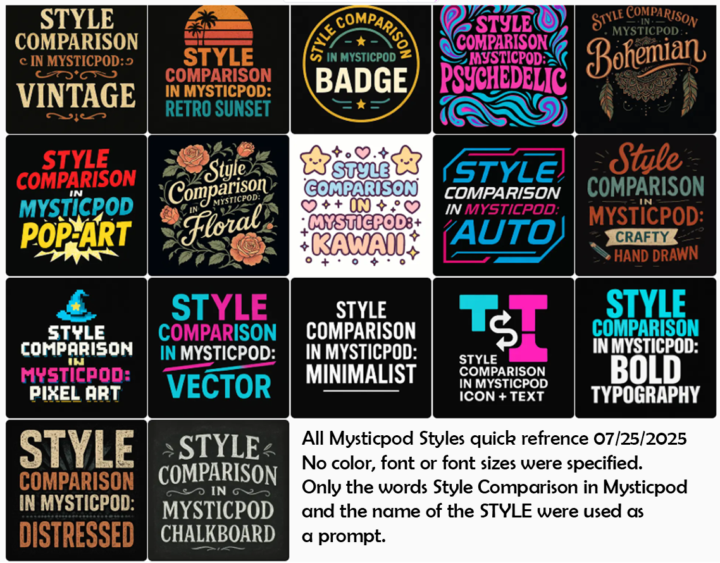
Mysticpod STYLES Quick Refrence
Mysticpod users, you might want to take a look at the Styles Quick Reference I put together. All 17 Styles in one PNG file for a quick look to help decide what you're seeking. The ZIP file contains all 17 styles, each in a larger 1024 x 1024 pixel file for a larger view. I did not apply any color, font or font sizes to these images only the words "Mysticpod Style Comparisons:" plus the particular STYLE selected for each one was used as a prompt. Hope this helps someone. . .

0 likes • Jul '25
Great! This is helpful!

Jul '25 •
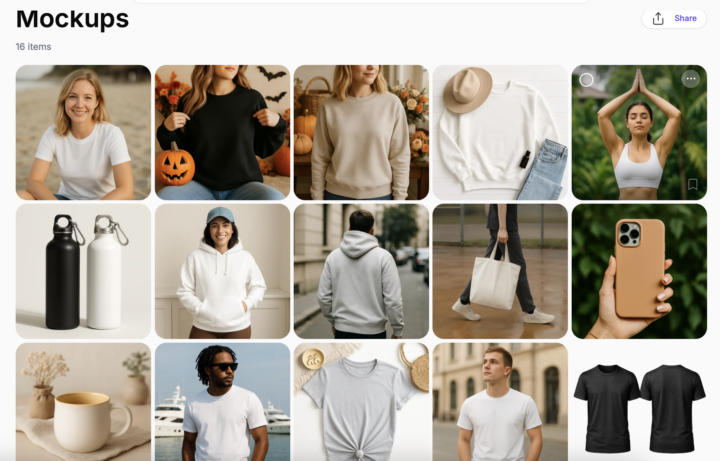
🤯 Still Confused About Mockups? FREE Templates Here! 👈
We know creating mockups directly in Mystic POD can sometimes feel tricky. That's why I've put together a set of go-to mockup templates with refined prompts you can reuse! Here's where you can import them: Mockup Templates ⬅️ These are super easy to reuse and remix. Simply grab its prompt, paste in your generated design, and watch Mystic POD create stunning product visuals or you can just add your magic touch to it by remixing! 🪄 ‼️ Just a quick note, I generated these with the Magic Prompt turned off. 😉 Which one's your favorite to start with? Or if you are looking for something specific, let me know below.👇
5 likes • Jul '25
@Michiko S For color change you can try iFoto (mentioned here: https://www.skool.com/mysticpod/classroom/8f14eda2?md=9b8a1d10325d490788d3b4f52ea74d4c)

Jul '25 •
4 Features I'd like to see in Mystic POD
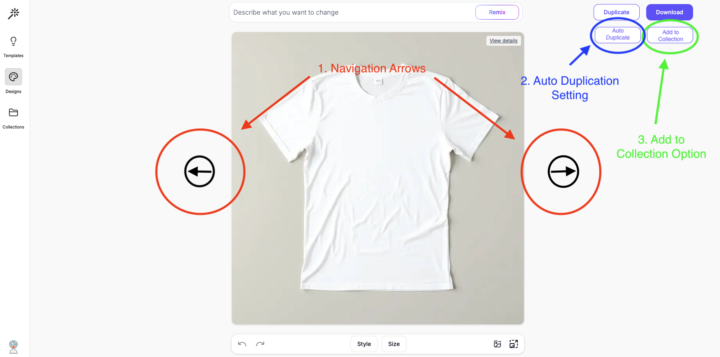
1. Enable arrow key navigation (left/right) to move between designs within full design view without returning to the overview 2. Add an auto duplication feature to duplicate images automatically before modification or remixing 3. Allow adding designs directly to collections from the design view to streamline organization 4. Introduce a new product type called "mock-up" (or allow static user-defined settings) that users can preset or customize, alongside existing products like t-shirts and mugs
3 likes • Jul '25
I'd like to see these UI improvements too!
Jul '25 •
Woohoo! Prompts Are Back! 🎉
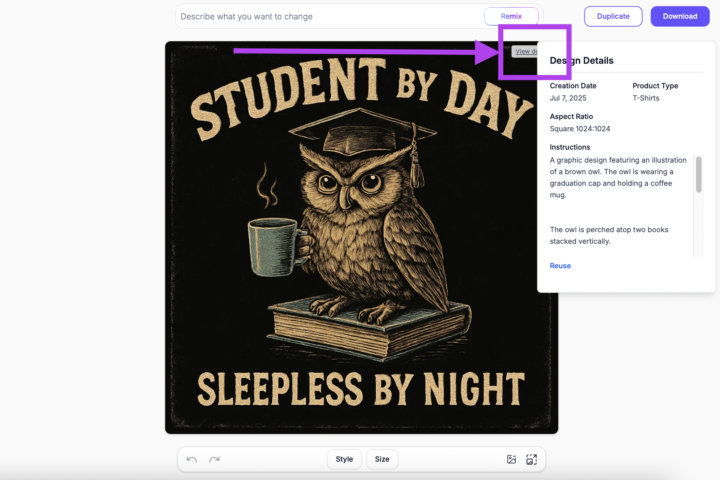
Hey Mysties! 📢 We've heard your feedback loud and clear, and we're thrilled to announce that a much-requested feature is back! You can now see the original prompt of your generated images again within Mystic POD! This will make it so much easier to refine and reuse those perfect prompts that create your bestselling designs. No more guessing what magic words you used! Simply click on the image you want to get the prompt of and click the 'View Details' button on the upper-right corner of the image. Tada! ✨
5 likes • Jul '25
This is what I wanted to happen!
Jul '25 •
BG removal algotithm choice
I am studying the Mystic manual and came across this feature: Version 2.0: Advanced Background Removal Setting Version 2.0 as Default: - If you prefer to use Version 2.0 from the start, you can set it as your default version. - To do this, navigate to your preferences and enable Version 2.0 as the default option instead of Version 1.0. There's no settings tab in my profile. Is it gone?
1 like • Jul '25
@Soufiane Laouici Nice tip! Thank you!
1-9 of 9

Active 2h ago
Joined Jul 11, 2025
ISTJ
Powered by