Activity
Mon
Wed
Fri
Sun
Mar
Apr
May
Jun
Jul
Aug
Sep
Oct
Nov
Dec
Jan
Feb
What is this?
Less
More
Owned by Todd
AI is changing everything. Your faith doesn't have to. Faith-centered AI training for Christians and ministry leaders.
Memberships
The Iron Circle: Brotherhood
131 members • Free
church
122 members • Free
34 contributions to The AI Advantage

Oct '25 •
What a neat platform Skool is!
Hello everyone! I'm tuning in from the Detroit, MI area. I've only used GG AI, so this will be my very first time working with any AI app. I'm excited to learn all about this and how it can help me FINALLY launch my business. As always, I'm thankful to Tony and Dean for always doing their best to bring the best tools and solutions to the world. 🤩


2 likes • Oct '25
@Jen Barrington Welcome. Skool & Circle and other membership style platforms are growing really rapidly. They are like older social media sites, in that you may need to be on more than one if you will have your own community/communities because of how many people they are each capturing in their ecosystem. I've been on Circle for a while and will also be launching a new membership on Skool in the next few days.
0 likes • Dec '25
@Jen Barrington Yes, a couple of weeks ago. It's going well so far. I'm ranked in the top 400 in Spirituality and am really happy with the engagement of my members. (Around 87%) I've focused more on engagement rather than raw numbers joining and that has contributed to steady growth in the rankings. I don't think anybody knows Skools exact formula for rankings, but I think based on my experience you would not find many things more important than member engagement. As an example, there are several groups right around me in the rankings with far more members than I have.
Nov '25 •
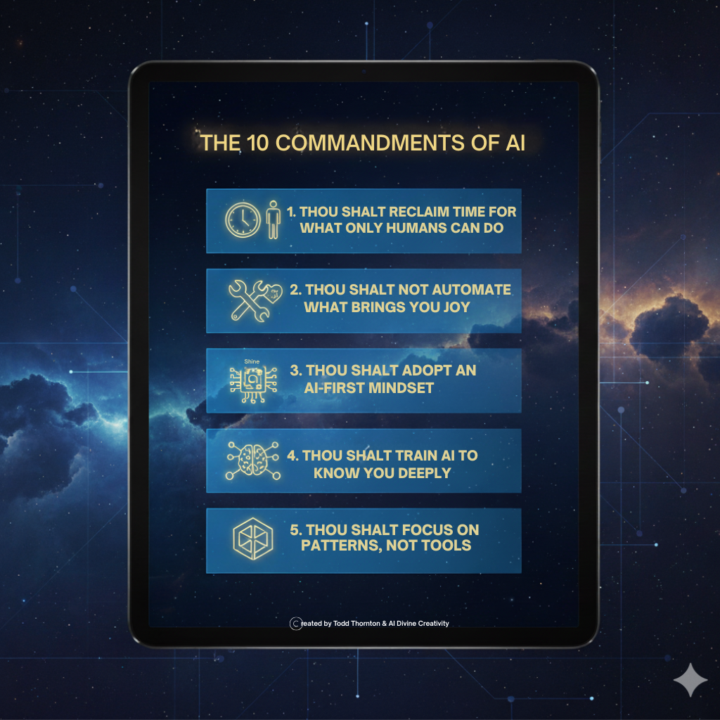
The 10 Commandments of AI
I distilled every speaker's wisdom into 10 essential commandments. This is your 10 Step AI playbook.
1 like • Nov '25
@Heidi Vallencourt I'm certainly not suggesting AI comes before God. I teach pastors how to use AI in an appropriate way so I would never do that. This particular list is about condensing the information from the conference and thinking about AI first when contemplating how to accomplish a task to give yourself more time for more important personal or professional work. In a pastor's case, automating some tasks is about giving them more time to personally counsel those in need.
2 likes • Nov '25
@Heidi Vallencourt Sorry for the delayed response. I'm truly sorry that my content came across in a way that felt disrespectful to your beliefs. Your faith is important, and I never meant to suggest that anything, including AI, could take priority over God in anyone's life. At the same time, I hope you can understand that I also need to stay true to my creative choices. I'm always open to feedback, and when I make a factual mistake, I'm quick to own it and make corrections. But when it comes to how content is interpreted, that can vary so much from person to person, and I have to accept that not everything I create will resonate with everyone in the same way. What I was trying to do was simply create a memorable tool to help people retain 10 important business concepts from the conference. Nothing more, nothing less. I know some people have found it helpful, while I understand it affected you differently. Both reactions are valid. I appreciate you taking the time to share your concerns with me. Even though we may not see eye to eye on this particular piece of content, I respect where you're coming from. I will gladly take your criticism to heart and in the future think more about how what I create can be interpreted in different ways.
Nov '25 •
What is your favorite AI tool for content, design/layout and images?
I am curious to know what most of you are using for content, design/layout and images that look close to real. Please share why these are your favorites.
1 like • Nov '25
Leonardo AI is the best image aggregator tool so you can use multiple image models including Lucid Realism & Nano Banana. (best model for editing). Content/research would be Claude or Perplexity or Gamma for presentations.
1 like • Nov '25
@Dan Funke I would use Nano Banana (either inside of Leonardo or in Google studio) to clean up any headshots and then use the Lucid Realism model inside Leonardo to create an avatar/look you really like. Once you have that, you go back to Nano Banana for variations. (IE standing, sitting, different backgrounds. etc. Hope that makes sense. You'd then use those images to create your avatar in your video tool/model of choice. Nano Banana is free to use inside Google studio, but you likely would have enough credits in Leonardo to use it some if you wanted things in one spot.
Nov '25 •
Today's Goal- Become
Woke up Day 2 with a poem in my head about goals. Then I remembered one conference theme: repurpose everything. So, I turned those lines into a spoken word feel track. Give BECOME a listen and let me know what you think in the comments. BECOME LYRICS Synthesize the chaos into sense, cut through confusion, sharp and dense. Prioritize, keep your focus tight, filter the noise, bring truth to light. Categorize what's real from the fake, your mind's the canvas — what will you make? Organize your thoughts, stay steady, composed, poise in the pressure when the system explodes. Analyze the patterns that appear in the grind, the clues are coded — coffee-stained notebooks, the rhythm you find in the way your pen moves when the hour gets late, in the calluses forming where your fingers meet fate. Now energize — feel the pulse ignite, your passion's fuel, so burn it bright. Memorize the lessons carved in every fall, wisdom echoes through the cracked walls. Maximize the seeds you've planted deep, let every scar teach your tongue to speak. Visualize the peak — you're climbing toward light, the summit whispers through the coldest night. Here's the shift: stop performing the part. Harmonize your purpose with your heart — not sync desire with fire's flame, but know the difference between hunger and fame. What you build, what you give, what remains when you're gone — that's the gold. That's the song. Revolutionize the way you move through days, turn your hustle into how you stay, how you show up when no one's watching close, how you honor what matters most. Crystallize your dreams till they gleam in your hands, make reality match what your spirit demands. Actualize what your soul already knows — see the invisible, watch it GROW. This is the GOAL. Not to chase the whole world's eyes... but to become WHOLE INSIDE.
1 like • Nov '25
@Connor Wallace Just search my name in the main search bar. One was posted yesterday and the first was posted the first day of the conference.
0 likes • Nov '25
@Karen Jensen You are welcome to use it. I'd be honored.
Nov '25 •
3 Questions That Will Define Your Future in the Age of AI
Updated with Day 3 Speakers- AI can help us distill a speaker's core message into actionable self-reflection. By analyzing their key themes and transformative ideas, we can extract the questions that matter most for our own journey. Based on the speaker's vision, here are three essential questions to ask yourself: Zach Kass 1. What is my automation boundary? 2. Are my current skills advancing my mission, or am I simply staying in my comfort zone? 3. What human qualities (empathy, creativity, wisdom) am I actively strengthening that will remain irreplaceable? Igor Pogany 1. What repetitive tasks am I still doing manually that could give me back 20 minutes or more per day? 2. What patterns in my work could I show AI through 3-5 examples to automate future similar tasks? 3. Am I tracking my AI time savings to build momentum and discover new automation opportunities? Allie Miller 1. Where am I the bottleneck in my own business, and what tasks could AI start or complete without my constant involvement? 2. Am I viewing "code" as an obstacle, or as a solution I can create (without coding) for my business? 3. How can I scale myself as the product instead of just trying to do more hours of work? Arthur Brooks 1. Am I using AI for analytical tasks (left brain) or mistakenly trying to use it for meaning, love, and relationships (right brain)? 2. Why am I alive, and for what would I give my life right now? 3. Am I reinvesting my AI-saved time into real relationships and experiences, or more digital simulations? Sabrina Romonov 1. What is one piece of content I'm already creating that could be automatically repurposed into 5+ different formats across platforms? 2. Have I trained my AI on my unique voice, audience, and expertise so it truly acts as my thought partner? 3. What small AI win can I implement this week to save 30+ minutes, and how will I compound that success over time? Marc Benioff 1. What would I build if I had unlimited resources and AI eliminated all capacity constraints? 2. Am I embracing the discomfort of this AI transformation, or am I dangerously comfortable? 3. What do I want to create with today's AI tools, and am I using AI to reveal my strategic blind spots?

2 likes • Nov '25
AI analyzed these speaker transcripts to generate these questions, but that doesn't mean they're the best ones for you and your business. One of the most powerful ways to maximize your impact after a conference is to spend time asking yourself questions that will actually move you forward on your path. AI just makes that much easier than in the past.
0 likes • Nov '25
@Carole Myers I certainly think it can help. I would ask it for ways to not be afraid of new things or change and give it the specific context. Also ask it to help you drill down on "why" it's happening. It sounds like if you found techniques for the exact problems you face then extra clarity would likely come quickly.
1-10 of 34
@todd-thornton-2429
I guide and equip Christians and ministry leaders to spread the Gospel further using AI that honors God. Step-by-step. One clear path at a time.
Online now
Joined Oct 10, 2025
Bowling Green, KY
Powered by