Activity
Mon
Wed
Fri
Sun
Nov
Dec
Jan
Feb
Mar
Apr
May
Jun
Jul
Aug
Sep
What is this?
Less
More
Atlassian Everything
314
Free
7 contributions to Atlassian Everything

May 19 •
Need Some Votes for an Assets Dashboard Suggestion
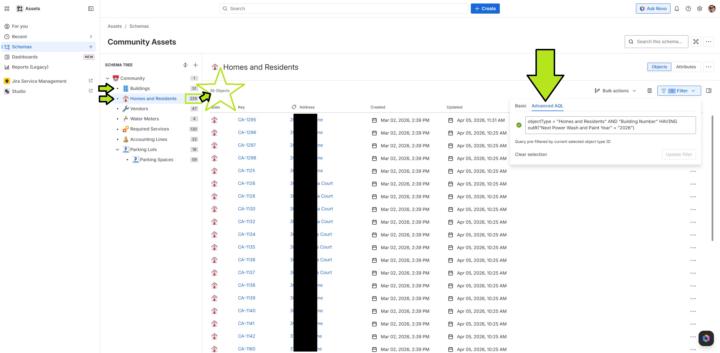
Hello everyone, May I have your vote? Link to the suggestion: https://jira.atlassian.com/browse/JSDCLOUD-18979 My implementation and description of the issue as it relates to it: Right now, I have to use this Advanced AQL and then format the columns correctly, just to see the information stored in attributes under objects from one object type that has an outbound reference to objects from another object type in the same schema: objectType = "Homes and Residents" AND "Building Number" HAVING outR("Next Power Wash and Paint Year" = "2026") I want to use the above AQL in Assets Dashboards so non-technical users can repetitively observe the correlation of this information between two objects without constant technical intervention. Further description of the setup: Currently, in the Assets schema tree, I have two particular object types "Buildings" and "Homes and Residents." In my community there are multiple homes or units in each building. Each "Buildings" object has two particular attributes named, "Building Number" and "Next Power Wash and Paint Year." "Homes and Residents" has a majority of home information to include the attribute "Building Number", which is the reference to a unique object from the "Buildings" object type. Do I have your vote yet? What do you think the chances are of Atlassian implementing this anytime soon? Thanks all!
0 likes • May 19
Thanks Chris!

Apr 8 •
Customer Service Management App
If you were to need a help desk for external client support today. Would you build it with Customer Service Management or Jira Service Management and why? I'm trying to understand the scenarious where right now it still best to use JSM for external help desk and not go down the CSM route (at least not yet). Atlassian marketing positioning suggest a line in the sand that if external customer help desk, then go CSM, if internal staff help desk then JSM.
1 like • Apr 8
TL;DR: You all may want to just see this "My honest opinion" section first from a video from the Jimi Wikman Official channel on YouTube (link below). Keep in mind that things may have changed since he released this video back in October of 2025. Follow along with him from the beginning of his video if you decide to check it out to see if CSM has improved since then and reply with your thoughts. https://youtu.be/wZO4BjNW6m8?si=HGAbYzxe8PBDdkN6&t=2685 Atlassian Support summarizes Customer Service Management here: https://support.atlassian.com/customer-service-management/docs/about-customer-service-management/ They say, "It’s organized around three main areas: customer experiences, customers, and projects." CSM's "projects" is probably the reason why we call "projects" in Jira/JSM "spaces" now. Furthermore, Atlassian Support says at the link below, "If you’re currently using Jira Service Management for external support, you may want to move to Customer Service Management to take advantage of some of its more advanced features." https://support.atlassian.com/customer-service-management/docs/move-from-jira-service-management-to-customer-service-management/ Then it goes on to not give you enough details about those advanced features to really help you make that decision on whether you should use it or not. This is the full video from the Jimi Wikman Official channel on YouTube where he shows how "customer experiences" work and details how this is really for only your first tier of support to the customer. They also call "Request Types" "Forms" in his video. What?! https://www.youtube.com/watch?v=wZO4BjNW6m8

Mar 26 •
Atlassian Billed Josh 100k . . . "on accident"
Has Atlassian ever "accidentally" billed you 100k before?

2 likes • Mar 26
Let's rephrase that question: Has Altassian ever stolen your gas money for the week?
Jan 18 •
Assets Now in Service Collection Standard (but not yet)
Marketing folks have listed "Asset and configuration management" under the "Standard" tier for the Service Collection here: https://www.atlassian.com/collections/service/pricing What is weird is that they are allowing those who only had JSM standard to migrate early to the Service Collection (with same pricing) or be migrated automatically (sometime this Feb is what it told me). I accepted the Service Collection Standard move from just JSM standard for one of my sites to happen now. This was actually a few days ago. I ended up with "Customer Service Management" but with no access to "Assets" yet. After submitting a support request, they tell me: "...I understand you have a question regarding the 'Assets' Feature within your Service Collection. I know you’re excited to try out this new functionality, and apologize for the inconvenience this has caused. While our features and pricing page does state that Assets is included for Standard plans, please note that there have been some slight delays in getting the feature rolled out. At this time we are targeting an early-mid February release for the Assets feature for all Standard plans. I realize the discrepancy between the information and actual practice isn’t great, and appreciate your understanding. I will pass this feedback along to our team for review as well. There will be a Community Blog post when the feature does officially become available. Please let me know if you have further questions as this time." Also, expanding "Assets pricing" at the bottom of the page at the link above shows a clear contradiction in the first two paragraphs: "Asset and configuration management is included in Service Collection Premium and Enterprise plans. Included in these plans, Standard customers will be allowed to store 5,000 Assets objects for free, while Premium and Enterprise customers will be allowed to store 50,000 and 500,000 Assets objects for free respectively. Above this limit, objects will start at $0.02(USD)/object/month with volume discounts."
1 like • Mar 2
@Susan Waldrip Atlassian is actually moving customers in the other direction, from the individual products and to the collections. They actually moved me from JSM Standard to Service Collection standard, which includes Jira Service Management, Customer Service Management, Assets, and Rovo: https://www.atlassian.com/collections/service/pricing Assets is a separate app, however it still integrates with Jira Service Management, Jira, Confluence, and more.
1 like • Mar 2
Over the weekend, I already implemented and integrated Assets with my JSM instance. I maintain a request portal for my condo community and our community management company actually uses JSM on the backend to manage all of our Maintenance Requests, Action Items and Projects (like epics/large projects), Safety/security/violations concerns, general questions, facilities access and reservations, and leased unit tracking. Attached are a couple of screen captures. One shows our clubhouse as an asset, with its related work, where you can also filter out resolved issues with a toggle. The other capture shows the asset information embedded on a work item. Assets is a game changer for me.

Jan 29 •
Storage on Atlassian side for files?
I'm wondering if it's possible to produce a CSV file in-house and upload it somewhere in the cloud (ideally in Atlassian's cloud) for JSM to access? It would be a file with our JSM customer's email address, organization code, and department name so would need to be accessed for every ticket. Can this be done? I'm asking because we recently purchased the Shared Data for Jira Fields app and we're probably going to face firewall permissions issues with that app "touching" our Oracle systems or data warehouse directly for this data.
1 like • Jan 29
Maybe this could work by configuring Assets? "Import your data into Assets" https://support.atlassian.com/assets/docs/import-your-data-into-assets/ I found the above, but then decided to ask Google Gemini your question too. This is what it said. The gurus here may be able to expand or eliminate these as options: "Yes, this is absolutely possible. Since you are looking to avoid direct database connections due to firewall restrictions, using a CSV as a middleman is a common and effective strategy. The Shared Data for Jira Fields app (by codefortynine) is specifically designed to handle this. You can host your CSV file in a cloud location that the app can reach via a URL, which bypasses the need for the app to 'touch' your internal Oracle systems directly. The Recommended Workflow Instead of a direct database connection, you can set up a 'push-pull' architecture: 1. Generate In-House: Run a scheduled script in your local environment that queries your Oracle/Data Warehouse and exports the required data (Email, Org Code, Dept) into a CSV file. 2. Upload to Cloud: Have that same script upload the CSV to a cloud storage service that provides a direct download link. 3. App Configuration: In the Shared Data for Jira Fields configuration, set the Data Source to 'URL.' Point it to your cloud-hosted CSV. 4. Field Mapping: Map the CSV columns to your Jira custom fields. You can set the app to refresh this data periodically (e.g., every hour or once a day) so your JSM tickets always show the most current customer info. Alternative: JSM 'Assets' (Standard/Premium Feature) If you have JSM Premium, you might not even need the third-party app. You can use the native Assets (formerly Insight) feature: - Import via CSV: Assets allows you to import CSV files from a URL on a schedule. - Object Mapping: Each row in your CSV becomes an 'Object' (e.g., a 'Customer Profile' object). - Ticket Integration: You can then use an 'Assets object' custom field on your JSM tickets. When an agent opens a ticket, Jira can automatically link the correct profile based on the reporter’s email, displaying their Dept and Org Code instantly.
1-7 of 7

@timothy-braxton-2039
Retired early from federal service (25 years) and looking for something to do! Love using Atlassian products, building PCs, fixing electronics, and +
Active 15d ago
Joined Jan 15, 2026
Glen Allen, Virginia
Powered by