Activity
Mon
Wed
Fri
Sun
Mar
Apr
May
Jun
Jul
Aug
Sep
Oct
Nov
Dec
Jan
Feb
What is this?
Less
More
Memberships
Learn Microsoft Fabric
15.3k members • Free
5 contributions to Learn Microsoft Fabric

13d •
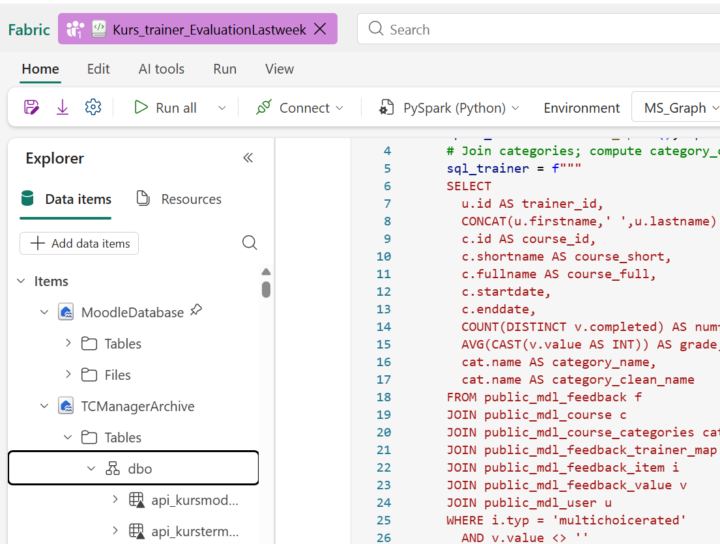
Read tables from a second Lakehouse in the same Fabric notebook
I am working in Microsoft Fabric and need to use two Lakehouses in the same notebook (later inner join between 2 tables from 2 lakehouse or join using 2 dataframes). I can read data from the default Lakehouse (for example: df_mean = spark.sql(sql_trainer)), but I cannot read tables from a second Lakehouse that is not set as default. What is the correct way to read tables from the second Lakehouse?

2 likes • 10d
You can read both the lakehouse with abfss path without even attaching lakehouse to the Fabric Notebook
0 likes • 10d
@Hachem Sfar You can still use SQL. Just load the second Lakehouse table with abfss, then register it as a temp view, and SQL joins work normally

23d •
Reuse Fabric Code Cross Worksapce
I have silver layer fabric workspace which has numerous notebooks under folder called "common". e.g one of the notebook is called Env_Config which basically identifies environment and then depending on environment, it does some basic variables configuration. Another notebook is called "shared functions" , a central notebook with all UDF. Now I am at the stage where I am working on gold layer where I need similar code to identify the environment and other basic configuration and shared functions. I am creating similar notebooks in gold because my understanding is, it is sounding like duplication but it is controlled duplication and seems fabric pattern. Am I right with above approach or are their any other alternatives or suggestions to avoid it?
3 likes • 10d
You don’t need to duplicate anything. Just keep the shared notebooks in one place and call them from Gold using: %run notebook_name %run ../common/Env_Config %run ../common/shared_functions
Jun '25 •
Suggest best way to connect SharePoint to Fabric ??
The SharePoint site contains folder like structure say year/month/date in that (list of files) and files are incrementally added every day so how to load the data in same format in Fabric Option 1: By creating a connection( with tenant details) using copy data can able to load only the schema of the files in the lakehouse not the physical tables Option 2: Using the dataflow gen2 failed to run the query as the data for the one month is more then 5GB Please suggest an optimise way to connect SharePoint of fabric
0 likes • Jun '25
use data pipeline with copy data and spark notebook still able to download only the file details like file when created / modified / etc... Not the data in the files are stored in the lake house and as suggested dataflow is not an option for incremental load when data is more then 5GB
Apr '25 •
Can We Migrate all the components from one Workspace to other Workspace which is not Git configured and both are in different regions
What is the best practice to migrate(dataflows, lakehouses, notebooks) from one workspace to other workspace
1-5 of 5

@sneha-jujare-7962
Passionate about designing scalable data systems, optimizing data flow, and transforming raw data into valuable insights for businesses.
Let’s connect
Active 9d ago
Joined Jan 31, 2025
Powered by