Activity
Mon
Wed
Fri
Sun
Jun
Jul
Aug
Sep
Oct
Nov
Dec
Jan
Feb
Mar
Apr
What is this?
Less
More
Memberships
AI Automation Society
352.9k members • Free
AI Automation Sprint
259 members • Free
Real-World AI Builders
572 members • Free
AI Fellowship Hub
8.6k members • Free
The Cyber Community
8.5k members • Free
[Archived] KubeCraft (Free)
11.2k members • Free
Tech Snack University
18.7k members • Free
The AI Gov Con Corp
2.6k members • $29/m
AI Automation Agency Hub
314.6k members • Free
16 contributions to AI Automation Society

3h •
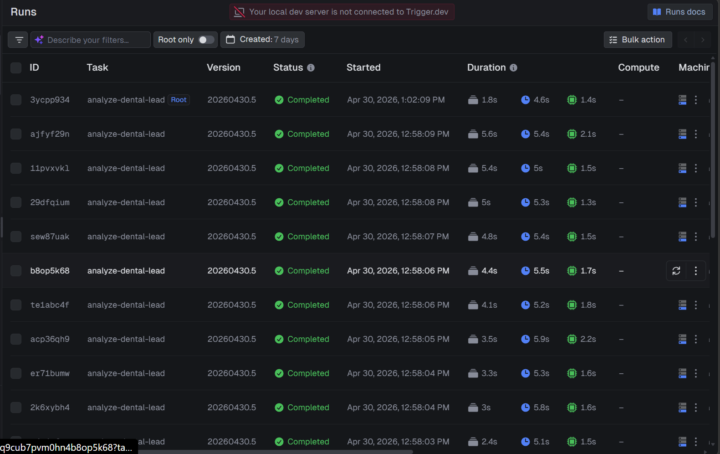
Day 4: Trigger-Clickups -7days AIS Automation
I was able to implement Sales Tuesday: It searches the web every Tuesday for 25 dental practices, analyzes their websites, and creates a ClickUp lead funnel with 3 personalized selling points per practice. One thing that broke SerpAPI returned 400 errors because the code used the wrong engine (google_maps requires a paid plan). Fixed by switching to the free google engine. I will combine this process with the day 3 project to build a more robust sale workflow
0
0

22h •
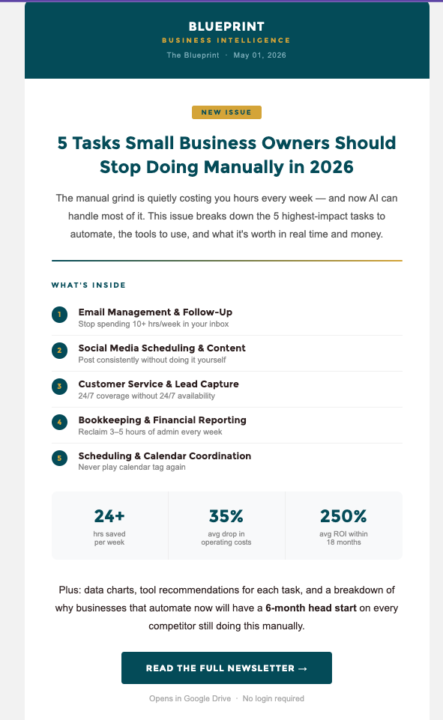
#7dayAISChallenge: Day 1 - Newsletter
Day 1 is done! This was interesting to see play out. I've done a few builds in n8n and what's clear to me is Claude Code's self-healing feature. With n8n, you'd definitely have to do some digging while troubleshooting. With Claude Code, you can see it more visually, you can see how Claude utilized the information given to it to create the newsletter. And more than likely, you can also leverage Claude's intelligence to fix any issues or errors it runs into. When that's not the case, you'll probably have to do some digging as well, but overall you understand more about how things are built versus just leveraging the automation of n8n.
0 likes • 6h
Congrats on completing the Day1. So far, I’ve found the newsletter really valuable. I keep coming back to it and using it more than I expected.
7h •
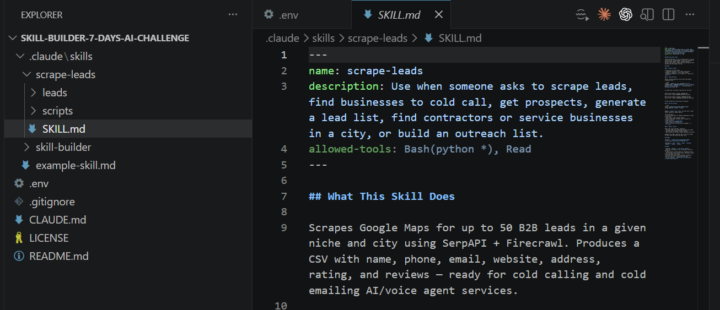
Day 3 - Skill Builder - 7Days AIS Challenge
- Skill built scrape-leads Scrapes Google Maps for B2B leads and saves them to a CSV, ready for cold calls and cold emails. I Trigger it by typing /scrape-leads and Claude asks for my niche + city, handles everything else. - Stack: SerpAPI (Google Maps search) + Firecrawl (email enrichment) - Output: name, phone, email, website, address, rating, reviews - Optimization I made: First run got emails on only 10/50 leads. Watched the agent work and realized it was only checking homepages. Updated it to fall back to /contact and /contact-us pages automatically. - Result: 21/50 leads with emails - more than double with one code change. - The output: 50 Services with phone numbers and emails, scraped in under 10 minutes, zero manual work.
1 like • 6h
@Lana Frei That makes sense now, thanks for pointing that out, I appreciate the clarity.

💎
⭐
2d •
🚀New Video: Build & Sell Claude Code Operating Systems (2+ Hour Course)
This is the full walkthrough of how I build my AI Operating System inside Claude Code, from the frameworks I use to think about it (the Three Ms and the Four Cs) to the actual setup, connections, skills, and routines that run while I sleep. By the end you'll know exactly how to set up your own AIOS, even if you've never opened Claude Code before. The full template, docs, and resources are free in my school community linked below. GITHUB REPO
13 likes • 2d
Thanks @Nate Herk

4d •
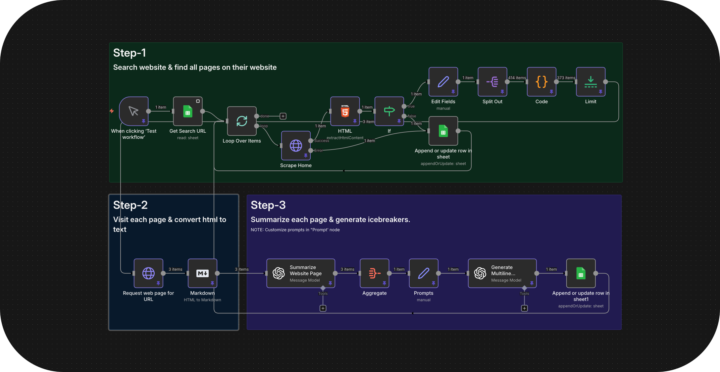
Why your cold emails get ignored (and how I fixed mine to book 9 calls/week)
I've been running cold email campaigns for clients for 3 years and the biggest shift I've seen isn't the tools. It's what actually gets a reply. Personalization used to mean scraping a name and company from LinkedIn, dropping it in the first line, and hitting send. "Hey {FirstName}, I noticed {Company} and thought..." That worked in 2022. It's dead now. Everyone's doing it and prospects can spot a mail merge from the subject line. What changed for me was treating personalization like actual research instead of a data field. Here's what I started doing: → I scrape the prospect's entire website. Not just the homepage. Blog posts, service pages, case studies, about page, even their contact form if it's there. → Then I feed all of that into OpenAI and have it analyze what they actually do, who they serve, and what problems they're likely dealing with. The AI doesn't just summarize. It finds the specific details nobody mentions in generic outreach. So instead of "I saw you work in logistics," the email opens with "Noticed you handle cross border freight into Mexico. Your blog mentioned customs delays eating 15% of delivery windows." That's the kind of line that gets opened because it doesn't sound like 500 other emails they got that week. The reply rates went from 2-3% with generic personalization to 8-10% with actual research. One prospect replied last week: "Your email won because you actually read our site. Everyone else sent the same template." The system I built does this automatically. Scrapes the website. Analyzes every page. Generates icebreakers that reference non-obvious details. It writes openers like a human who spent 20 minutes studying their business, except it does it for 1,000 prospects in an hour. Here's what I learned building this: Small prompt details make a massive difference. Having OpenAI shorten company names naturally (say "Stripe" not "Stripe Inc.") and reference specific pages beyond the homepage makes it feel real. The difference between "I saw your website" and "I saw your freight tracking dashboard lets customers get ETAs without calling" is everything.
1 like • 4d
Very informative, thanks for sharing this timely insight.
1-10 of 16

@siri-d-6124
Solutions Architect - building in AI automation creating systems that save time, increase revenue, and scale businesses.
Active 3h ago
Joined Jun 19, 2025
Powered by