Activity
Mon
Wed
Fri
Sun
Apr
May
Jun
Jul
Aug
Sep
Oct
Nov
Dec
Jan
Feb
Mar
What is this?
Less
More
Owned by Patrick
Where serious artists start with Blender Octane learn the fundamentals fast and free inside the Blender Octane 101 Guide.
Stop guessing in Blender Octane. Learn how to light, texture, and render with confidence so your work finally looks professional. $35 normally
Memberships
CG Python Academy
1.2k members • Free
Creative 3D Community
6.5k members • Free
BlenderJoy
386 members • Free
Skoolers
190.3k members • Free
Kanji Athletes
63 members • $2/m
Blender Professionals (Free)
2.2k members • Free
Mindset Mastery
11 members • $20/m
133 contributions to Blender for Octane (Free)

4d •
Big Update — Community Changes Coming in June
Quick heads up. In June, the free community will be closing. Join here https://www.skool.com/blender-octane/about If you’re currently in the free group, you’ll need to move over to the main community to stay connected. Nothing changes for the basics: You’ll still have access to the free Blender Octane 101 guide. But here’s what’s new… We’re shifting to a freemium model. That means: - You can still get started for free - But if you want to go deeper, premium is where everything is Premium includes: - Full courses - Material + asset library - More in-depth breakdowns - Direct help and feedback inside the community The goal is simple: Less split attention, more focused growth, better results for everyone. If you’re serious about improving your work, this is where you want to be. More details coming soon. https://www.skool.com/blender-octane/about
0
0

9d •
Consolidating to One Blender Octane Community
Community Update: Consolidating to One Blender Octane Community Watch Video Summary The video is a community update announcing the closure of one community in three months to consolidate efforts into a single community. The creator explains the benefits of merging the communities, including better focus and maintaining value for premium members, and provides instructions on how to join the new consolidated community. Action items Join the new consolidated community via the provided link. JOIN HERE Understand the difference between free and premium memberships in the new community. Prepare for the closure of the current community in three months.
3
0


10d •
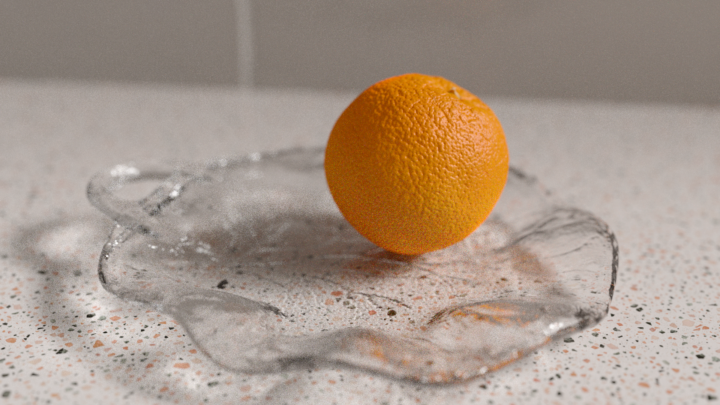
Orange Render
This is my fiancé's render! He absorbed all of the videos I watched next to him and he did this in couple of hours! And he is a programmer, not even a 3d artist 😆 Crazy🤭
1 like • 9d
This looks really good great lighting almost looks like a photo Excellent job Can't wait to see the next one
Feb 7 •
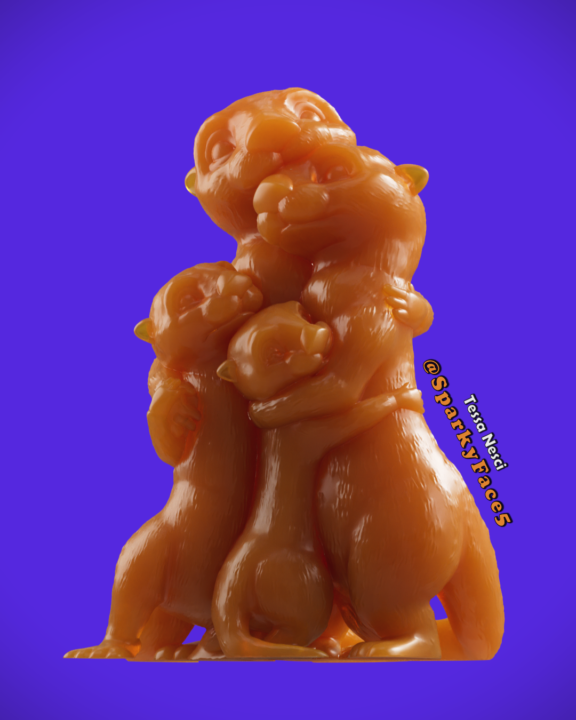
My Otter Family
This is a model I created for my husband a few years ago, it's a representation of our family as his favourite animal, otters. Lately I have been playing around with learning more about rendering, lighting and materials. I love the way light plays with food and candy so why not combine the two things together 😅 So here we are, a chewey caramel sticky and delicious family of otters 🤤🤣
1 like • 10d
@Abdelmoniem Mohamed https://www.skool.com/blender-for-octane-6039/quick-update-about-the-community?p=2dd4f1d4
1 like • 10d
@Abdelmoniem Mohamed
16d •
Creating Realistic Grungy Edges
Hey guys a lot of you guys are asking about material videos to help you out so here's a quick one that I do on how to grunge stuff up using the dirt node Creating Realistic Grungy Edges and Material Layers in 3D Rendering Watch Video Summary This video is a detailed tutorial on creating a grungy, aged edge effect on a 3D cube using material nodes and textures in a rendering software. The instructor demonstrates how to manipulate dirt textures, noise, and material layers to achieve realistic edge wear and metal underlayers, while also discussing the use of projection and bump mapping. Additionally, the video touches on a multi-scene project converted from Cycles to Octane, intended for a paid community resource. Action items Use dirt and noise textures to create realistic edge wear on 3D models. Utilize material layers to add underlying metal effects with adjustable opacity. Convert and customize existing assets for personal or community projects.

0 likes • 10d
@Abdelmoniem Mohamed scene files are available in the other community
0 likes • 10d
@Abdelmoniem Mohamed https://www.skool.com/blender-for-octane-6039/quick-update-about-the-community?p=2dd4f1d4
1-10 of 133

@patrick-levar-2358
I create Blender Octane videos to assist you in making better-looking 3D renders.
Active 2m ago
Joined Oct 8, 2025
Osaka, Japan