Activity
Mon
Wed
Fri
Sun
May
Jun
Jul
Aug
Sep
Oct
Nov
Dec
Jan
Feb
Mar
Apr
What is this?
Less
More
Memberships
Clief Notes
23.7k members • Free
8 contributions to Clief Notes

7h •
Skills and Tools in ICM
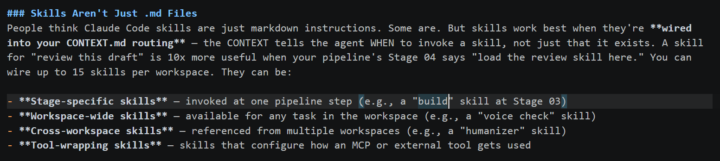
Hoping to get a few questions answered on skills/tools based on the resource materials and examples from the classroom. 1. Do you guys keep a "global skills" folder at the project level (ie. for skills used for multiple workspaces)? That way you don't have to maintain the same skill in multiple places? 2. In the workspace-blueprint example, it says "skills work best when they're wired into the CONTEXT.md files. I asked Claude how to "wire" (which I assume just means making it accessible via backslash) and Claude said it needs to exist in the .claude/ folder, but I don't see this in the example. 3. The example also states "you can wire up to 15 skills per workspace". I don't see this limitation in any documentation - is this just a suggestion? If so, why? If you invoke a skill by name or md, why would you want to limit the number of skills in a workspace - if the ICM works as intended, it should only load in the specified skills.
0 likes • 3h
@Tristen Andre thanks for your response! I am using claude code w/ vsc. I had a chat with Claude, and it seems that it only has attention of a skill (automatically at the start of a session) if it exists in .claude/skills, otherwise you have to reference the skill in CONTEXT.md (which you should do regardless). Additionally, Claude Code will only read the description of the skill.md file for skills in .claude/skills instead of loading in the entire md at session start. I'm going to manage this through CONTEXT.md just because I want a model agnostic framework, in case I need to switch models in the future
0 likes • 2h
@Albot Bot Thanks for your response! I did some additional research and I likely won't make them discoverable through .claude/skills/ since I want a model agnostic framework. I also understand your point on description dilution - thanks

1d •
Level 2!!
Made it to Level 2!! I'm working on some ideas and folder structures that I'd like to share. Are we allowed to share github repo's here? Not sure of the rules, couldn't see any posting guidelines.
1 like • 22h
I don't think there's any rules against it. Interested in seeing what you have though!

3d •
LEAKED: The Anthropic Team's Internal Prompting Framework
An ex Anthropic researcher just leaked 10 prompts to help you optimize your prompting. ## Prompt 1: Context Brief (The Map Claude Actually Needs) Never jump straight into a question. Start with rich context: ``` You are helping me with [specific goal]. My background: [your role + company/project + constraints]. I've already tried [X and Y]. I'm stuck on [Z]. First, confirm you understand the full context before suggesting anything. ``` Internal tests showed this single change boosts output quality by 41%. Claude isn't psychic — give it the full map. ## Prompt 2: Force Visible Reasoning (Chain-of-Thought on Steroids) Don't ask for answers. Demand the process: ``` Before giving any final recommendation: - show your full step-by-step reasoning - explicitly list every assumption - flag uncertainties and confidence levels (low/medium/high) - only then deliver the polished answer. ``` This pulls out Claude's hidden reasoning layers. You don't just get an answer — you get an auditable thought process you can actually trust. ## AND MORE - see attached files. From @kyronis_talks on X
1 like • 22h
Awesome - thanks for sharing! I assume the most appropriate place to integrate these into the ICM would be in the CLAUDE.md?

🚀
4d •
Claude Design Update is Folder Architecture
Claude design is fully released. It burns up tokens but it works very well, and allows you to automate the folder design process that I've been showing you all. My video will go on to how not to use it as I think there's still some limits to what it can be done, but it's the step in the right direction. Again, I've been telling you about building systems that will be amplified by updates, not replaced. This is a perfect example. I'm going to go ahead and make a nice long form video out about this. What do you want out of the YouTube video? Comment below what use cases you want me to explore in the long-form (and eventually course addition of course !) For those of you that have been studying this the past few months, how does it feel to be ahead for once!?
1 like • 4d
@Gregorio Hildebrand the core thesis behind Jake's ICM Folder Architecture is managing context for the AI, that's all. You want the AI to only load in the instructions and context it needs to fulfill the prompt. Your other options include Claude Cowork which is basically the app version of the Claude Code setup and Claude Projects which is just a single context container. Claude Code is def the way to go. Now I've only used Claude Design once, but I assume there's a way to give it access to the folder architecture you build out.
16d •
Obsidian is BLOAT! Batter Up
When you move from building a static knowledge base to running an active, agentic workflow, something interesting happens. Jake's method proves once again you don't need bloated apps and proprietary solutions to get results. In this approach, you don’t need a specialized app to manage your AI. The folder system itself becomes the agent architecture and the user interface. Here’s how it plays out in practice. The Filesystem Is the Orchestrator In advanced agentic workflows, you are not just storing notes. You are running multi-step production pipelines — turning a script into animation, video creation pipelines, or handling complex sequences. Jake’s ICM handles this with the basic operating system filesystem. Numbered folders manage stage sequencing. Folder hierarchy controls context scoping so the AI only sees exactly what it needs. The output of one folder flows naturally into the next as input. Because the folder structure already organizes the logic, routing, and execution, adding Obsidian creates a redundant interface layer on top of a system that is already complete. As Jake puts it, what is simpler than a folder. VS Code Gives You a Leaner Setup For directing these workflows, many move to Visual Studio Code paired with Claude Code. VS Code shows you the raw folder tree and gives direct terminal access without extra layers. Obsidian is built as a personal knowledge management tool with a visual, plugin-heavy interface. When your setup is busy running Python scripts, scheduled checks, and processing files, a lightweight developer environment fits the factory floor better than a note-taking app. Plain Text Keeps Everything Clean A key principle here is plain text as the interface. Any tool that can read a text file should be able to participate without proprietary formats or hidden databases. Obsidian can alter how your files work by adding its own metadata and formatting requirements. Staying purely in local folders keeps the entire workflow transparent, untouched, and fully portable.
1 like • 5d
@David Vogel I'd like to get your thoughts (and if this is referenced somewhere already, drop a link and I'll take look) on how to apply Jake's ICM concept at an organization level. Is there a ceiling to how large the scope of Level-1 should be? I was thinking company = Layer 1, departments = Layer 2, tools/skills/integrations = Layer 3. I'd like to build something that I can deploy org wide, because departments aren't completely silo'd. For example, the agent a sales rep uses might need to access the product/ workspace. Second, you would need a true orchestration layer to deploy this at an org level, right? Something like (n8n, zapier, etc.)? Just looking for a sanity check.
1 like • 5d
@David Vogel this is awesome - really appreciate the response. Identical to how me and the team were scoping out the design of the system - thank you, cheers.
1-8 of 8

@p-patel-5644
Tech startup director looking to keep up with the ever-evolving world of AI
Active 2h ago
Joined Apr 13, 2026
Powered by