Activity
Mon
Wed
Fri
Sun
Aug
Sep
Oct
Nov
Dec
Jan
Feb
Mar
Apr
May
Jun
Jul
What is this?
Less
More
Memberships
DP
Digital Product Creators Club
766 members • Free
AI Pro Writers Studio
112 members • Free
The Wordsmiths’ Guild
12 members • $42/month
Story Hacker AI
1.8k members • $67/month
Ideorix - AI Writing & Editing
144 members • $15/month
The Argovale Lore Guild
349 members • Free
Story Hacker STARTER
7.6k members • $7
29 contributions to Digital Product Creators Club

7d •
Pen Name?
Are you writing under your name? Or a pen name? If you are using a pen name, are you using your picture and/or bio for the author, or...
🔥
5 likes • 7d
I have several pen names. I worked on biographies for these individuals, and had Nano Banana build headshot pro photos for them. In the end, you can't really tell they're not real people...

14d •
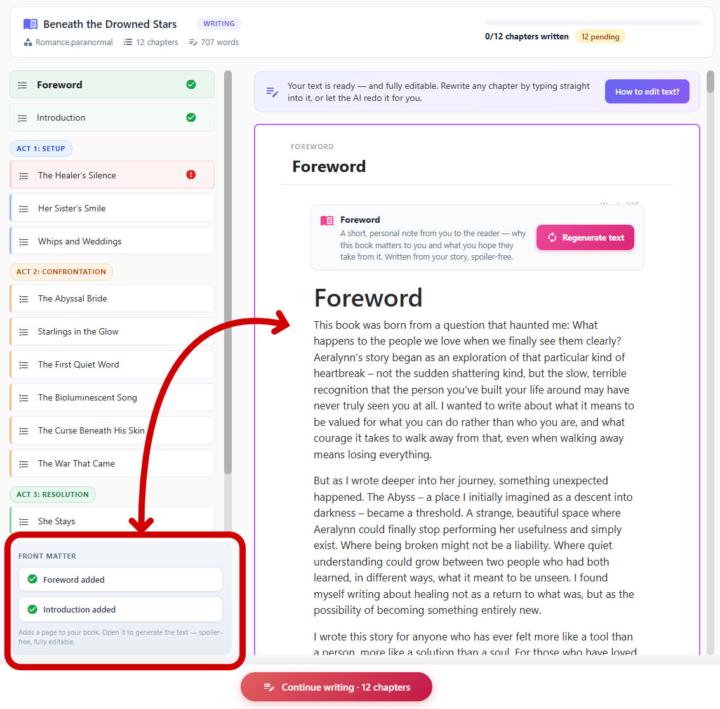
🎉 Big news — I just shipped a new feature: Forewords & Introductions!
You asked, I built it. You can now add a Foreword or an Introduction to any book you write in BookNova — in one click. Here's why this matters more than it sounds: A foreword or introduction is the first thing a reader meets. It's where you set the tone, share why this story matters, and pull the reader in before chapter one even begins. Great books have them for a reason — they turn "a book" into your book. Until now, if you wanted one, you had to write it by hand or awkwardly wedge it into chapter 1. Not anymore. 👇 How it works: In the Generate step, look for the new Front matter panel in the sidebar. Click Add Foreword or Add Introduction — it drops a new page into your book. Hit Generate text, and BookNova writes it from your actual story — matching your themes, your tone, your voice. Not happy? Hit Regenerate. Want to tweak it? Every word is fully editable. Don't want it? Delete it in one click. And here's the part I'm genuinely proud of: it's completely spoiler-free. BookNova is smart enough to write a warm, inviting foreword that captures the heart of your book — without ever giving away the twists, the ending, or the surprises your readers are meant to discover. It reads like you wrote it after finishing the whole thing. ✨ It works in every language BookNova supports, and it flows straight into your PDF, EPUB and Word exports as a proper front-matter section — TOC and all. This is one of those small touches that makes a self-published book feel truly professional. Go try it on your next book and tell me what you think — I read every reply. 💛 Happy writing! :)
🔥
6 likes • 14d
Good to have the frontspiece pages. And any Afterword materials. Always makes the final product look like it came via traditional publishing.
🔥
4 likes • 17d
@Kathy Rupert I've been at it for 18 months. There are parts I still think of as 'off the map.' Like the old world maps, marked "Here Be Dragons."
🔥
4 likes • 15d
@Michael Culp Yep. Write it, then label it...
24d •
Should I ban em-dashes "—"?
A lot (like A LOT) of clients are complaining that they don't want to see these AI em-dashes. Should I ban them 👉 "—"? And just keep the occasional regular, small "-" ?
🔥
1 like • 23d
Maybe a switch? Oh, @Steven Sheeley already said that...

30d •
🌍 Welcome to Global Food Wars
No Winner in This Food War 😂 I'm creating a PDF called Global Food Wars where foods argue over who's the best. No official winner—just funny debates, big personalities, and food drama. 🍕🍔🥘 Curious what food you'd pick to win 👀
🔥
1 like • 29d
Brussels sprouts. Not because they're the best (though I like them a lot). Because the over veggies will run away. For non-veggies: Liver and onions...
1-10 of 29
🔥
@mitch-white-1417
Retired scientist (math, chem, physics, nuclear) and technical trainer, current pro musician, and novelist with delusions of adequacy...
Online now
Joined May 22, 2026