Activity
Mon
Wed
Fri
Sun
Jun
Jul
Aug
Sep
Oct
Nov
Dec
Jan
Feb
Mar
Apr
May
What is this?
Less
More
Memberships
AI for Life
28 members • $297
Claude Code Kickstart
532 members • Free
AI Automation Society Plus
3.6k members • $99/month
AI Automation Society
364.2k members • Free
11 contributions to AI for Life

3d •
Elevenlabs text to speech
I had not used Elevenlabs text to speech in a long time. Honestly, last time I used it, it was kind of clunky. Hooo boy have they improved! Yesterday, I did something that was really just for myself. Kind of a passion project. Not looking to build a revenue stream at this point, just for fun. Using Claude to help with settings and inputs, I created a new voice - something else I had never done - and generated "The Raven" with the text to speech. You can hear the results here: https://www.youtube.com/@cozygothiclibrary That's the YouTube channel I started to have somewhere to put these. At some point I may bother to automate the whole process, but for now, I am enjoying the relatively manual creation. Entering the text to be converted to speech. Saving the files. Assembling them in Adobe Audition, adding sound effects. Creating the images. Assembling everything in Premiere Pro. Anywho... just thought I'd share something that's kind of related to things we do. It was fun, I learned stuff. Yay :)
1 like • 3d
@Matthew Sutherland difficulty level… probably on the low side. Effort, on the other hand, high side. I have an Adobe Creative Suite subscription. Been using Adobe products since they were Macromedia. So, I am very familiar with using them. If you have to learn Audition, Premiere Pro, and Photoshop for the first time… what took me 8 hours would probably take closer to a week.
1 like • 3d
That being said, I am purposely going slow to build SOPs that I can eventually hand off to a VA

4d •
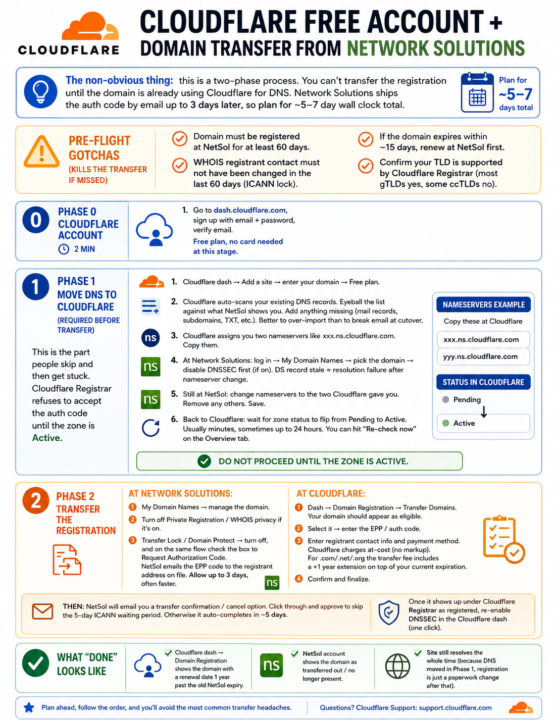
Cloudflare Free Account + Domain Transfer from Network Solutions
CLOUDFLARE FREE ACCOUNT + DOMAIN TRANSFER FROM NETWORK SOLUTIONS ================================================================ The non-obvious thing: this is a TWO-PHASE process. You can't transfer the registration until the domain is already using Cloudflare for DNS. Network Solutions ships the auth code by email up to 3 days later, so plan for ~5-7 day wall clock total. PRE-FLIGHT GOTCHAS (kills the transfer if missed) ------------------------------------------------- - Domain must be registered at NetSol for at least 60 days. - WHOIS registrant contact must NOT have been changed in the last 60 days (ICANN lock). - If the domain expires within ~15 days, renew at NetSol first. - Confirm your TLD is supported by Cloudflare Registrar (most gTLDs yes, some ccTLDs no). PHASE 0: CLOUDFLARE ACCOUNT (2 min) ----------------------------------- 1. Go to dash.cloudflare.com, sign up with email + password, verify email. Free plan, no card needed at this stage. PHASE 1: MOVE DNS TO CLOUDFLARE (required before transfer) ---------------------------------------------------------- This is the part people skip and then get stuck. Cloudflare Registrar refuses to accept the auth code until the zone is Active. 1. Cloudflare dash -> Add a site -> enter your domain -> Free plan. 2. Cloudflare auto-scans your existing DNS records. Eyeball the list against what NetSol shows you. Add anything missing (mail records, subdomains, TXT, etc.). Better to over-import than to break email at cutover. 3. Cloudflare assigns you TWO NAMESERVERS like xxx.ns.cloudflare.com. Copy them. 4. At Network Solutions: log in -> My Domain Names -> pick the domain -> DISABLE DNSSEC FIRST (if on). DS record stale = resolution failure after nameserver change. 5. Still at NetSol: change nameservers to the two Cloudflare gave you. Remove any others. Save. 6. Back to Cloudflare: wait for zone status to flip from Pending to Active. Usually minutes, sometimes up to 24 hours. You can hit
1 like • 4d
I use Namecheap for domain purchases (have for many years), and Cloudflare for DNS. I keep the domains at Namecheap for renewal purposes, and just point the nameservers to Cloudflare.
5d •
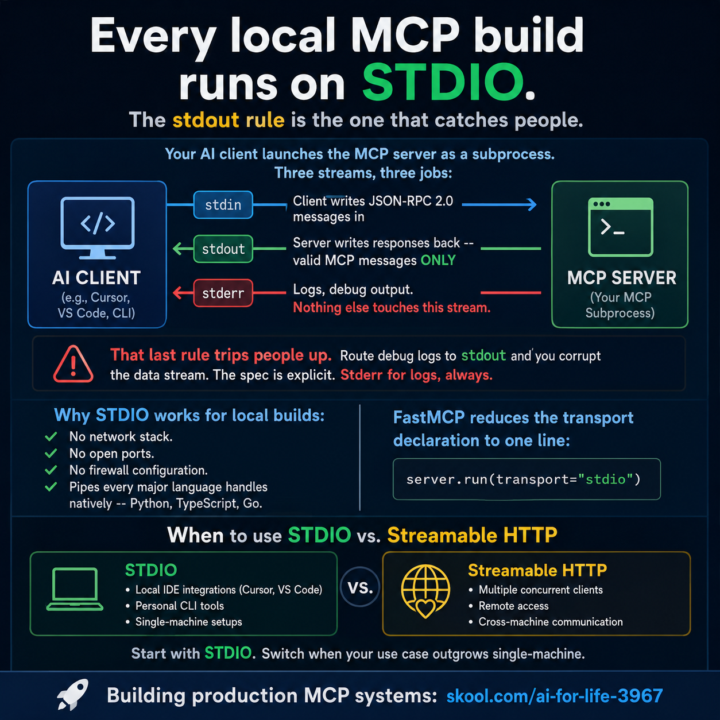
Every local MCP build runs on STDIO. The stdout rule is the one that catches people.
Your AI client launches the MCP server as a subprocess. Three streams, three jobs: - stdin: client writes JSON-RPC 2.0 messages in - stdout: server writes responses back -- valid MCP messages ONLY - stderr: logs, debug output. Nothing else touches this stream That last rule trips people up. Route debug logs to stdout and you corrupt the data stream. The spec is explicit. Stderr for logs, always. Claude Code is the client in this setup. Add your server to ~/.claude/settings.json: ```json { "mcpServers": { "my-server": { "command": "python", "args": ["server.py"] } } } ``` Claude Code launches it as a subprocess, wires the STDIO pipes, and handles the protocol. No transport config needed -- STDIO is the default for local servers. Your server side is one line with FastMCP: ```python server.run(transport="stdio") ``` Why STDIO works for local builds: No network stack. No open ports. No firewall configuration. Pipes every major language handles natively -- Python, TypeScript, Go. When to use STDIO vs. Streamable HTTP: STDIO: Claude Code, Cursor, VS Code, personal CLI tools, single-machine setups. Streamable HTTP: multiple concurrent clients, remote access, cross-machine communication. Start with STDIO. Switch when your use case outgrows single-machine. --- Building production MCP systems: skool.com/ai-for-life-3967 ELI5 explanation: Imagine your AI app (Cursor, VS Code) wants to talk to a little helper program you built. It opens up that helper as a child process and they pass notes through three pipes: stdin = AI sends questions in stdout = Helper sends answers back stderr = Helper writes its diary (logs, debug stuff) The trap everyone falls into: stdout is only for clean answers in the agreed format (JSON-RPC). The second you print("debugging...") to stdout, you’ve dumped your diary into the answer pipe and the AI chokes. Logs go to stderr. Always. No exceptions. Why this setup is great for stuff running on your own machine:
1 like • 5d
@Matthew Sutherland I'm not even sure I understand what to do with this yet. My brain isn't processing it yet. I might have to have Claude ELI5 it to me.
1 like • 5d
@Matthew Sutherland
6d •
Boris Cherny at Sequoia AI Ascent 2026 with Lauren Reeder.
Boris is the gentleman at Anthropic that created Claude Code. Just an interesting observation. Boris asked an audience of about 50 attendees, how many use Claude Code CLI? Nearly everyone put their hand up. When Boris asked, how many people use VS Code? One person put their hand up. I think nearly everyone was using an iOS device as well.

1 like • 5d
@Matthew Sutherland LOL! Someday maybe. I like AMD for the time being because they're great performance for price. Even this build was just shy of $2.5k (although with the price of gold now, the next one will probably be double).
0 likes • 5d
@Matthew Sutherland yes, I agree
Apr 1 •
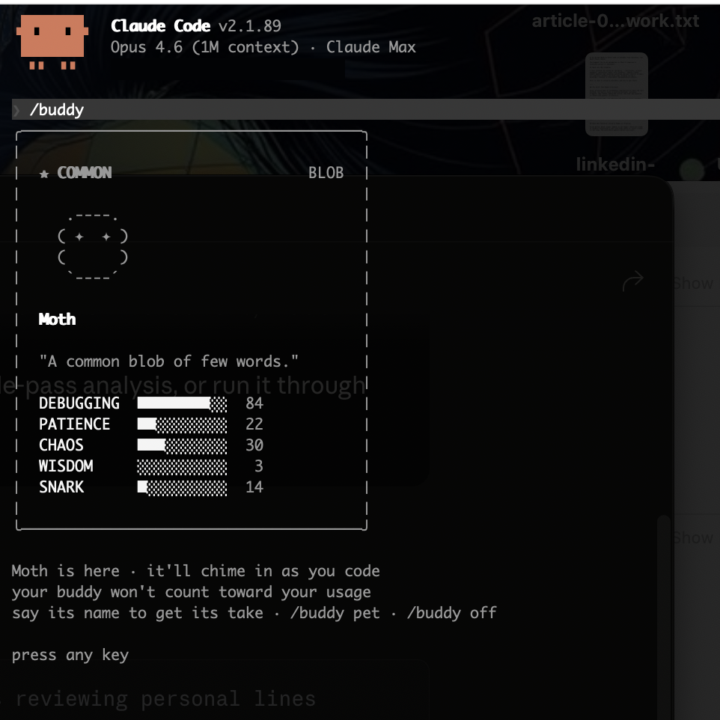
😆 Claude Code dropped /buddy today.
Claude Code dropped /buddy today. Your coding companion. Mine is named Moth. Debugging: 84. Wisdom: 3. Honestly the most accurate representation of how I feel at hour three of a session that I've ever seen in software. Happy April Fools from Anthropic. They stuck the landing.
2 likes • Apr 1
│ ★★★ RARE OWL │ │ │ │ (___) │ │ /\ /\ │ │ ((@)(@)) │ │ ( >< ) │ │ `----´ │ │ │ │ Grittle │ │ │ │ "A chaos-loving owl who finds bugs │ │ through sheer destructive │ │ experimentation and won't hesitate │ │ to roast your error handling │ │ while somehow getting results │ │ anyway." │ │ │ │ DEBUGGING ██░░░░░░░░ 19 │ │ PATIENCE ████░░░░░░ 44 │ │ CHAOS █████████░ 88 │ │ WISDOM █████░░░░░ 46 │ │ SNARK ████░░░░░░ 38 │ │ │ │ last said │ │ ╭────────────────────────────────╮ │ │ │ *ruffles feathers and cackles* │ │ │ │ │ │ │ │ "Fresh code? Oh, this'll be │ │ │ │ *fun* to break." │ │ │ ╰────────────────────────────────╯
1 like • Apr 1
@Matthew Sutherland sounds like a weird kaiju. Beware of Godzilla's wrath.
1-10 of 11

Active 3h ago
Joined Mar 17, 2026