Activity
Mon
Wed
Fri
Sun
Mar
Apr
May
Jun
Jul
Aug
Sep
Oct
Nov
Dec
Jan
Feb
What is this?
Less
More
Memberships
SOLIDWORKS Course Pro
66 members • Free
SOLIDWORKS Accelerator
2.2k members • Free
4 contributions to SOLIDWORKS Accelerator

Dec '25 •
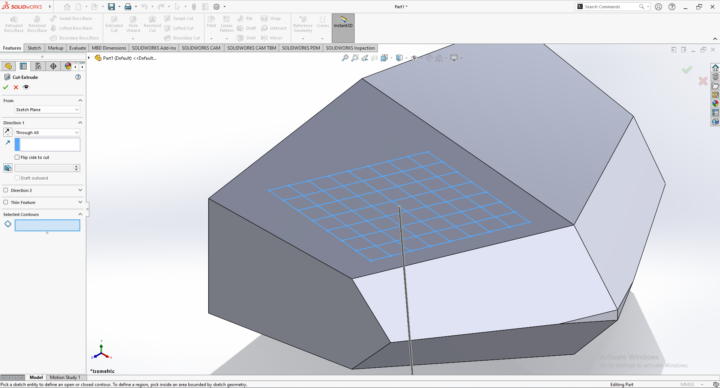
CONTOUR SELECTION PROBLEM
Guys how should i select these boxes, these are not getting selected as separate contours for some reason.

0 likes • Jan 3
Can you upload your file and I'll have a peek? BTW, I'm Desktop 2025, so if you're 2026 already you'll have to save as an older version. If you're using makers I cannot open.
1 like • 22d
@Danish Iqbal, I know its been a while, did anybody else help you with this, or did you figure it out yourself? If not, my apologizes and please see below. This is from your file. No issues with what you've done so far. So, highlight your sketch in the features tree. Then select Extrude-Cut. Change the depth to 1mm Select the "Selected Contours" box at the bottom of the Property Manager and select the regions on the sketch. (If "Sketch3-Contour<1>" is in the box when you start, delete it first)

4 likes • Jul '25
Spend all my time on SCP and BootCamp

Jan '25 •
Level 3 Tutorial Posted! - The Game 2025-01
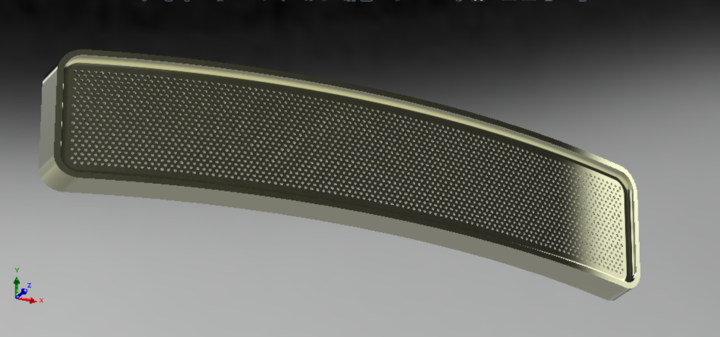
THE NEXT GAME HAS STARTED! CLICK HERE TO GO PLAY!!! [EDIT (final) Feb 11] All done 💯 I have added a tutorial file in PDF for anyone who wants to try this. It took me a looooong time and it is the first time I have ever done a full tutorial so please give it a try and let me know what you think. I added the PDF to this post and it is down in the replies as well. [EDIT Feb 05] Okay we are pretty much done. Just waiting on me to write up the results and post them here. I am slow though, so please go ahead and keep trying it if you like. For anyone who is all finished, - have you tried making one with hundreds of holes, like speaker grille? - How could you parametrically link the size of the holes to the number of holes, so that they always adjust to fit without destroying the structure? The answers to all your questions .... Soon™ [EDIT Feb 02] After Aryan posted his submission I found a couple more problems with the drawing and my actual master file (big surprise 😬) so I have updated the drawing with some scribbles. Should not change too much but if i caused anyone pain im terribly sorry. [EDIT - I think this will be the last level for this model, as I have ideas for different ones already, so EVERYone give it a try if you want. What is a master's way? ] Shouting out the recent forum illuminati to come drop some knowledge @Eric Nadeau @Duff Emediong @Naval Kishore Singal @David Roy @Zacharias Kourelis @Romit Makwana @Jn Barbacena @Sohaib Ahmed @Jonathan Florez , and of course @Avito Lourenco and @Aryan Fallahi
2 likes • Feb '25
@Jesse Davis Tutorials take a long time. But sharing is worth it.
3 likes • Feb '25
@Jesse Davis Yes Fill Pattern is cool, but you loose some control as to exactly where you want every hole. And I'm not playing that game with 15000 holes
Feb '25 •
The Game 2025-02 Level 1
[EDIT - 2025 Feb 23] LEVEL 2 has started! Click here to check it out. We are finished Level 1! Please see the PDF "Debrief" file attached to this message, and down below. Thank you everyone for the great participation this time! I just need to do the drawing for Level 2 and it will be up very shortly. [[ Current level is open to anyone whose forum level is 1-3 ]] Welcome back to the game everyone! I am going to try to start out with a more straighforward model for level 1 this time. Please give it a try! When we have a few submissions, we will take a look at all the different approaches and then move on to a slightly more interesting level 2. Upload your screenshots and part files in this thread. Comments and questions are welcome. When we close the level I will post whatever we have found the "best" solution is, incorporating everybody's different appraoaches. =============================== NOTE 1: for SW2025 users; I only have the 2024 version, so if you want me to review your .SLDPRT file, please make a version for 2024 using File >> Save As... before uploading NOTE 2: for Maker's version users; I am sorry but I don't have Maker's version. I am not sure If @Aryan Fallahi has it or not but I hear that he is off to the USA this month to attend a conference. I wish I could give a better answer for you, but maybe you can post STEP files? ASSIGNMENT BELOW (or PDF file is attached to this message) =============================== From: [email protected] To: [email protected] Subject: URGENT NEW CLAMP DESIGN NEEDED Despite being more than a week behind schedule on the last project, it seems the client was happy enough with your drilled aluminum fascia plate design that they have decided to hire us for their next project.

2 likes • Feb '25
It can be done, with or without the added edit
1-4 of 4

Active 2h ago
Joined Feb 12, 2025
Powered by